NAB Broadcast Workflow Demo Booth Planning for Exhibitors
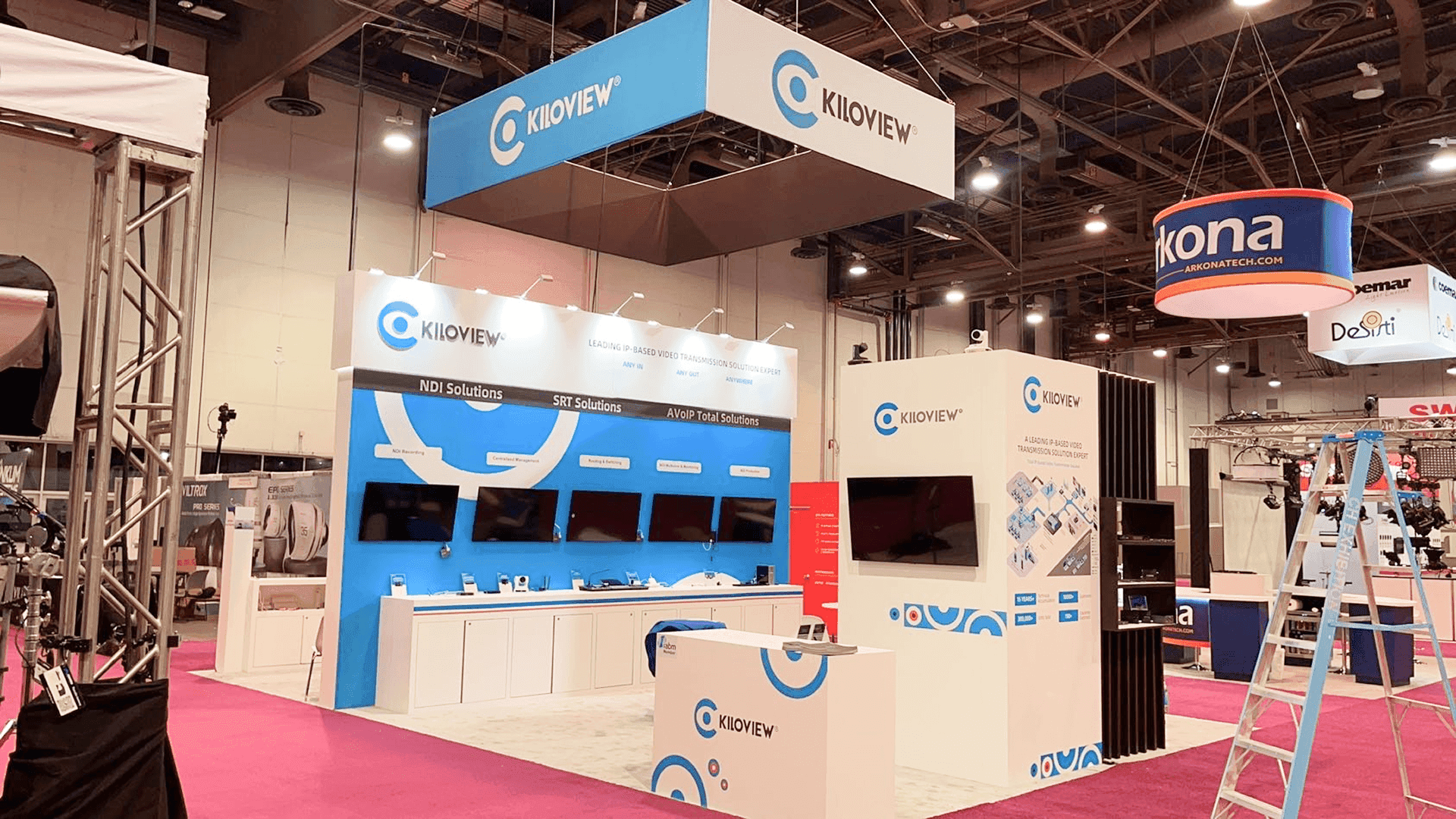
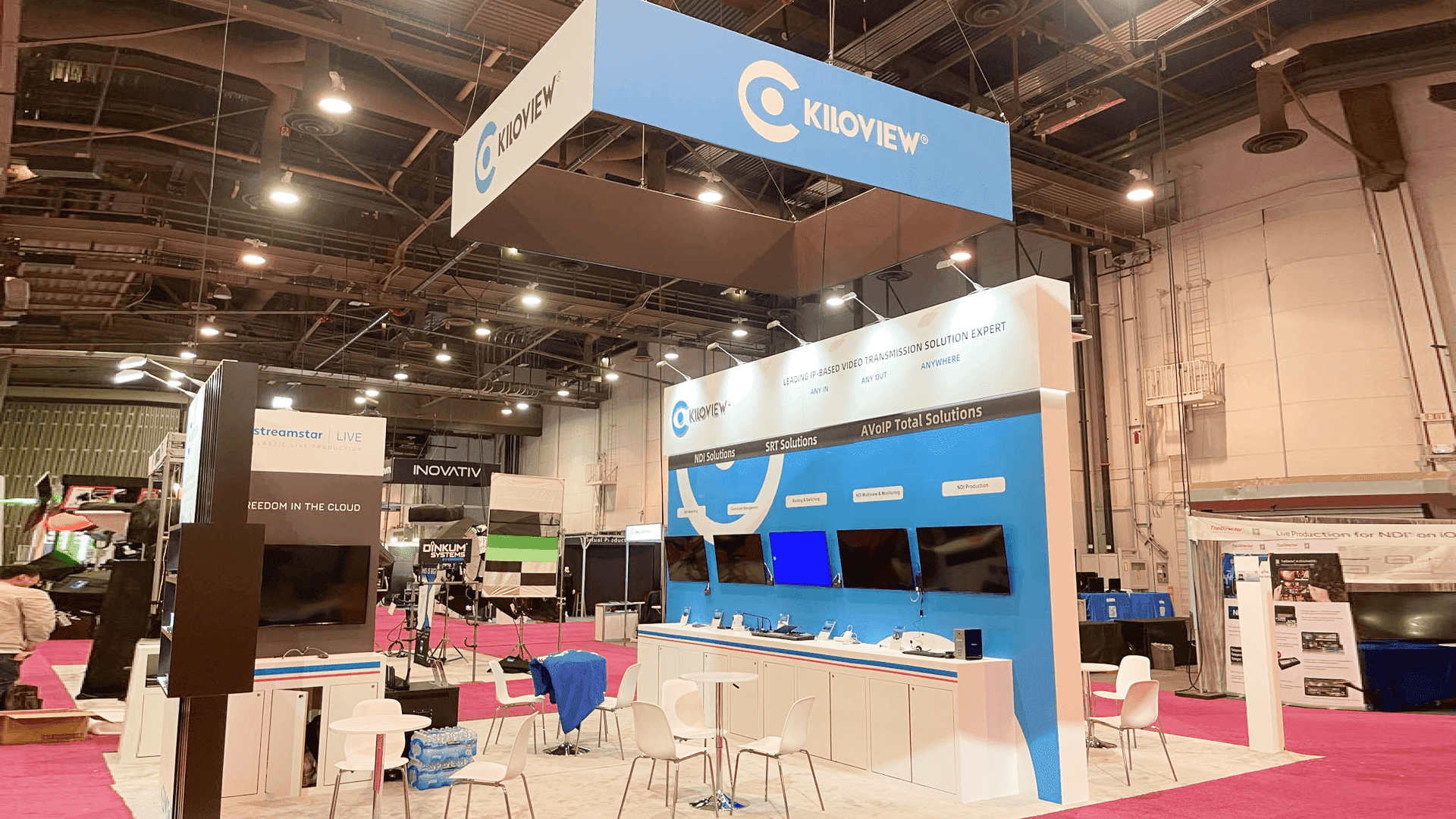
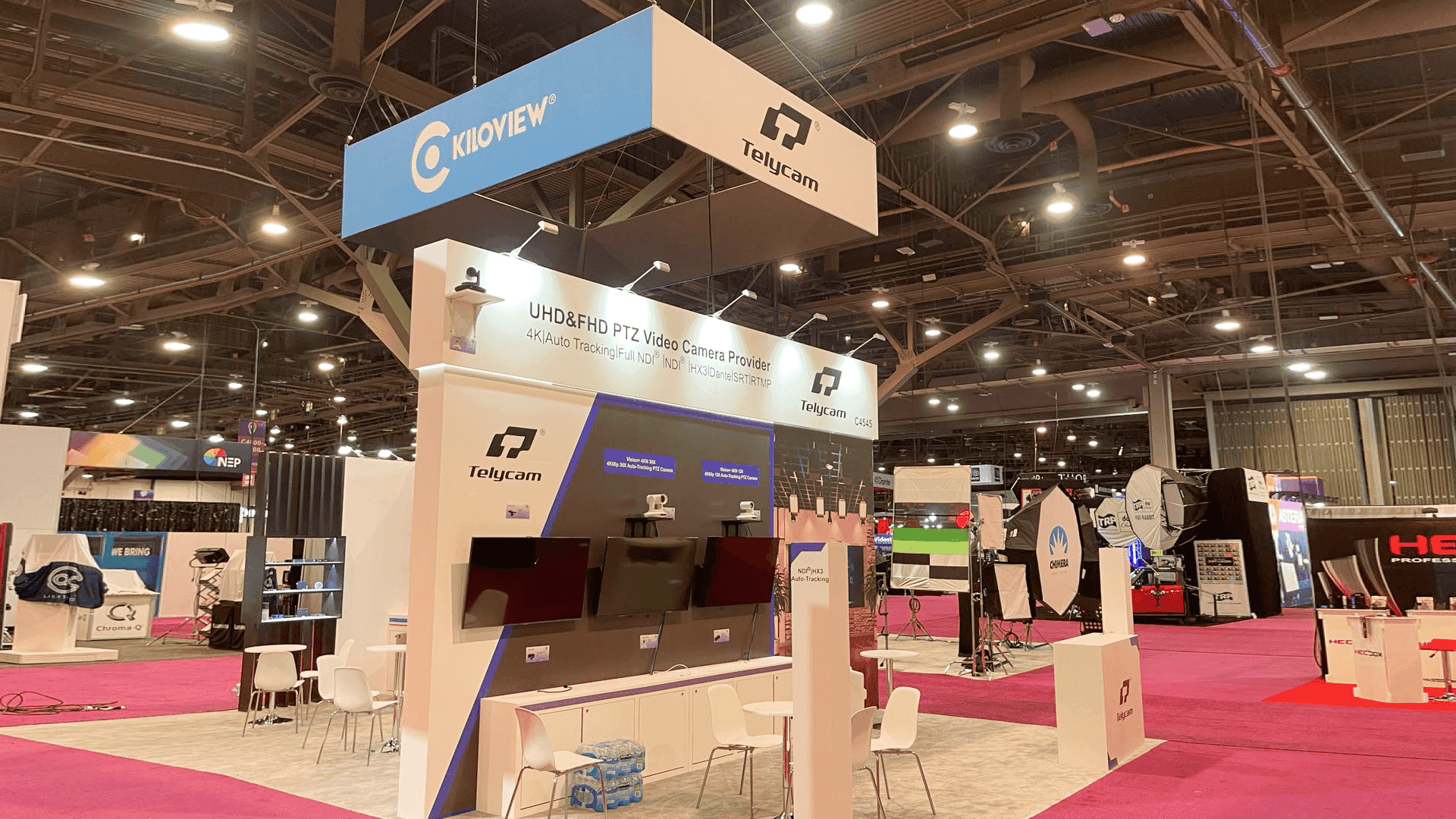

How should exhibitors plan a NAB broadcast workflow demo booth?
A NAB broadcast workflow demo booth should be planned around the workflow visitors need to understand: signal path, live switching, operator station placement, screen visibility, staff explanation, product handoff, lead capture, storage, and LVCC show-site setup. The booth should help technical buyers follow the workflow quickly before moving into a deeper product conversation.
A NAB broadcast workflow demo booth should make a technical process easier to follow from the aisle. Broadcast and media technology buyers often need to understand how video inputs, switching tools, signal routing, control interfaces, monitoring stations, cloud workflows, and production software connect inside one operating path. If the booth only shows equipment without a clear workflow sequence, visitors may remember the hardware but miss the system value.
For broadcast technology exhibitors, the booth should connect live switching demo stations, operator consoles, screen-led explanations, AV workflow graphics, storage, staff positions, technical buyer conversations, lead capture, and LVCC setup into one practical plan. Working with Las Vegas trade show booth builders can help exhibitors connect booth design, demo visibility, graphics, fabrication, logistics, and installation into one planning path before NAB Show opens.
This page focuses on NAB broadcast workflow demo booth planning, live switching demonstrations, operator station layout, screen-led workflow explanation, technical staff handoff, and show-site execution. For broader event timing, booth rental options, LVCC planning, and related NAB pages, use NAB Show booth planning. For booth structure, demo stations, fabrication, installation, and venue execution, use NAB Show booth planning support.
Why Exhibitors Choose Circle Exhibit
Clear scope, transparent quote review, nationwide booth support, and efficient setup planning for qualified rental and custom exhibit projects.
48hr
Setup Window
10+
Years Since 2014
U.S.
Trade Show Support
Real
Booth Project Proof
NAB broadcast workflow booth size should be chosen around the number of operator stations, screens, demo counters, technical staff positions, visitor flow, storage, and whether the booth needs space for live switching, workflow explanation, or private buyer conversations.
A 10x20 NAB broadcast demo booth can work when the exhibitor needs one focused workflow message, one demo counter, compact screen support, light storage, lead capture, and short technical conversations. This layout should keep the workflow simple and avoid showing too many tools at once. For inline layouts, review 10x20 booth planning.
A 20x30 broadcast workflow booth is useful when the exhibitor needs multiple screens, separate operator stations, AV workflow graphics, storage, and a clearer demo-to-meeting path. This size can support one area for workflow explanation and another area for technical product conversations. For larger planning, review 20x30 trade show booth planning.
A 20x20 NAB workflow demo booth gives more room for a live switching station, screen-led explanation, product counter, storage, lead capture, and a small buyer conversation area. This footprint works well when visitors need to understand one workflow path and then ask technical questions without blocking the aisle. For this booth size, review 20x20 trade show booth planning.
A custom NAB broadcast demo layout is stronger when the booth needs integrated screens, operator consoles, special equipment placement, cable control, custom counters, hidden storage, or a more guided technical journey. In these cases, booth fabrication and prebuild support should be planned before graphics, freight, and installation details are finalized.
These related planning articles help broadcast technology exhibitors think through common booth questions before NAB Show: how technical workflows should be simplified, where operator stations should sit, how live switching demos should be explained, and how visitors should move from screen-led demo to technical conversation. The main article, Why Technical Workflows Need Simpler Booth Messaging at NAB, covers workflow messaging, demo clarity, booth graphics, operator station visibility, common setup mistakes, and practical FAQ for exhibitors. Another article can explain how graphics and brand presentation helps make broadcast workflow diagrams, screen content, signal flow, and product labels easier to understand without crowding the booth.
NAB broadcast workflow demo booths need to show how the system works, not just what the product looks like. The booth should help visitors follow the workflow from input to control, switching, monitoring, output, and conversation.
A live switching demo should have a clear sequence. Visitors need to understand what signal enters the workflow, where switching or control happens, what the operator sees, and what output or production result is being shown. The booth should support this path with screens, counters, staff positions, and simple workflow graphics.
Operator stations should be visible enough to support the demo but not placed where they block aisle traffic. Consoles, control surfaces, laptops, preview screens, and monitoring tools should be arranged so visitors can understand the workflow without crowding the operator area.
Screens should help explain the broadcast workflow, not just play product videos. Strong graphics and brand presentation helps connect system diagrams, signal flow, product labels, screen content, and booth messaging so technical buyers can follow the story faster.
Broadcast workflow demos often move from a quick visual explanation into technical questions about compatibility, latency, control, storage, cloud workflow, production output, or integration. The booth should make it easy to guide qualified visitors from the demo station into a staff conversation or meeting area.
NAB broadcast workflow booths often need to explain live production tools, switching systems, control interfaces, AV workflows, monitoring stations, and content delivery technology in a busy show environment. The booth should make the workflow path clear before the discussion becomes technical.
Many visitors are looking for production tools, broadcast systems, camera workflow solutions, control room technology, streaming infrastructure, or post-production workflow improvements. The booth should help technical buyers understand the workflow quickly and move into the right staff conversation.
Broadcast workflow demos depend on screens, devices, operator stations, cables, product samples, backup materials, and working demo files. These elements should be planned before move-in so the booth can support live explanations during show traffic.
Not Sure Which Booth Size You Need?
Not every exhibitor knows whether a 10x20, 20x20, 20x30, or larger booth is the right fit. Circle Exhibit can help review your event goals, product display needs, demo areas, meeting space, storage, budget scope, and setup timeline before you choose a booth size.
Avoiding Screen Overload
Placing Operator Stations Without Blocking Traffic
1
Define the Broadcast Workflow Story
2
3
4
Rental Booth Option for Focused NAB Workflow Demos
A rental-based booth can work when the exhibitor needs branded graphics, one main workflow screen, demo counters, light storage, lead capture, and a practical setup path for a focused broadcast workflow explanation. This option is best when the demo path is simple and the booth does not require special equipment mounts or fully custom operator stations. For this direction, review Las Vegas trade show booth rental.
Custom Build Support for Operator Stations and AV Workflows
Custom build support is stronger when the booth needs integrated screens, operator consoles, cable control, custom counters, hidden storage, private technical conversations, or a more guided visitor journey. In these cases, booth fabrication and prebuild support helps keep the broadcast workflow demo consistent from design to installation.
Choosing Based on Workflow Complexity and Visitor Flow
Choose based on how the workflow needs to be explained. If visitors only need one clear screen-led demo and a simple staff conversation, rental may be enough. If the booth needs multiple operator stations, live switching, equipment control, and deeper technical handoff, custom support may be safer.
Workflow screens, switching demo files, product videos, signal flow diagrams, and backup media should be prepared before setup begins. Staff should know which screens support aisle messaging, workflow explanation, operator view, and technical conversation.
Operator stations, laptops, monitors, routers, control surfaces, chargers, and AV devices need early placement planning. Clean cable paths and accessible power support help the booth stay safer, easier to operate, and more reliable during live workflow demos.
Broadcast workflow booths need storage for cases, backup cables, media drives, devices, tools, printed materials, lead capture items, and staff supplies. Storage should stay close enough for staff access but remain outside the main visitor path and demo area.
Before opening, the team should check screen content, demo files, operator station placement, cable safety, device charging, staff positions, lead capture, storage access, and visitor flow. [**Logistics and pre-show coordination**](/services/logistics-pre-show-coordination) helps keep these workflow booth details aligned before opening.
Related NAB Broadcast Workflow Planning Pages
Need a Flexible NAB Broadcast Workflow Booth Rental?
A rental-based booth can work when a NAB broadcast workflow demo needs branded graphics, one clear workflow screen, product counters, light storage, lead capture, and a practical show-site setup path. This option is best when the demo flow is focused and the booth does not require multiple custom operator stations or complex integrated equipment positions.
What is a NAB broadcast workflow demo booth?
A NAB broadcast workflow demo booth is planned around showing how a broadcast or media production workflow works. It usually includes screens, operator stations, product counters, AV workflow graphics, technical staff positions, lead capture, storage, and a visitor path from first-look understanding to deeper product conversation.
What should a broadcast workflow demo booth include?
Is a 20x20 booth enough for a NAB broadcast workflow demo?
How should screens be used in a NAB workflow booth?
How can exhibitors prepare broadcast workflow demos before NAB Show opens?
READY TO PLAN YOUR NEXT BOOTH?
Let’s Build a Booth That Fits Your Event
Share your event name, booth size, city, timeline, product display needs, and design references. Circle Exhibit will review your project direction and help you choose a rental-friendly or custom exhibit path.
3000+
Booth Projects Supported
50+
U.S. Event Cities
Transparent
Quote Review
Use the main NAB Show event page for broader booth planning, booth size choices, rental vs custom build decisions, LVCC setup notes, and NAB project references.
For exhibitors that need booth structure, fabrication, graphics, logistics, installation, and show-site execution aligned around a broadcast workflow demo.
For NAB exhibitors planning a focused workflow demo, operator station, screen-led explanation, storage, lead capture, and a small buyer conversation area.
For NAB booths that need workflow diagrams, screen messaging, product labels, branded surfaces, aisle-facing graphics, and technical product explanation support.
For exhibitors that need pre-show coordination, device staging, cable planning, screen setup, storage access, and final show-site readiness checks.