NAB Show Booth Planning at LVCC

How should exhibitors plan a NAB Show booth in Las Vegas?
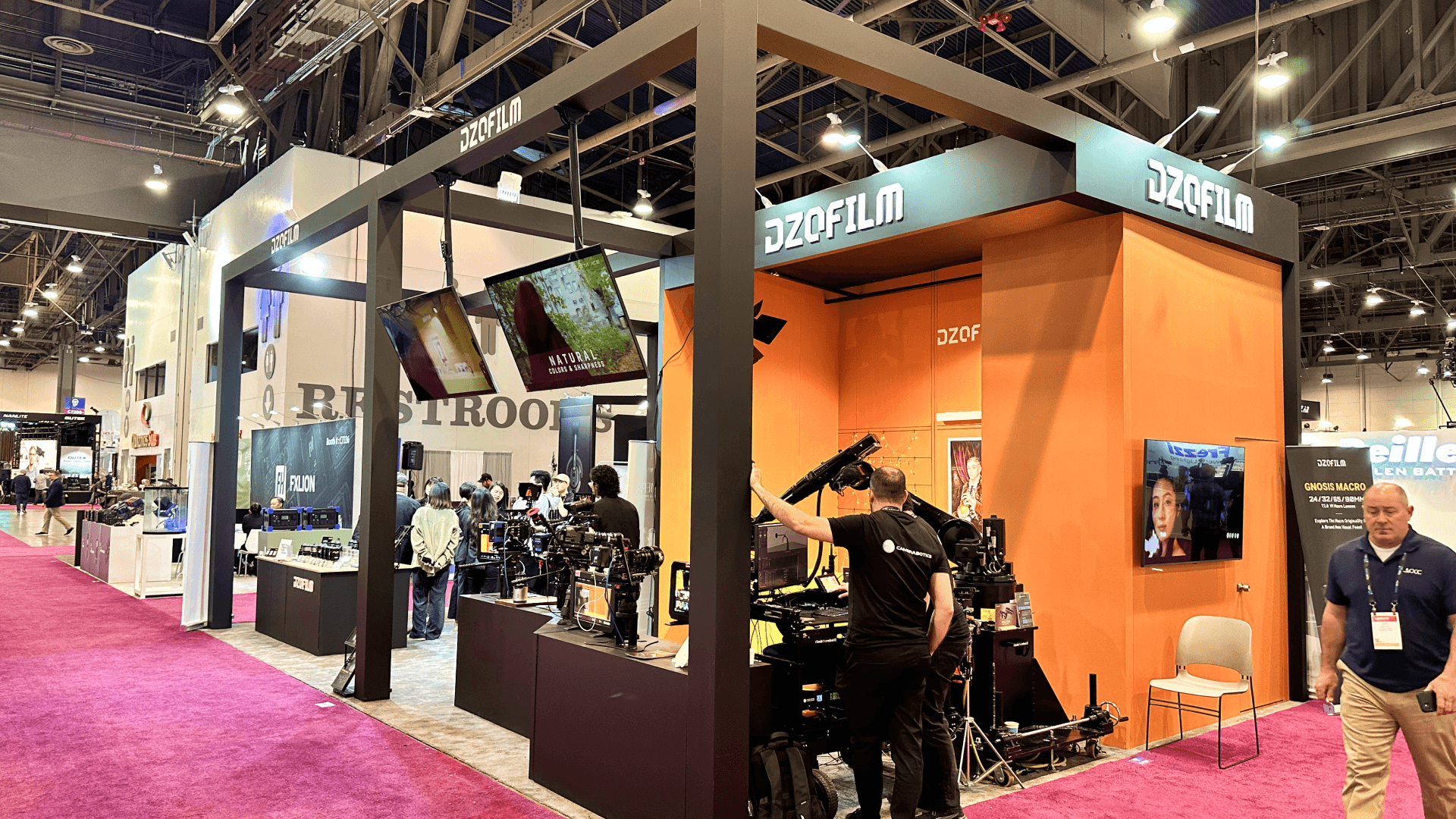
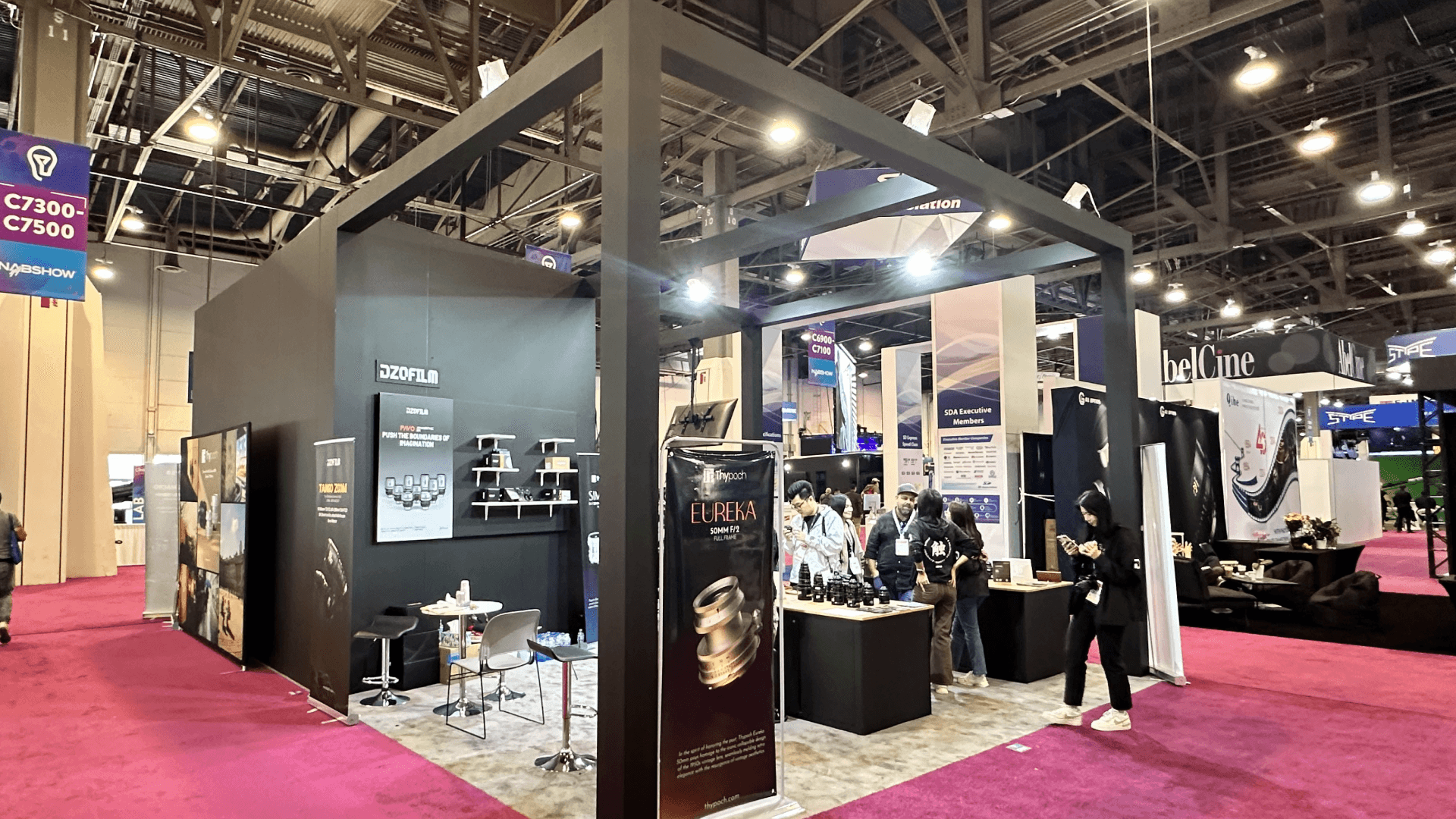
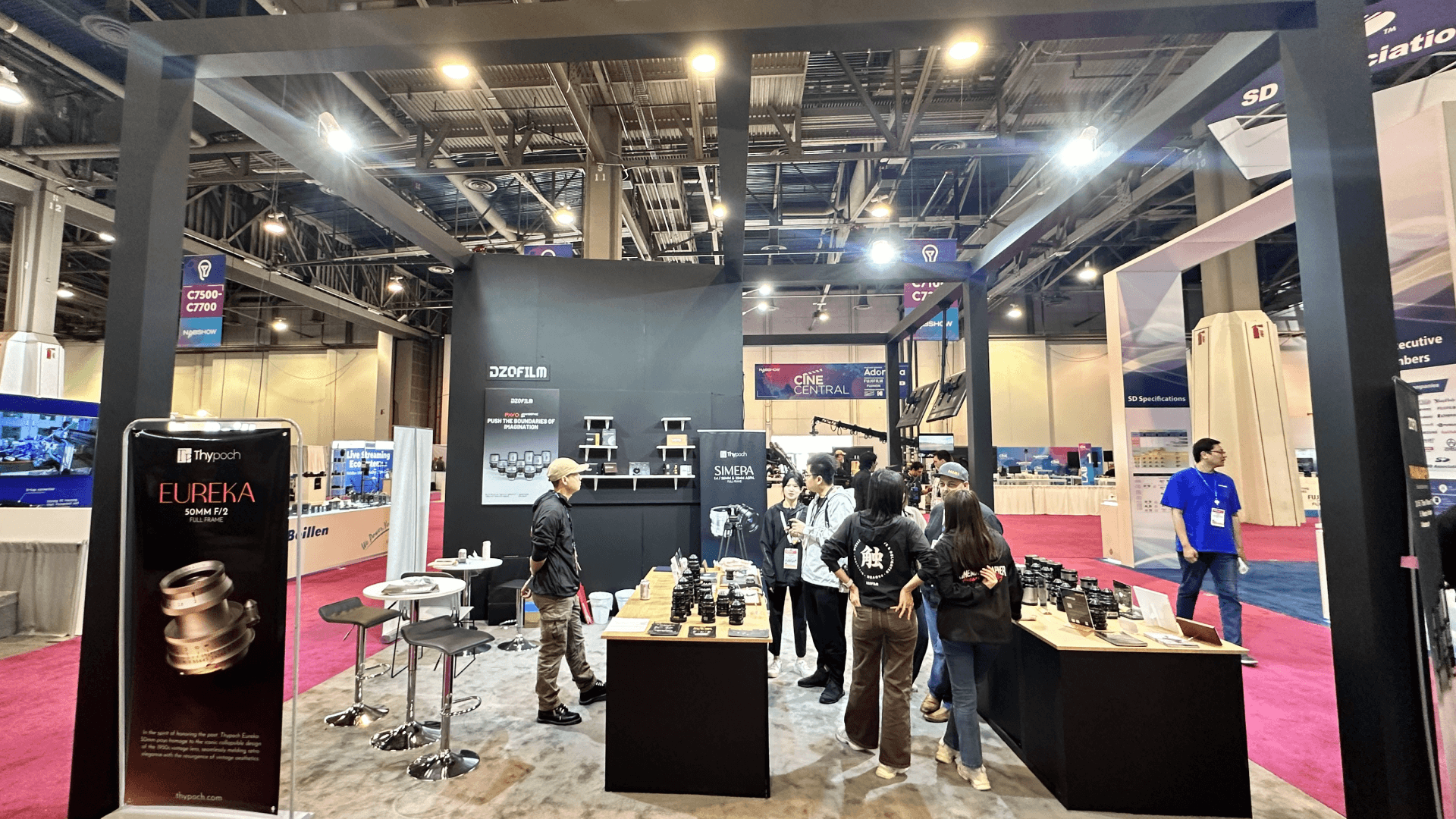
NAB Show booth planning should support broadcast technology, media systems, AV demos, screen walls, and buyer conversations at the Las Vegas Convention Center. Exhibitors need booth layouts that make technical workflows easy to understand while coordinating graphics, power, freight timing, installation, and opening-day system checks.
NAB Show booth planning in Las Vegas should reflect how broadcast, media production, streaming, camera, audio, AV workflow, and content technology exhibitors explain complex systems on a busy show floor. At the Las Vegas Convention Center, the booth often needs to combine product demos, screen-led explanations, technical conversations, storage, lead capture, branded graphics, and buyer flow within one clear layout.
Working with Las Vegas trade show booth builders helps connect booth structure, fabrication, demo visibility, graphics, installation, and show-site execution with real NAB requirements. A strong booth should read clearly from the aisle, show visitors where the demonstration begins, and explain how the technology fits into a broadcast or production workflow.
More complex technical presentations may need a NAB broadcast workflow demo booth with live switching, operator stations, and screen-led workflow explanations. A NAB 20x20 booth is better suited to a focused mid-size program that balances demo counters, storage, meeting space, and rental flexibility.
Why Exhibitors Choose Circle Exhibit
Clear scope, transparent quote review, nationwide booth support, and efficient setup planning for qualified rental and custom exhibit projects.
48hr
Setup Window
10+
Years Since 2014
U.S.
Trade Show Support
Real
Booth Project Proof
NAB booth size should follow the way the technology is demonstrated. Live camera demos, software walkthroughs, screen-led presentations, audio equipment, meeting space, storage, and visitor movement all affect the footprint. Technical teams also need enough room to operate equipment and continue detailed buyer conversations without blocking the demo area.
A 10x20 booth suits a focused product demo, software platform, camera accessory line, audio tool, or compact media technology display. One demo counter, a clear screen area, concise aisle-facing graphics, and concealed storage can keep the product story easy to follow.
A 20x30 booth gives camera brands, broadcast technology companies, AV platforms, and software exhibitors more room for multiple demo stations or a larger screen wall. The added depth helps separate technical demonstrations, visitor circulation, staff explanations, and buyer conversations.
A 20x20 booth provides open aisle access with room for one or two equipment demos, reception, light storage, and a small meeting point. It is a practical option for NAB exhibitors that need a flexible island layout without building several separate demo zones.
A 30x40 island booth or larger footprint is better suited to broadcast systems, production technology, live workflow demos, meeting rooms, equipment displays, and large-format screen presentations. Freight timing, power and AV routing, lighting, rigging, hanging signs, storage, and installation sequence should be coordinated before materials arrive at the Las Vegas Convention Center.
Demo traffic affects where visitors stop, what they understand from the aisle, and how they move from a screen-led explanation into a technical conversation. How demo traffic changes NAB booth design explains how screen placement, booth size, product visibility, staff handoff, storage, and visitor flow should be planned before the exhibit structure is finalized.
NAB exhibitors do not all need the same booth plan. A camera equipment brand, a software workflow provider, a streaming platform, and a broadcast hardware company may all attend the same show, but their demo layout, booth size, screen use, storage needs, and staff conversation flow can be very different. Use these NAB planning paths to connect the main NAB Show hub with more specific booth scenarios.
For exhibitors showing live switching, signal routing, cloud workflow, operator stations, screen-led production paths, or technical workflow demos, this planning path focuses on how visitors understand the workflow from the aisle to the demo station. Review NAB broadcast workflow demo booth planning for live switching demos, operator station placement, screen visibility, and technical buyer conversation flow.
For exhibitors using a 20x20 footprint, this planning path focuses on one clear product story, screen-led demo space, product counters, storage, lead capture, staff movement, and short buyer conversations. Review 20x20 booth planning for general size guidance, or use NAB 20x20 booth planning for broadcast exhibitors for size-specific NAB demo counter placement, rental fit, and 20x20 layout priorities.
For camera, lens, production hardware, and media technology exhibitors, this planning path focuses on hands-on product testing, lens display, monitor previews, product labels, storage, and buyer discussion areas. Review NAB camera demo booth planning for camera testing stations, monitor placement, lens display layout, and technical product conversations.
For exhibitors comparing rental structure, custom booth build, graphics, storage, installation, and LVCC setup needs, this planning path connects NAB booth planning with broader Las Vegas execution support. Review Las Vegas trade show booth rental for rental-based booth options, or use Las Vegas trade show booth design and build for fabrication, logistics, installation, and show-site execution.
NAB Show focuses on professional video, broadcasting, live production, streaming, and media technology workflows.
Exhibits often include camera rigs, control room demos, LED walls, and live switching/streaming environments that require technical planning.
NAB exhibitors typically plan around Las Vegas venue rules, union labor coordination, and drayage/material handling timelines.
Not Sure Which Booth Size You Need?
Not every exhibitor knows whether a 10x20, 20x20, 20x30, or larger booth is the right fit. Circle Exhibit can help review your event goals, product display needs, demo areas, meeting space, storage, budget scope, and setup timeline before you choose a booth size.
Power, Data, and Network Stability for Live Demos
Acoustic Control and Demo Audio Management
1
Define Demo Scenarios and Production Workflow
2
3
4
When a Rental Booth Works Well
A rental booth can work well for NAB exhibitors that need a flexible structure, branded graphics, demo counters, screen support, light storage, lead capture, and a practical LVCC setup path. This is a strong fit for exhibitors with one clear product story, a focused software demo, or a mid-size booth that does not require highly customized equipment integration. For this direction, review Las Vegas trade show booth rental.
When Custom Build Support Is Better
Custom build support is better when the NAB booth needs integrated screen walls, operator stations, camera testing counters, secured product displays, hidden storage, special lighting, cable control, or a more guided visitor path. This direction is especially useful for broadcast workflow demos, camera demo booths, larger island layouts, and technical product presentations that need stronger show-site coordination. For this direction, use Las Vegas trade show booth design and build.
How to Choose Based on the Demo Type
Choose the booth type based on what visitors need to understand first. For one focused 20x20 demo, start with NAB 20x20 booth planning. For live switching, signal flow, and operator stations, review NAB broadcast workflow demo booth planning. For hands-on camera testing, lens display, and monitor previews, review NAB camera demo booth planning.
NAB booths often include screens, demo hardware, lighting, cameras, audio equipment, counters, graphics, and network-dependent tools. AV setup should be coordinated with the installation sequence so the booth structure, power access, screen positions, and demo areas are ready before final checks begin.
Broadcast and media technology booths need a clear path from aisle visibility to product explanation. Demo counters, screen walls, equipment placement, and meeting areas should be checked during setup so visitors can watch, ask questions, and move through the booth without blocking technical staff.
NAB booths often depend on power, signal routing, charging points, routers, cables, monitors, or audio connections. These details should be planned before show-site installation so cable paths, counters, graphics, and visitor flow do not conflict on the floor.
Before the floor opens, the booth should be checked for screen content, lighting, device readiness, demo equipment, lead capture tools, staff access, and aisle-facing visibility. These final checks help reduce technical friction during the first rush of visitors.
For exhibitors planning a NAB Show booth, these related pages help separate the main event hub from more specific booth planning needs: NAB broadcast workflow demo booth planning for live switching and operator station layouts, NAB 20x20 booth planning for focused mid-size booth planning, NAB camera demo booth planning for camera testing and lens display layouts, Las Vegas trade show booth rental for rental-based booth options, and Las Vegas trade show booth design and build for fabrication, logistics, installation, and show-site execution.
NAB Show Booth Rental Planning for Technology and Media Demos
For NAB Show exhibitors, a rental booth can support broadcast technology demos, screen displays, product counters, branded graphics, meeting space, and storage. 20x20 and 20x30 rental layouts are useful when exhibitors need clear demo flow, AV visibility, buyer conversations, and Las Vegas show-site setup support without a fully custom island structure.
What booth setups are common at NAB Show?
NAB booths often include demo counters, LED walls, and studio-style zones to showcase cameras, broadcast monitors, and live production systems—ranging from inline booths to large island exhibits.
Do NAB exhibitors need to plan rigging and power differently?
What logistics factors matter most for NAB booth execution in Las Vegas?
Is a rental booth suitable for NAB exhibitors?
What should NAB exhibitors prepare before booth installation?
READY TO PLAN YOUR NEXT BOOTH?
Let’s Build a Booth That Fits Your Event
Share your event name, booth size, city, timeline, product display needs, and design references. Circle Exhibit will review your project direction and help you choose a rental-friendly or custom exhibit path.
3000+
Booth Projects Supported
50+
U.S. Event Cities
Transparent
Quote Review
For exhibitors planning live switching demos, operator stations, AV workflow explanations, screen-led product walkthroughs, and technical buyer conversations.
For NAB exhibitors planning a focused 20x20 booth with screen-led demos, counters, storage, lead capture, staff movement, and buyer conversation flow.
For camera, lens, and production hardware exhibitors planning hands-on product testing, monitor previews, lens displays, and technical product conversations.
For exhibitors considering a rental-based booth structure with branded graphics, counters, storage, screen support, and practical LVCC setup planning.
For exhibitors that need booth structure, fabrication, graphics, logistics, installation, and show-site execution aligned around NAB booth planning.
For NAB exhibitors that need booth structure setup, screen placement, cable routing, demo equipment checks, freight timing, installation coordination, and final show-site readiness at LVCC.
NAB Show planning often becomes clearer when you can compare how different booth sizes, screen-led demo layouts, operator-facing counters, and visitor flow work across real projects. Explore our NAB Show Booth Projects collection to see grouped examples from actual builds, including layouts shaped around broadcast workflow, media presentation, branded visibility, and controlled show-floor viewing.