Automate Live Automation Demo Booth Planning for Integrated Systems


How should a live integrated automation demo be planned for Automate?
Start with the working system, not the booth structure. Define where the equipment operates, where buyers can clearly watch it, and how technicians reach the system without crossing the visitor path. Screens, utilities, storage, and reset access can then be placed around the real operating sequence instead of being added afterward.
A live integrated demo creates a different planning problem from displaying a single controller, camera, robot, or software interface. The application may only become clear when several technologies are operating together and buyers can follow the process from start to finish.
That working sequence should drive the layout. Define the operating area first, then decide where buyers can watch, where engineers can explain the system, and how technicians reach the equipment when something needs adjustment. If the important result appears in software, inspection data, or a control interface, keep the screen close enough to the machine for the connection to be obvious.
This page assumes the decision to bring an integrated live system has already been made. For broader planning—including what to demonstrate, overall booth-size direction, and the wider buyer journey—return to the Automate 2027 booth planning guide. Automate 2027 takes place at the Las Vegas Convention Center, where booth installation and equipment setup should be planned as one coordinated sequence.
Why Exhibitors Choose Circle Exhibit
Clear scope, transparent quote review, nationwide booth support, and efficient setup planning for qualified rental and custom exhibit projects.
48hr
Setup Window
10+
Years Since 2014
U.S.
Trade Show Support
Real
Booth Project Proof
Choose the footprint after the actual operating area is known. Buyer viewing, technician access, screens, storage, and circulation should be added to that requirement rather than squeezed into whatever space remains.
A 10x20 booth can work when the system is self-contained and does not need a large operating envelope. Equipment position matters more in a compact space because there is little room to recover from a blocked viewing angle or awkward technician path.
A 20x30 booth becomes useful when the working area, buyer observation, service access, and technical conversations can no longer comfortably share the same part of the booth.
A 20x20 booth gives one primary demo more breathing room. Buyers can have a clearer observation point while technicians retain better access around the equipment and supporting screens stay close to the action.
Larger island spaces make more sense when several cells or substantial pieces of equipment have to operate at once. Additional area can keep one demo crowd from interfering with another while giving technicians usable access behind the systems.
Once buyers understand how an integrated automation system operates, the next questions often become specific to their own parts, production rates, controls, and operating conditions.
The Automate buyer application-fit guide covers that next stage—how exhibitors can move from a working-system demonstration into throughput, production-line integration, changeover, maintenance, and deeper technical evaluation.
A live automation booth works best when visitors can follow the application without needing a full engineering explanation first.
Do not let a machine frame, monitor stand, counter, or group of staff hide the part of the process that proves the application. Buyers should be able to see the key action from a natural viewing position.
Visitors should know where to stand without drifting into the operator’s area. A defined viewing point also makes it easier for staff to explain the system while the demo keeps running.
If the result appears as inspection data, AI output, process status, or a control interface, keep that information close enough to the equipment for buyers to understand the connection immediately.
Tools, spare parts, laptops, controllers, and sample materials should be reachable from the technician side of the system instead of being carried through the visitor area between demonstrations.
Several technologies may need to operate together for buyers to understand the complete automation application.
Automate 2027 runs May 10–13 at the Las Vegas Convention Center in Las Vegas.
The booth should help visitors follow the operating cycle, understand the result, and continue into technical discussion.
Not Sure Which Booth Size You Need?
Not every exhibitor knows whether a 10x20, 20x20, 20x30, or larger booth is the right fit. Circle Exhibit can help review your event goals, product display needs, demo areas, meeting space, storage, budget scope, and setup timeline before you choose a booth size.
Where Does the Buyer Stand?
Can the Buyer Understand What Just Happened?
1
Draw the Working System Before the Booth
2
3
4
Self-Contained System, Modular Surround
If the system has its own base, controls, and operating area, much of the surrounding booth can stay modular. Graphics, screens, counters, storage, and conversation space can be handled through a Las Vegas booth rental.
When the Exhibit Has to Work With the Machine
Custom engineering becomes more relevant when the booth must support equipment mounting, platforms, unusual clearances, structural interfaces, or dedicated cable routes. These requirements should be resolved through trade show booth design and engineering before fabrication begins.
Custom Only Where It Solves a Real Interface
A practical hybrid approach keeps ordinary exhibit elements reusable while using custom engineering only where the machine creates a real structural, access, or operating requirement.
The equipment may need access before walls, counters, or other booth elements close off the path. Its arrival and final position should be part of the installation plan from the beginning.
The technical team needs a clear handoff between exhibit installation and machine setup. Power, data, screens, and access around the system should be ready before serious testing begins.
Software, sensors, computers, vision equipment, and control systems may behave differently from shop testing once everything is connected on site. Build enough time into setup to diagnose issues without racing the show opening.
Run the system after screens, graphics, staff, furniture, and storage are in place. A viewing or access problem may only appear once the booth is operating as it will during the show.
Need a Demo-Ready Automate Booth Structure?
A modular rental structure can work around a customer-owned automation system when the exhibit is responsible for branding, screens, counters, storage, and visitor space rather than the machine system itself.
What makes an integrated automation demo different from a normal product display?
The buyer may need to watch several technologies operate together before the application makes sense. The working area, viewing point, explanation, and technician access therefore have to be planned as one system.
What booth size is best for an integrated live demo?
Should buyers and technicians have different access areas?
Where should screens go around a live automation demo?
What should be tested before the show opens?
READY TO PLAN YOUR NEXT BOOTH?
Let’s Build a Booth That Fits Your Event
Share your event name, booth size, city, timeline, product display needs, and design references. Circle Exhibit will review your project direction and help you choose a rental-friendly or custom exhibit path.
3000+
Booth Projects Supported
50+
U.S. Event Cities
Transparent
Quote Review
The Main Event Hub covers the wider exhibitor journey, overall demo direction, booth size, buyer conversations, and commercial planning.
Venue context for equipment access, utilities, freight dependencies, and show-floor installation.
Use this when the working system and exhibit structure need to be resolved together before fabrication.
Useful for checking equipment access, structure, mounting, cable routing, screens, and service clearances before show-site installation.
For fabrication, EAC coordination, installation, and local execution around more complex equipment-based exhibits.
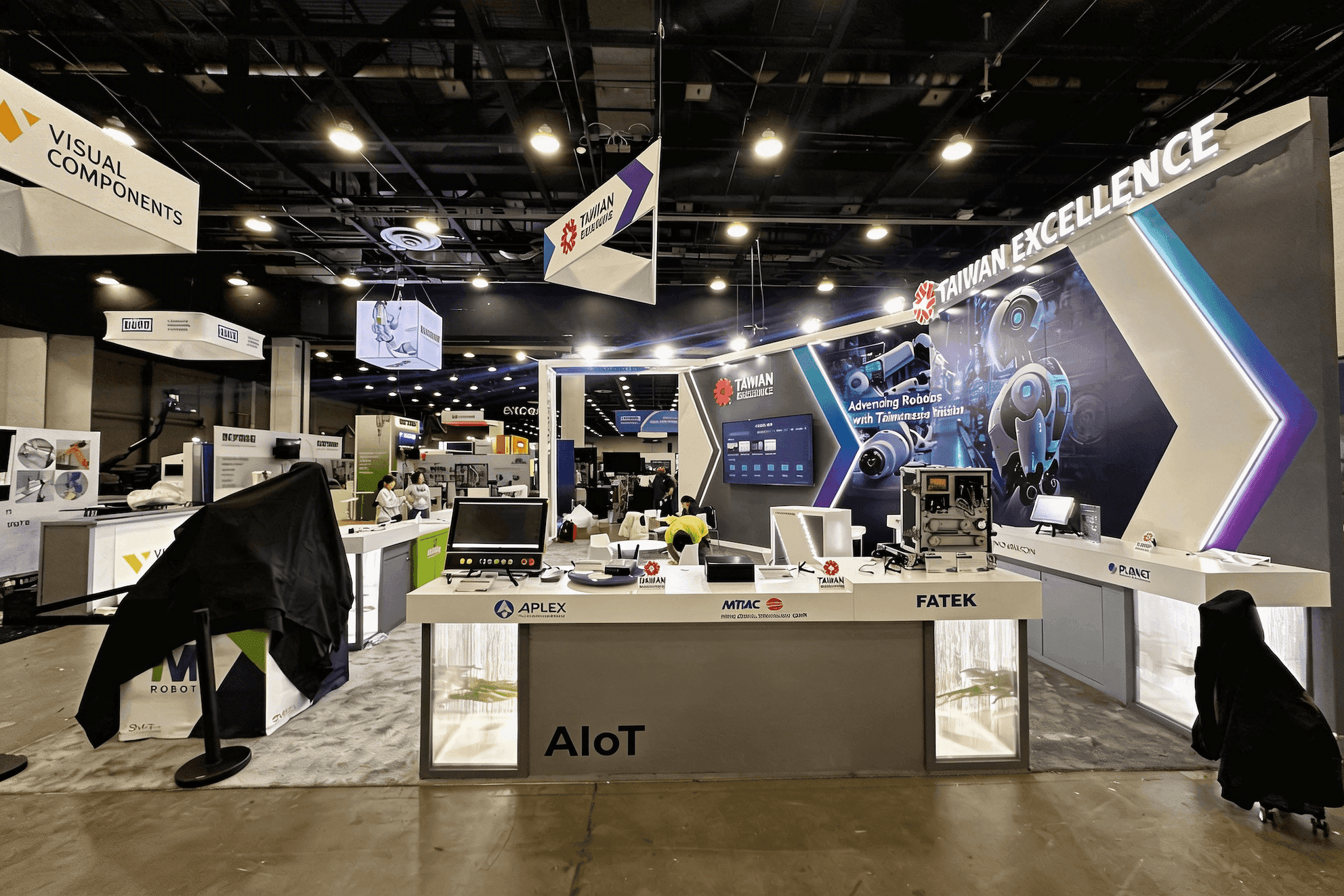
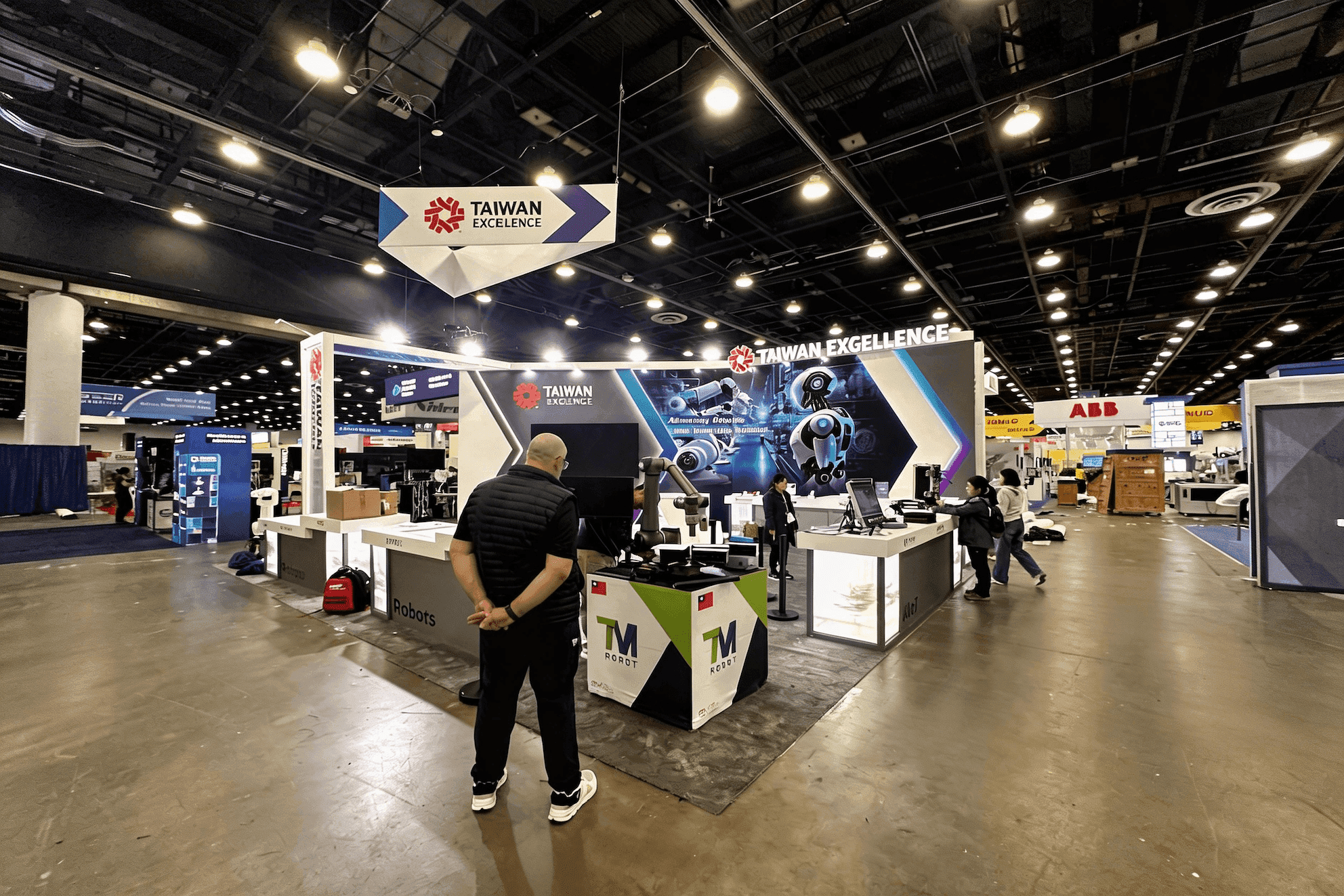
Mech-Mind Automate 2025 is a compact live robotics reference with a controlled demo perimeter and technical screens. Taiwan Excellence Automate 2025 shows several robotics and automation demonstrations arranged around an open visitor path.