TCEA Convention & Exposition Booth Planning

How Should Exhibitors Plan a Booth for TCEA?
Start with the classroom or school tasks your TCEA display will show. Decide what visitors will see or try, where others can watch, and where longer questions will continue. Choose a footprint and staffing plan that lets these activities run together, then confirm equipment, utilities, storage, and installation needs.
At TCEA, show how the product fits a classroom, campus, or school technology task. A teacher may want to try it, while an instructional coach asks about its use in teaching. Give school IT staff a way to reach the product specialist when their questions need a longer conversation.
A 10x20 booth layout may suit a focused walkthrough with room for the operator and visitors. Consider a 20x20 booth when a demonstration and a longer conversation need separate working positions. Extra floor area helps when the team can staff both activities.
At the Henry B. González Convention Center in San Antonio, plan power and network locations alongside the screens and equipment. Circle Exhibit can provide trade show booth design and build support for the agreed physical layout and installation scope.
Why Exhibitors Choose Circle Exhibit
Clear scope, transparent quote review, nationwide booth support, and efficient setup planning for qualified rental and custom exhibit projects.
48hr
Setup Window
10+
Years Since 2014
U.S.
Trade Show Support
Real
Booth Project Proof
Account for people using the product, others watching, further discussions, and storage. Compare footprints around these simultaneous activities, then check whether the team can staff them and keep equipment accessible.
A 10x10 booth may suit a focused product story with a small demonstration surface. Place the operator and visitor first, then check space for supplies.
In a 20x20 booth, test whether a demonstration and a conversation can run without blocking visitor access. Check viewing positions, operator movement, and storage together.
For a guided walkthrough, use the length of a 10x20 booth to arrange the demonstration and question point. Check equipment depth before adding furniture.
Several product tasks may justify separate stations in a 20x30 booth. Confirm that the team can cover them and that equipment access remains clear.
Select the surfaces, screens, graphics, and storage around how the product will be evaluated. A touch display, tabletop teaching kit, and school software walkthrough each place different demands on the same footprint.
Put the classroom or school task in the main message. Use the product name and supporting details where visitors can read them during the demonstration.
Match the surface and screen arrangement to the product, from a touch display to a tabletop kit. Leave operating access for staff and a clear view for observers.
Use a conversation point that leaves the active demonstration accessible. Where space is limited, plan a handoff or later follow-up instead of adding more furniture.
Keep spare devices, accessories, and demonstration materials within staff reach. Provide charging positions and a return place for handled items off the main display surface.
Exhibitors present classroom software, interactive equipment, STEM resources, devices, and school IT solutions.
The convention runs January 31–February 3. The exhibit hall opens February 1–3 at the Henry B. González Convention Center.
Teachers, instructional coaches, campus leaders, and school IT teams approach products with different application and implementation questions.
Not Sure Which Booth Size You Need?
Not every exhibitor knows whether a 10x20, 20x20, 20x30, or larger booth is the right fit. Circle Exhibit can help review your event goals, product display needs, demo areas, meeting space, storage, budget scope, and setup timeline before you choose a booth size.
Different Questions at One Display
Room to Try and Watch
1
Define the Visitor’s First Task
2
3
4
Rental Components That Already Fit
Choose a rental layout when available walls, counters, screens, and storage suit the display. Confirm dimensions and equipment support before selecting the final design.
Rental Structure With Custom Fixtures
Keep the rental structure when it works, and add specific fixtures for the product. A custom mount or worktop may resolve the requirement without changing the whole exhibit.
Custom Structure for Equipment Support
Consider a custom structure when the rental system cannot provide the equipment support or operating access needed. Use design and engineering to confirm the scope.
TCEA’s January 29 setup window is for booths of 600 square feet or more. Match crew and equipment arrivals to the schedule for the assigned space.
Plan mounting and cable routes before positioning demonstration equipment. Clear freight from the aisles by 5 p.m. on January 31.
Electricity and internet are outside the booth fee, and flooring is required. Confirm orders and connection locations through the current exhibitor service information.
Finish installation and checks before 11 a.m. on February 1. Keep the exhibit intact until the hall closes at 2 p.m. on February 3.
Customizable Booth Rentals for TCEA Exhibitors
Explore rental layouts that leave room to see or try the product and continue the conversation. Choose the size around your equipment, storage, and the activities that need to run together.
Should we bring every product to TCEA?
Prioritize products visitors can see, try, or discuss in the available space. Use follow-up materials to cover the rest of the range when extra displays would crowd the main activity.
Can teachers and school IT staff use the same demo area?
Does the TCEA booth fee include power, internet, and flooring?
Does a Booth Demo Listing cover the demonstration setup?
Who should handle technical product questions at the booth?
READY TO PLAN YOUR NEXT BOOTH?
Let’s Build a Booth That Fits Your Event
Share your event name, booth size, city, timeline, product display needs, and design references. Circle Exhibit will review your project direction and help you choose a rental-friendly or custom exhibit path.
3000+
Booth Projects Supported
50+
U.S. Event Cities
Transparent
Quote Review
Compare footprints when product use, observers, conversations, and storage need space at the same time.
Bring equipment dimensions, working positions, and service locations into a buildable exhibit plan.
Help visitors recognize the education application before moving into product features and supporting detail.
Review what must travel, when it needs to arrive, and who handles the preparation and delivery arrangements.
Define the assembly scope, equipment handoffs, and dismantling arrangements before the crew reaches the venue.
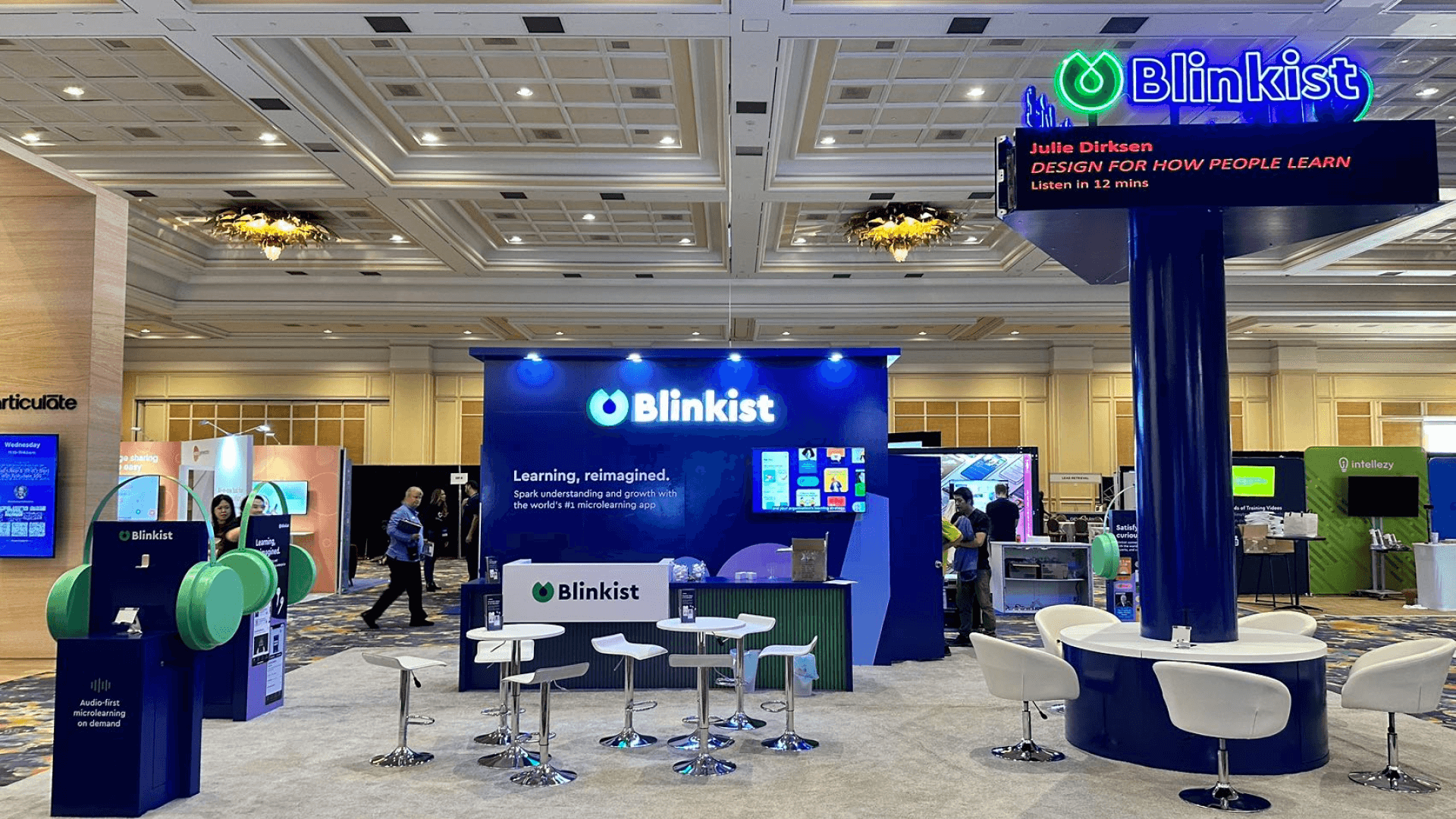
The Blinkist 20x30 booth at DevLearn 2023 provides a reference for product interaction, visible demonstration points, and visitor circulation. It is a comparable project from another event.