National Farm Machinery Show 2027 Booth Planning


How should exhibitors plan a National Farm Machinery Show booth?
Plan an NFMS booth around the products visitors need to inspect and the questions they need answered. Allow space for the full display, relevant specifications and useful conversations. Machinery, components and agricultural technology need different viewing and explanation conditions, so review the assigned footprint and open sides before selecting fixtures, graphics and the setup approach.
A visitor at NFMS may want to compare an implement's configuration, check a component's connection or see how an agricultural system is used. At the Kentucky Exposition Center in Louisville, the product and its supporting information should be close enough to review together.
Consider a 10x20 booth layout for a focused component range or a 20x20 booth plan for a compact unit with a separate discussion point. Full-size machinery may need substantially more space once attachments, inspection positions and staff access are included. Review the approved display dimensions and assigned open sides before selecting fixtures.
Prepare a display brief covering the products, comparison points, supporting information and conversation needs. Circle Exhibit provides trade show booth design and build support to develop that brief into an exhibit layout, graphics and an agreed delivery and setup scope.
Why Exhibitors Choose Circle Exhibit
Clear scope, transparent quote review, nationwide booth support, and efficient setup planning for qualified rental and custom exhibit projects.
48hr
Setup Window
10+
Years Since 2014
U.S.
Trade Show Support
Real
Booth Project Proof
Start with the product in its approved display position, then add inspection access, information and discussion space. If those functions do not fit, compare a larger footprint with a smaller product selection or fewer fixtures. Increasing the booth size is useful only when the extra area supports a necessary task.
Use a 10x10 booth for a small component range, a service offer or a screen presentation with little physical stock. Allow for counter depth and staff positions before filling the back wall with products.
For a compact unit or assembly with supporting components, review 20x20 booth planning. The product's actual dimensions, inspection access and discussion area must fit together before fixtures are selected.
A 10x20 booth layout gives a focused range more display length for comparing parts, accessories or models. Keep the groups easy to compare and reserve a place for questions instead of lining the entire front with counters.
Consider 20x30 booth planning or more space for machinery or a product group that needs several viewing positions. Keep the inspection route open when placing counters, storage and seating. Some full-size equipment will need significantly more space.
The equipment positioning guide explains when the product's final location needs to be resolved before surrounding walls, utilities and installation decisions. It covers equipment exhibits more broadly and can support early NFMS layout discussions.
The display should answer the question that brought the visitor to the product. An inspection point, application reference or short screen sequence can each do a different job.
Position the product so visitors can see the connection, control, assembly or service feature being discussed. Keep inspection and handling within the agreed display conditions, with staff available to explain the details.
Pair parts and attachments with a labeled application image or assembly reference. Show which connection or function is being discussed, and leave detailed compatibility checks to the exhibitor's technical team.
Use a short screen sequence to explain one agricultural task, showing the operator's input, the system response and the information used for a decision. Keep detailed specifications available for follow-up.
Record the product or application being discussed, the unresolved question and who will follow up. Place these conversations near the display without interrupting the busiest inspection point or blocking access for other visitors.
NFMS brings farm machinery, agricultural products and services together in one indoor show, with equipment and technology presented for in-person review.
The 2027 show takes place at the Kentucky Exposition Center in Louisville, Kentucky, over four days from February 10 through February 13.
Visitors can compare equipment and technology from several suppliers in one visit, then ask about suitability, configuration, operation and service.
Not Sure Which Booth Size You Need?
Not every exhibitor knows whether a 10x20, 20x20, 20x30, or larger booth is the right fit. Circle Exhibit can help review your event goals, product display needs, demo areas, meeting space, storage, budget scope, and setup timeline before you choose a booth size.
Components Lack an Application Reference
Too Many Models Make Comparison Harder
1
Define What Buyers Need to Compare
2
3
4
Rental Booths for Components and Screen Presentations
Standard counters, graphics and screens may be enough for a focused parts range or software presentation. Compare trade show booth rental options after confirming display dimensions, storage and buyer-conversation needs.
Rental Structures with Purpose-Built Displays
A rental structure may still need dedicated component mounts, a display bench or a custom information panel. Define those additions separately so the team can review the scope against the show's service requirements.
Custom Builds Around Product Access
Consider a more tailored build when equipment position, inspection access and supporting explanations determine the surrounding structure. Resolve those relationships through booth design and engineering before committing to fabrication.
Confirm the footprint, open sides, columns and applicable height limits for the assigned space. Review product and exhibit heights before structures or large graphics are finalized for production.
Use the arrival instructions issued for your booth. Coordinate machinery and exhibit deliveries so larger items can reach their positions before walls, counters or finished surfaces narrow the route.
Check which orders belong with the facility team and which go through Fern, the official decorator. Align those orders with the exhibit contractor's agreed work before confirming the setup scope.
Review product positions, labels, screens, storage access and staff locations before opening. Confirm the required power services and technical checks for powered displays with the responsible team.
Discuss Your NFMS Booth Rental
Send the assigned footprint, equipment or component list, display dimensions and any screen or meeting requirements. Circle Exhibit can help review a rental configuration and identify where dedicated fixtures, graphics or coordination may be needed. The proposal should separate exhibit work, machinery handling and official show-service orders.
Does every NFMS exhibitor need to bring a full machine?
A component, accessory or agricultural technology offer can be presented without the full host machine when the application is clear. Bring the complete unit when scale, access or configuration is central to the buyer's evaluation.
Does a 20x20 booth always have four open sides?
Can a video replace a working machinery demonstration?
Do machinery exhibitors need a private meeting room?
Can the booth be reused after NFMS?
READY TO PLAN YOUR NEXT BOOTH?
Let’s Build a Booth That Fits Your Event
Share your event name, booth size, city, timeline, product display needs, and design references. Circle Exhibit will review your project direction and help you choose a rental-friendly or custom exhibit path.
3000+
Booth Projects Supported
50+
U.S. Event Cities
Transparent
Quote Review
Coordinate product positions, viewing access, dedicated fixtures and the exhibit structure before approving drawings or starting production.
Connect specifications, application images and component diagrams with the products visitors are evaluating, keeping technical information close to each display.
Bring shipment details, crate identification, assigned arrival instructions and the installation handoff into the plan before booth freight is dispatched.
Agree how exhibit components will be assembled and removed around the approved product placement, access routes and show-site schedule.
Compare the space available for products, people and supporting functions before choosing a larger footprint or reducing the display.
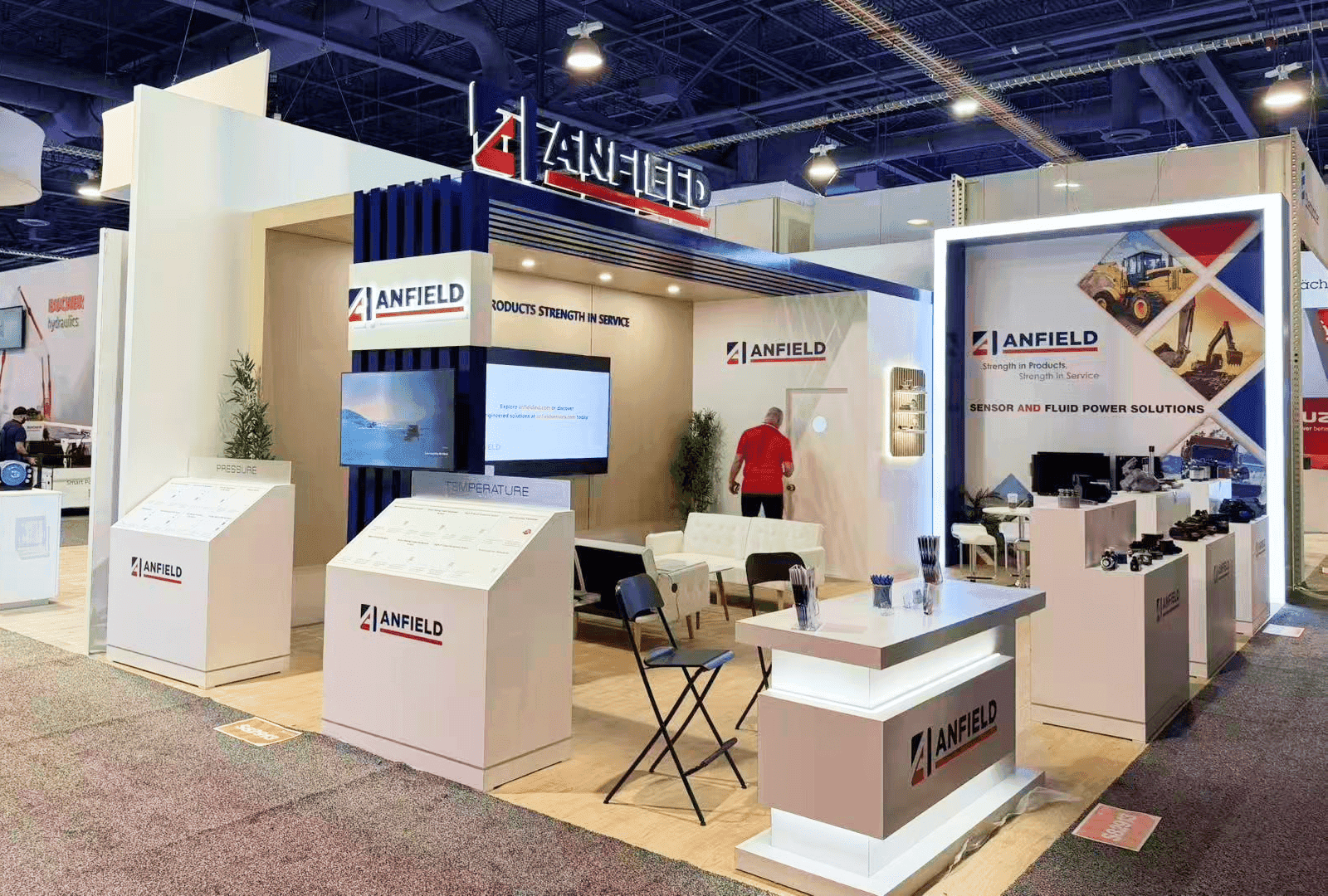
ANFIELD's 20x30 CONEXPO project shows product counters, branded information and space for conversations in a construction-industry exhibit. This comparable reference was completed at CONEXPO in Las Vegas. It is not an NFMS project.