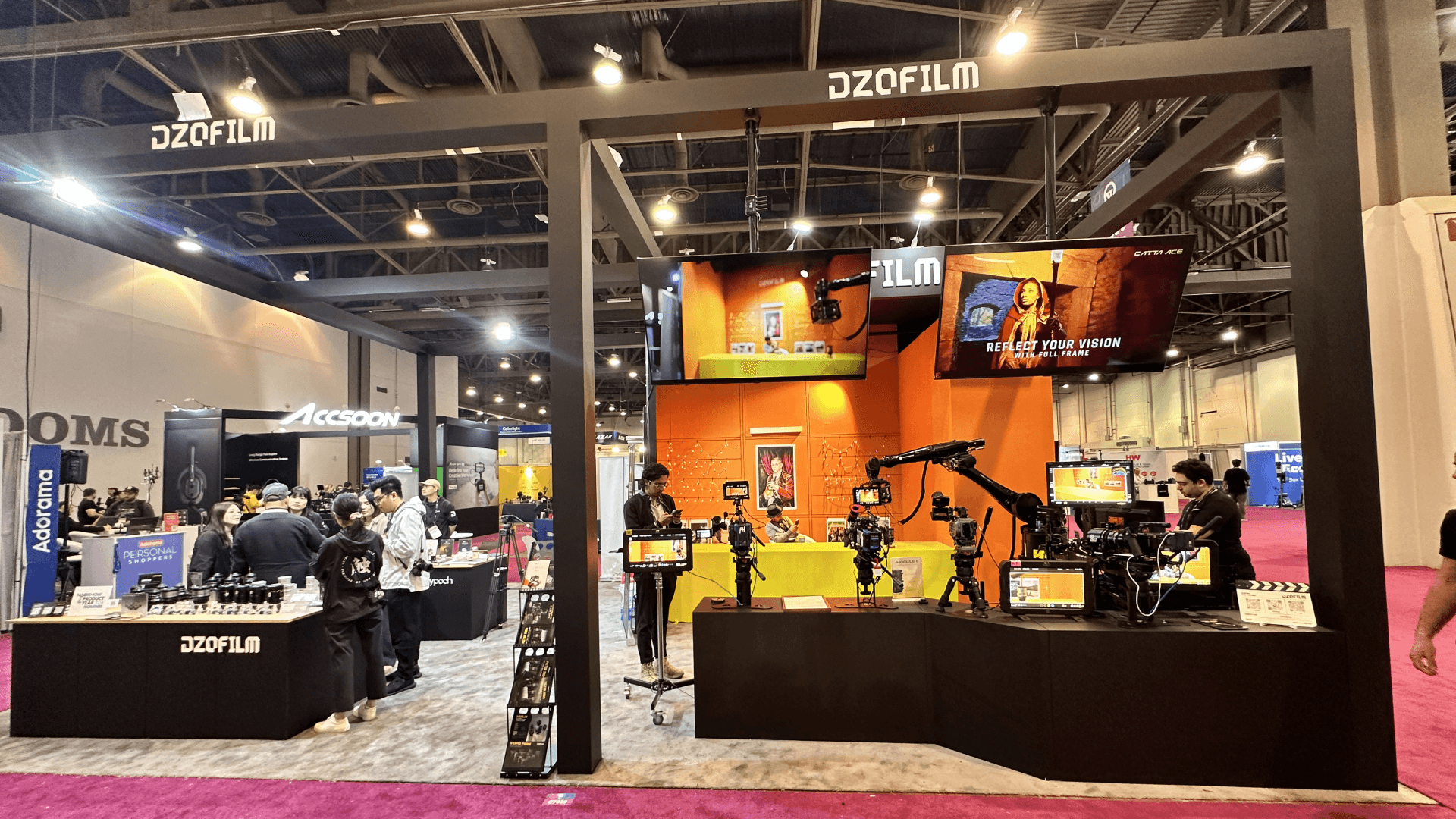
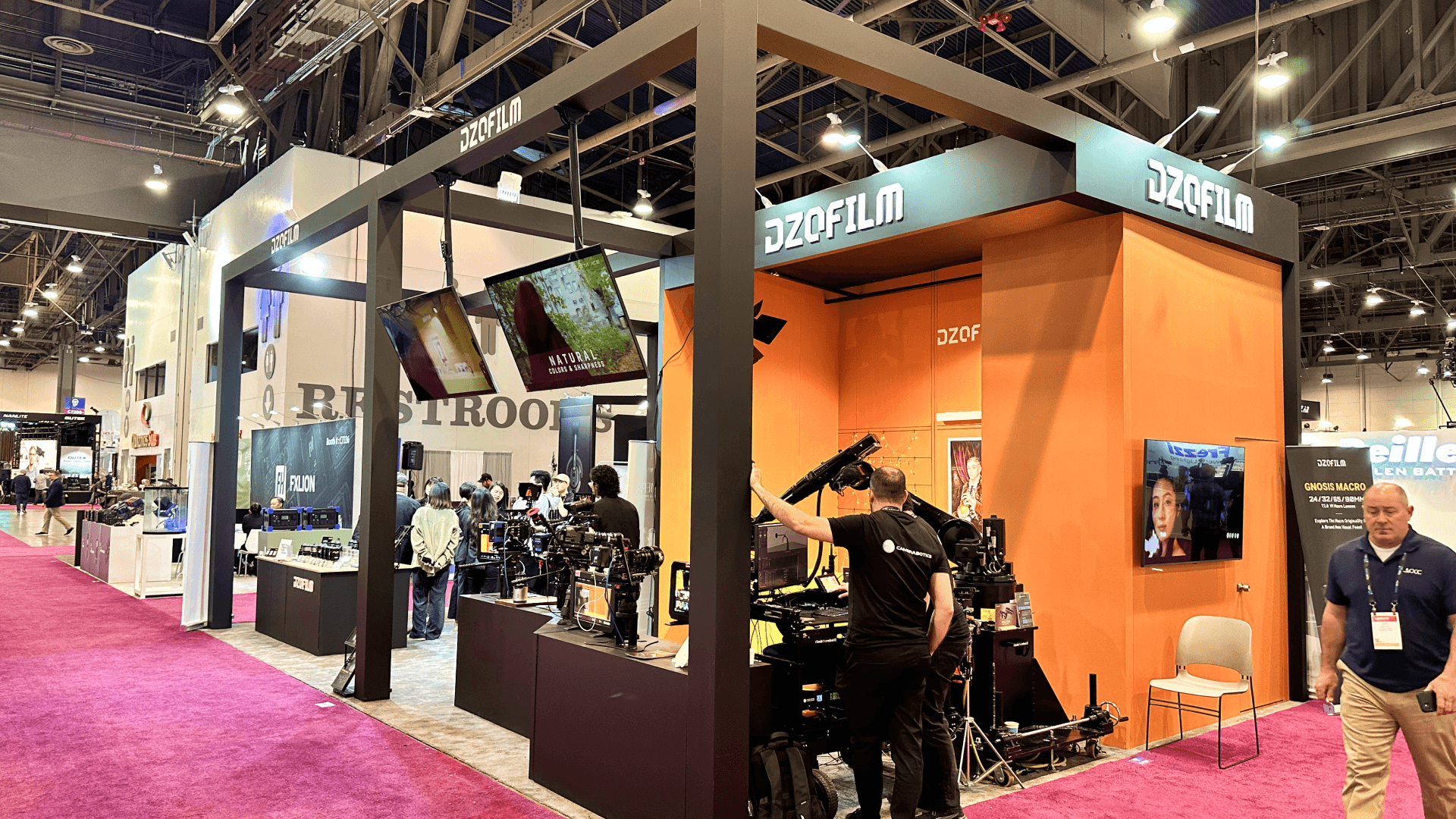
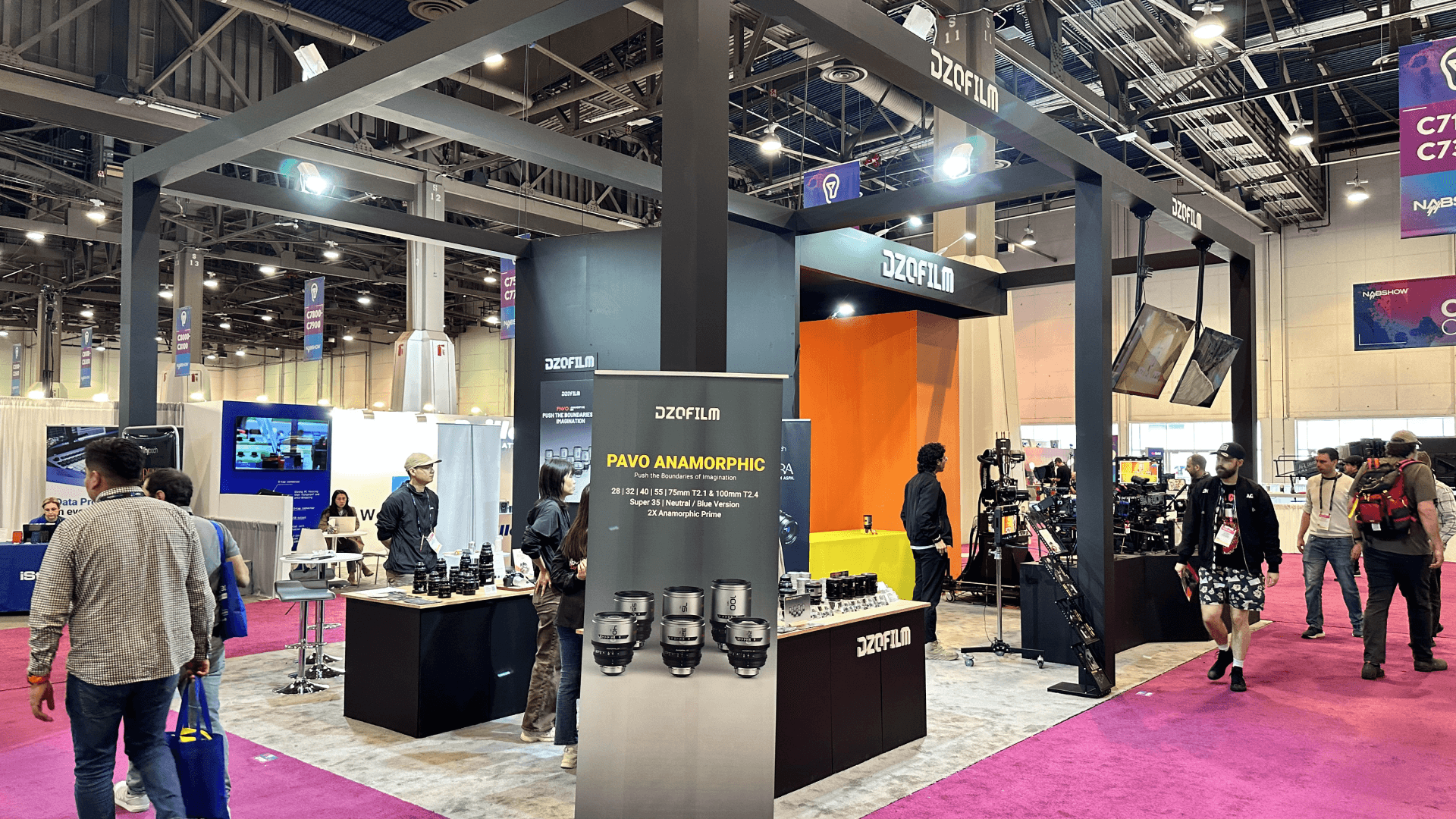
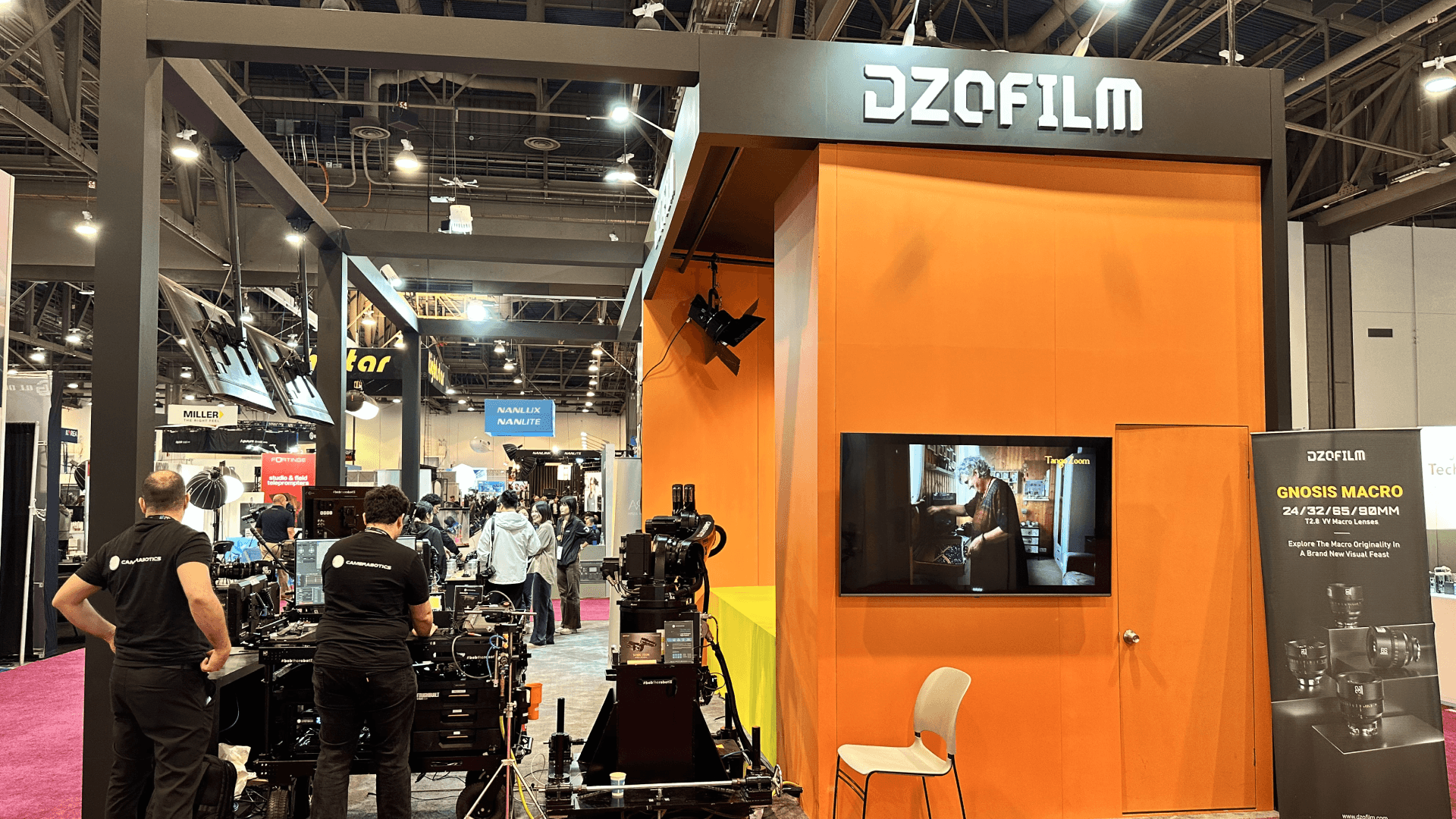
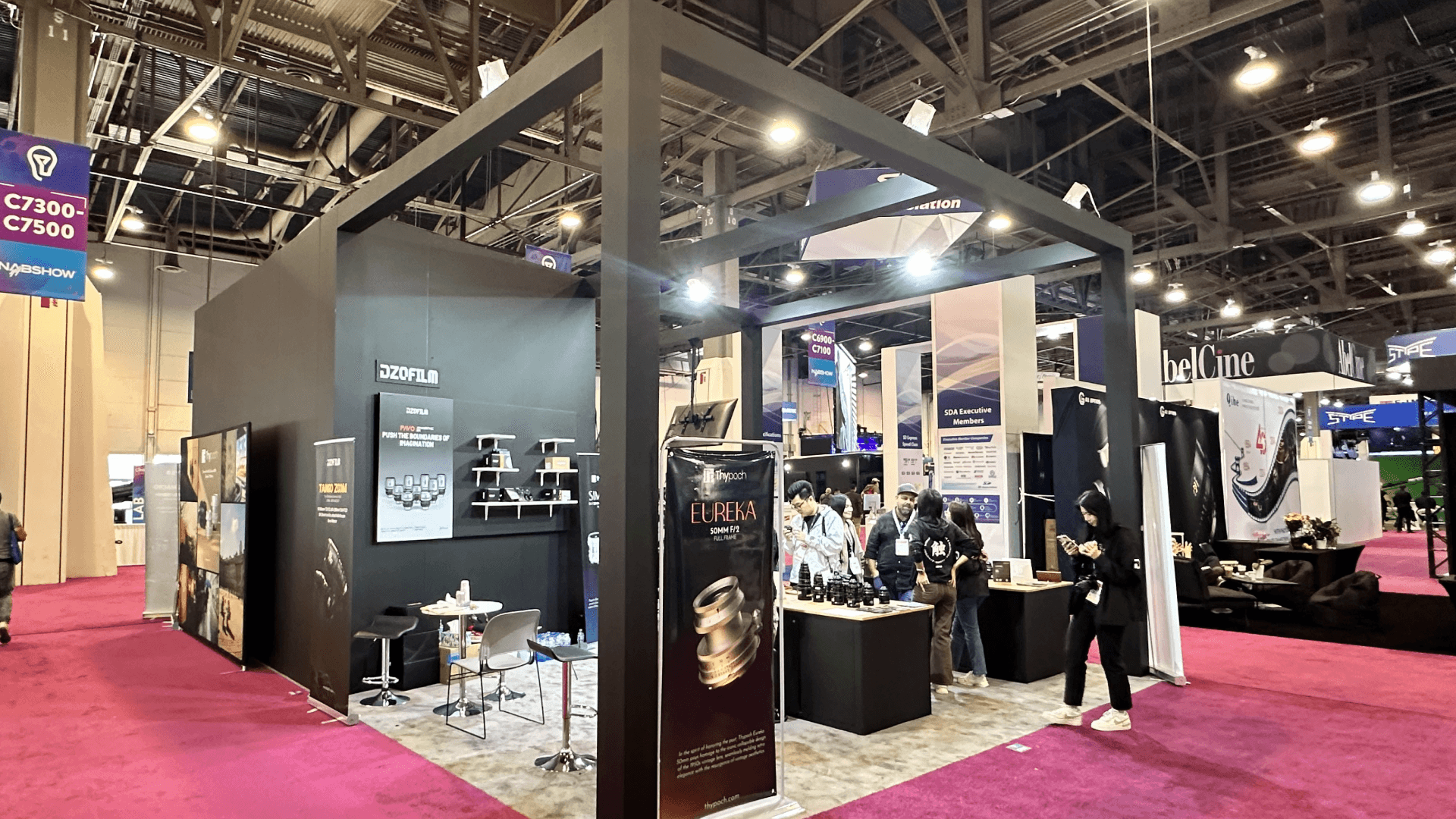
DZOFILM brought a 20x20 booth to NAB Show 2024 in Las Vegas, built as a compact cinema lens demo booth for hands-on product testing, live video feedback, and real production-style interaction. Instead of treating the footprint like a static display wall, the booth was planned as a working broadcast optics environment where visitors could handle cinema lenses, compare image-performance differences quickly, and understand what the brand was showing within seconds. In a fast-moving media and content-production show, the layout had to make the booth feel technically credible without losing openness at the edge.
Because NAB attendees often compare cameras, lenses, monitors, and workflow tools in one pass, we treated demo access, sightlines, cable control, and product positioning as part of the booth system from day one. That allowed the space to support repeatable testing and short technical conversations without turning the front line into a bottleneck. For a compact 20x20 booth, the goal was not to add more structure, but to make the demo logic clearer and easier to read.
To keep the installation predictable at LVCC, we planned the booth around power and data readiness, secure gear handling, drayage timing, and the sequence required to get every demo point operational before traffic built. That same execution logic is why this case also connects naturally to on-site installation and dismantle services, where demo-led booths depend on what gets solved before opening morning.
💼
Client:
📅
Year/Exhibition:
📍
Location:
📐
Size:
🏢
Industry:
🏢
Venue Context:
Challenge
The main challenge was density. A 20×20 footprint can support hands-on equipment demos, but once lens bars, monitors, active camera positions, and visitor conversations all happen at once, the booth can become crowded very quickly. DZOFILM needed the space to feel like a working demo environment rather than a retail display. Visitors had to be able to approach the lenses, understand what was being tested, and stay engaged without the booth losing clarity from multiple approach angles.
The second challenge came from execution. NAB booths that involve cameras, lenses, monitors, and live signal flow depend on more than graphics. Product access, demo routing, cable control, powered surfaces, and clean counter sequencing all shape whether the booth feels trustworthy on show day. That is why this case also supports booth fabrication and pre-build checks in Las Vegas. In a booth like this, readiness is what protects both the demo experience and the handling conditions of higher-value gear.
Design vs. On-site Execution
The concept was built around functional openness. Instead of filling the booth with too many branded surfaces, the design used an industrial-frame structure, a hands-on lens bar, and live video feedback positions to make the booth feel like a working test environment. The goal was to let visitors understand the booth through use, not just through messaging. For a brand showing cinema optics, that meant the layout had to support handling, comparison, and technical explanation in the same compact footprint.
On site, that concept only worked because the install sequence protected the same priorities as the layout. Demo stations had to stay readable, the industrial frame had to define the space without overpowering it, and live video positions needed to operate cleanly without exposed cable paths. In a booth like this, layout logic and installation order are tightly connected, which is exactly why 20x20 trade show booth size planning is the right supporting size page for this case. This last sentence is an inference based on the confirmed 20×20 island format and the event’s AV-heavy demo requirements.
This project was also featured in our portfolio gallery, showcasing on-site visuals and key exhibit highlights from the event.
View the DZOFILM booth at NAB Show 2024 project gallery for real show-floor photos and visual references.
Hands-On Lens Bar
A dedicated lens bar gave visitors a direct way to examine optics, compare form factors, and move quickly from visual interest into product-specific questions. That made the booth feel active without requiring a theatrical stage.
Live Video Feedback Position
Live feedback screens helped turn lens handling into a visible demo experience. They let visitors connect what they were touching with what they were seeing, which made the product story much easier to understand in real time.
Industrial Frame Anchor
The industrial-style open frame gave the booth structure and recognizability without blocking sightlines. It helped define the footprint while keeping the demo environment visible from multiple sides. This is an inference grounded in the confirmed “industrial-frame structure” description.
Conversation and Demo Support Edge
A clean edge zone allowed the team to move from quick testing into short technical conversations without blocking the main demo flow. That balance helped the booth stay usable during heavier visitor periods. This is an inference based on the case’s hands-on demo setup and 20×20 island format.

On-site Highlights
This booth worked because the execution system protected the same qualities that made the concept effective: open testing, technical clarity, and stable demo conditions. In a NAB environment, power and data readiness, cable discipline, secure handling of higher-value gear, labor timing, and staged freight all influence whether a compact booth can open as a real working demo space. The following highlights show how show-floor execution helped keep the DZOFILM booth test-ready, readable, and operational under real LVCC conditions.
On-Site Execution Highlights
Rigging + Open Frame Coordination
Power + Data Routing for Live Video Feedback
Drayage + Staging Control for Demo-First Setup
Union Labor Sequencing + Gear Protection
Install Closeout + Demo Readiness for Opening Hours
Outcome
The booth made lens handling and image evaluation easier to understand in a short amount of time, helping visitors move from curiosity into more technical product questions.
By combining a hands-on lens bar with live video feedback, the booth felt more like a working environment than a static display, which suited the expectations of NAB attendees.
The 20×20 layout stayed open enough for walk-up interaction while still holding enough structure for guided testing and technical explanation. This is an inference based on the confirmed island format and booth concept.
Because the booth was planned around demo function, power stability, and installation order, it could open in a cleaner and more operational condition for show traffic.
What made this booth effective was not just the industrial look. It was the fact that the layout behaved like a compact testing environment. For a lens brand at NAB, that matters more than visual scale. Visitors do not just want to see products on a wall. They want to understand how the optics feel, how the demo is set up, and whether the booth supports a credible working workflow. By giving the booth a hands-on lens bar, live feedback, and an open frame structure, the space turned technical comparison into something easy to approach.
Practical takeaway: if a broadcast optics booth needs to support product handling and real-time demo feedback, do not solve it by adding more branding. Solve it with sequence and usability. The strongest booths are the ones where product access, powered demo surfaces, and cable discipline already work together before the hall opens. That is also where an experienced Las Vegas trade show booth builder adds real value—by making sure the booth performs as a working show-floor system under real LVCC conditions. This conclusion is an inference supported by NAB’s AV-heavy execution requirements and the confirmed DZOFILM booth concept.
Quick Q&A
Q: What made this DZOFILM booth different from a typical static display?
A: The case is described as a compact “shooting lab” with a hands-on lens bar and live video feedback, which means the booth was designed around live product use rather than passive viewing.
Q: Why was a 20×20 footprint enough for this booth?
A: The confirmed booth concept focused on a compact island format that prioritized handling, testing, and immediate technical interaction rather than large scenic build-outs. This is an inference based on the case description and booth size.
Q: What execution factor matters most for a NAB lens-demo booth?
A: NAB’s event guidance emphasizes power, data, cable routing, secure gear handling, labor timing, and drayage, all of which directly affect whether a demo-led optics booth can function smoothly.
Q: Why is live video feedback important in this kind of booth?
A: It turns product handling into an immediate visual result, helping visitors understand lens performance faster during short show-floor interactions. This is an inference grounded in the confirmed live video feedback element.
Q: What is the most overlooked detail in a compact broadcast gear booth?
A: Sequence control. When demo gear, screens, power, and cable routing are not installed in the right order, even a strong booth concept can lose clarity and usability before opening. This is an inference supported by NAB’s published execution challenges.