/

30x30 AI Productivity Demo Booth

  • 30x30 AI productivity booth rental with overhead branding and multiple software demo stations
  • 30x30 enterprise AI trade show booth with large workflow screen and interactive demo counters
  • 30x30 SaaS exhibit rental for AI software demonstrations, buyer meetings, and lead capture
  • 30x30 productivity software booth with digital presentation wall and hands-on demo workstations
  • 30x30 technology island booth rental with reception counter and separate AI demonstration areas
  • 30x30 enterprise software exhibit for AI workflow presentations and customer consultation meetings
  • 30x30 AI software demo booth design with branded screens, interactive stations, and open visitor circulation

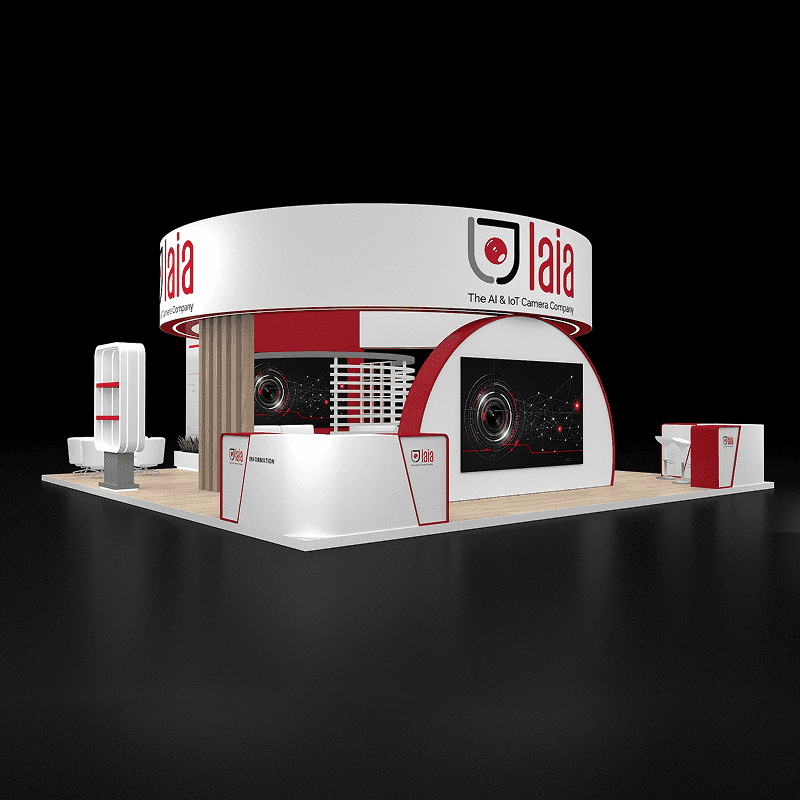
30x30 AI productivity booth rental with a large software presentation screen, separate interactive demo counters, overhead branding, reception, and buyer seating.

CE-RBD-3030-015

A multi-station AI software exhibit combining a central presentation screen, hands-on workstations, visitor qualification, enterprise meetings, and tidy device storage.

30x30 AI Productivity Multi-Station Demo Booth Rental Design

How can a 30x30 AI productivity booth run guided and hands-on demos together?

This 30x30 island layout gives the main display screen a guided presentation role while separate workstations let visitors test shorter AI workflows. Reception and a seated discussion area support qualification and follow-up without taking over the demo stations.

Request Customization

Features :

Fully customizable

Zero post show billing

On-Time Delivery

Best For

AI assistants, productivity software, enterprise SaaS, workplace collaboration systems, workflow automation, cloud software, and B2B technology platforms needing several live demos.

Main Features๏ผš

  • Large guided AI software presentation screen

  • Two dedicated hands-on demo workstations

  • Reception and lead qualification counter

  • Branded central technology feature wall

  • Long suspended overhead branding sign

  • Compact enterprise buyer meeting area

  • Concealed charging and demo device storage

  • Separate presentation and trial visitor paths

Layyout Description

The main branded wall presents an AI productivity workflow on a screen large enough for a guided explanation. Separate slim workstations let visitors try specific tasks without blocking the presentation area. Reception near one aisle handles initial qualification, while a small seating group gives sales specialists a place to discuss integration, deployment, or purchasing next steps. The long overhead sign adds visibility, and cable paths plus secure device storage keep the technology accessible to staff but out of sight.

Features :

Graphics Areas

Overhead technology signage, AI workflow messaging, interface graphics around the central screen, workstation labels, reception branding, and side product information panels.

Furniture Included

Reception counter, workstation podiums, monitor or laptop mounts, small meeting table and chairs, and storage cabinets.

Screen / LED Option

A primary large display can demonstrate the shared AI workflow; workstation screens can support hands-on tasks, product modules, dashboards, integrations, or guided trials.

Storage Included

Secure cabinets near the workstations and reception can hold laptops, tablets, spare devices, adapters, charging cables, literature, and staff belongings.

Flooring

Neutral island flooring with concealed or protected cable paths between the presentation wall, workstations, and reception.

Lighting

Balanced lighting should keep screen glare low while making workstations and entry signage visible. Suspended-sign lighting requires a separate venue power and rigging plan.

Quote Note

Final pricing depends on screen sizes, workstation quantity, device integration, internet and power requirements, cable management, overhead branding and rigging, furniture, storage, freight, and technical installation support.

Related Software and Enterprise Technology Demo Projects

Similar 30x30 Booth Rental Designs

Related Exhibitions

FAQs

Can visitors try two AI workflows at the same time?

Yes. Separate demo workstations can be prepared for different use cases or audiences while the large screen continues a guided presentation. Staffing and device security should be planned together.

What internet and AV setup is needed for live AI software?

Confirm dedicated connectivity, display resolution, cables, power, account access, and a fallback recording or offline demo before show opening.

Is there room for enterprise software buyer meetings?

A compact seating area can support integration, licensing, or rollout discussions without using the demonstration workstations for long conversations.

Can the demo station layout change for another software product?

Yes. The reusable structure can take updated graphics, device mounts, screen positions, and furniture, subject to revised power, cabling, and venue requirements.

Plan a Trade Show Booth Rental That Fits Your Event

Compare booth size, rental design, graphics, product display needs, and show-site setup before choosing your final booth structure.

Office

4915 Steptoe St #300, Las Vegas, NV 89122

Telephone