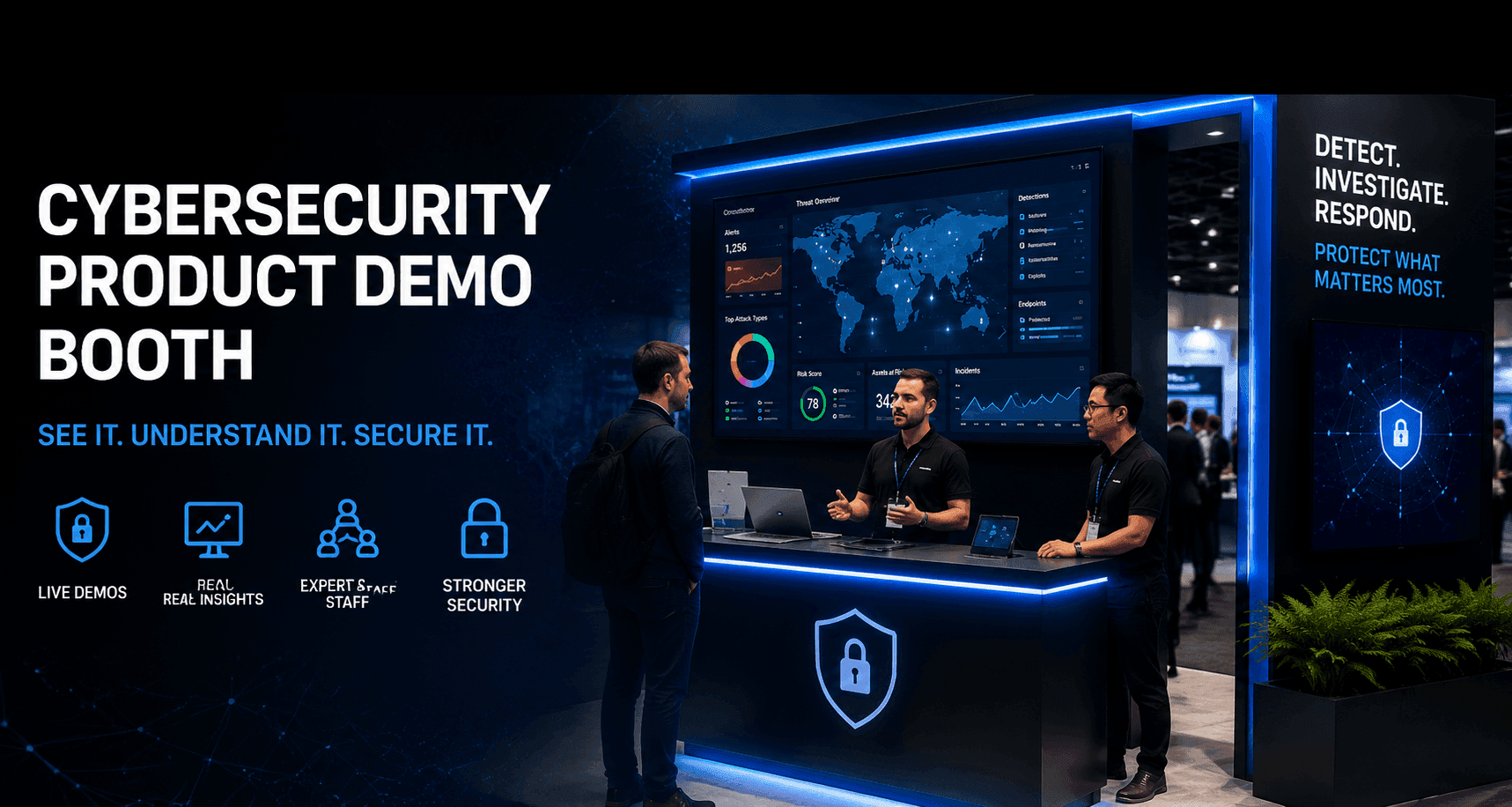
What Is a Cybersecurity Product Demo Booth?
A cybersecurity product demo booth is a trade show booth planned around product explanation instead of general brand visibility. It helps exhibitors show software workflows, security dashboards, SaaS platforms, SOC operations, threat detection paths, endpoint protection tools, identity systems, or cloud security processes in a way visitors can understand quickly.
Definition and purpose
A cybersecurity product demo booth gives visitors a structured way to see what the product does, how the workflow works, and why the solution is relevant. Unlike a standard brand booth, it needs to support live or guided demos, technical questions, screen visibility, and staff handoff.
For Black Hat USA exhibitors, the booth should answer three questions quickly:
What security problem does the product solve?
What workflow or dashboard should visitors see first?
Who should handle the next conversation: demo staff, technical staff, or sales staff?
Core components
A strong technology product demo booth usually includes:
a primary screen or dashboard
one or more demo counters
clear booth graphics and product category messaging
staff positions for greeting, demo, technical review, and follow-up
storage for devices, cables, printed materials, and staff items
AV and power planning
a side discussion or meeting area when deeper conversations are expected
The booth does not need to show every feature. It needs to make the first product story easy to understand.
Why booth planning matters
Cybersecurity products are often complex. If the booth is not planned clearly, visitors may see screens but not understand the product story. Staff may repeat the same basic explanation too often. Qualified buyers may also leave before reaching the right technical or sales team.
Good booth planning turns the booth into a guided path: aisle interest, quick qualification, screen-led demo, technical review, and follow-up.

A 20x20 booth works best when the product story is focused and one main demo station can support most visitor conversations.
How Screens, Demo Counters, and Booth Graphics Should Work Together
A screen-led product demo booth depends on alignment between screens, counters, graphics, and staff placement. If these elements do not work together, the booth may look active but feel confusing.
Screen placement
The primary screen should be visible from the aisle and should support one clear product story. For example, a SOC dashboard, alert workflow, risk view, or SaaS interface should be easy to see without forcing visitors to step too far into the booth.
Do not overload the first screen with too many features. The screen should create interest first. Deeper product details can happen at the demo counter or in a side conversation.
Demo counter positioning
A demo counter booth setup gives staff a defined place to guide visitors through the product. The counter should not block the aisle or hide the screen. It should help visitors move naturally from first contact to a product walkthrough.
For Black Hat USA, demo counters often need to support short technical conversations. Plan enough space for visitors to stand, watch the screen, ask questions, and move aside when a deeper discussion is needed.
Graphics and messaging
Booth graphics should clarify the product category before the visitor speaks with staff. For cybersecurity exhibitors, graphics should explain whether the booth focuses on cloud security, endpoint protection, identity security, SOC operations, threat intelligence, compliance, data protection, or another security area.
For stronger booth graphics support, exhibitors can also review graphics and brand presentation support when planning backwalls, screen areas, demo counter messaging, and branded surfaces.

A 20x30 booth gives Black Hat exhibitors more flexibility for multiple demos, technical conversations, and side meeting space.
Cybersecurity Product Demo Booth Planning Checklist
Booth Planning Element | Why It Matters for Cybersecurity Exhibitors | Planning Note for Black Hat USA |
|---|---|---|
Primary screen | Shows the main dashboard, workflow, or product interface from the aisle | Keep one clear screen-led message instead of showing too many features at once |
Demo counter | Gives staff a defined place to walk visitors through the product | Position the counter so visitors can see both the screen and the staff member |
Product category graphics | Helps visitors understand whether the booth is about cloud security, endpoint protection, identity, SOC operations, or another solution area | Use clear category language instead of only brand slogans |
Staff handoff path | Moves visitors from first contact to demo, technical review, or sales follow-up | Separate greeting, product demo, technical, and follow-up roles when possible |
Side discussion area | Supports deeper technical or enterprise conversations without blocking the main demo | Use this space for qualified visitors, integration questions, or buyer follow-up |
Storage and device support | Keeps laptops, cables, printed materials, and staff items organized | Plan storage early so demo areas stay clean during busy show hours |
AV and power readiness | Keeps screens, devices, lighting, and demo equipment reliable | Check power access, cable routing, and screen visibility before the booth opens |
Lead capture point | Helps the team document interest and schedule follow-up | Place lead capture near the end of the visitor path, not at the first greeting point |
How Should Staff Handoff Work in a Technical Demo Booth?
A cybersecurity booth often needs several staff roles working at the same time. Without a clear handoff path, the booth can become crowded, and strong prospects may not reach the right person.
First-contact staff
First-contact staff should greet visitors and ask a short qualifying question. Their job is not to explain every feature. Their job is to identify whether the visitor should see a quick demo, speak with technical staff, or schedule a deeper follow-up.
A simple question works better than a long introduction. For example:
Are you looking at cloud security, endpoint protection, or SOC workflow tools?
Are you evaluating a solution now, or comparing options for later?
Would you like to see the dashboard workflow first?
Product demo staff
Product demo staff should focus on the main workflow. They should be able to show the product clearly without turning the demo into a full training session.
For a SaaS demo booth, this may include:
showing the core workflow
explaining the user role
walking through a dashboard or alert view
connecting the feature to a real security problem
keeping the demo short enough for booth traffic
For software exhibitors, Black Hat SaaS demo booth planning can support deeper planning around workflow screens, demo counters, and user-role messaging.
Technical and sales follow-up
Technical staff should handle integration, architecture, deployment, workflow depth, or enterprise-fit questions. Sales or partnership staff should handle next steps, meeting scheduling, and buyer follow-up.
The key is to separate these conversations from the front demo area when possible. This keeps the product demo booth open for new visitors while still supporting deeper technical conversations.
Sample Visitor Flow for a Black Hat USA Product Demo Booth
A strong cybersecurity product demo booth should guide visitors through a simple path. The path should feel natural, not forced.
Visitor path example
A practical visitor flow may look like this:
The visitor sees the product category and dashboard from the aisle.
First-contact staff asks a short qualifying question.
The visitor moves to the demo counter for a focused product walkthrough.
Demo staff explains the main workflow on the screen.
Technical staff joins if the visitor asks deeper questions.
Qualified visitors move to a side discussion area or schedule follow-up.
Lead capture happens after interest is confirmed, not before the product story is clear.
This flow keeps the booth organized and helps staff avoid repeating the wrong explanation to the wrong visitor.
Common planning mistakes
Cybersecurity exhibitors should avoid these common booth planning mistakes:
showing too many dashboards at once
using graphics that only show brand slogans
placing demo counters where they block visitor movement
assigning all staff to the same role
leaving no space for technical questions
hiding storage until it becomes a show-site problem
planning screens without checking visibility from the aisle
A booth can look visually strong but still perform poorly if the demo path is unclear.
What Should Exhibitors Check Before Show-Site Setup?
Product demo booths need more show-site preparation than simple brand booths. Screens, devices, counters, graphics, staff positions, and storage all need to work together before visitors arrive.
Demo readiness
Before the booth opens, exhibitors should check:
screen visibility from the aisle
demo device setup
Wi-Fi or network assumptions
cable routing
screen brightness
counter placement
staff talking points
lead capture process
If the demo depends on a live environment, also prepare backup content such as recorded walkthroughs, static dashboard views, or offline product screens.
Storage and traffic flow
Storage should be planned before show-site setup, not after the booth is built. Laptops, bags, printed materials, cables, giveaways, and staff items can quickly make a technology product demo booth feel cluttered.
A clean booth helps visitors focus on the product story. It also keeps the demo counter available for conversations instead of turning it into a storage surface.
Show-site execution
A cybersecurity demo booth may require coordinated setup for booth structure, graphics, screens, counters, lighting, AV, and staff briefing. For larger or more complex booth environments, Las Vegas trade show booth builder support can help connect design, fabrication, logistics, and show-site setup into one execution path.
Final Takeaway
A Black Hat USA cybersecurity product demo booth should be planned as a screen-led product explanation environment, not only as a branded exhibit space. The booth should combine product demo booth structure, clear booth graphics, demo counters, staff handoff, storage, AV readiness, and show-site setup. The goal is not to show every feature at once. The goal is to help the right visitors understand the product quickly and move into the right technical or sales conversation. For event-specific planning, start with Black Hat cybersecurity product demo booth planning.
FAQ
What is a cybersecurity product demo booth?
A cybersecurity product demo booth is a trade show booth designed to show security software, dashboards, workflows, SaaS tools, or technical product stories. It usually includes screens, demo counters, product category graphics, staff handoff, and space for deeper technical conversations.
How is a product demo booth different from a standard brand booth?
A standard brand booth focuses mainly on visibility and messaging. A product demo booth must also support screen-led explanation, guided demos, technical questions, staff handoff, and follow-up conversations.
What should a Black Hat USA cybersecurity booth include?
It should include visible screens, demo counters, clear product category graphics, organized staff roles, storage, AV and power planning, lead capture, and a defined path from first contact to demo and follow-up.
Why are booth graphics important for cybersecurity exhibitors?
Booth graphics help visitors understand the product category quickly. For cybersecurity exhibitors, graphics should clarify whether the booth is about cloud security, endpoint protection, identity, SOC operations, threat intelligence, compliance, or another solution area.
How should staff handoff work in a cybersecurity demo booth?
Staff handoff should move visitors from greeting to qualification, product demo, technical review, and sales follow-up. Each role should be clear so visitors reach the right person without creating crowding around the demo counter.







