How Audio Monitoring Areas Should Sit Beside Main Presentation Zones at NAB

Circle Exhibit Team
Industry professionals
Exhibition industry professional dedicated to delivering the latest insights and curated recommendations to you.
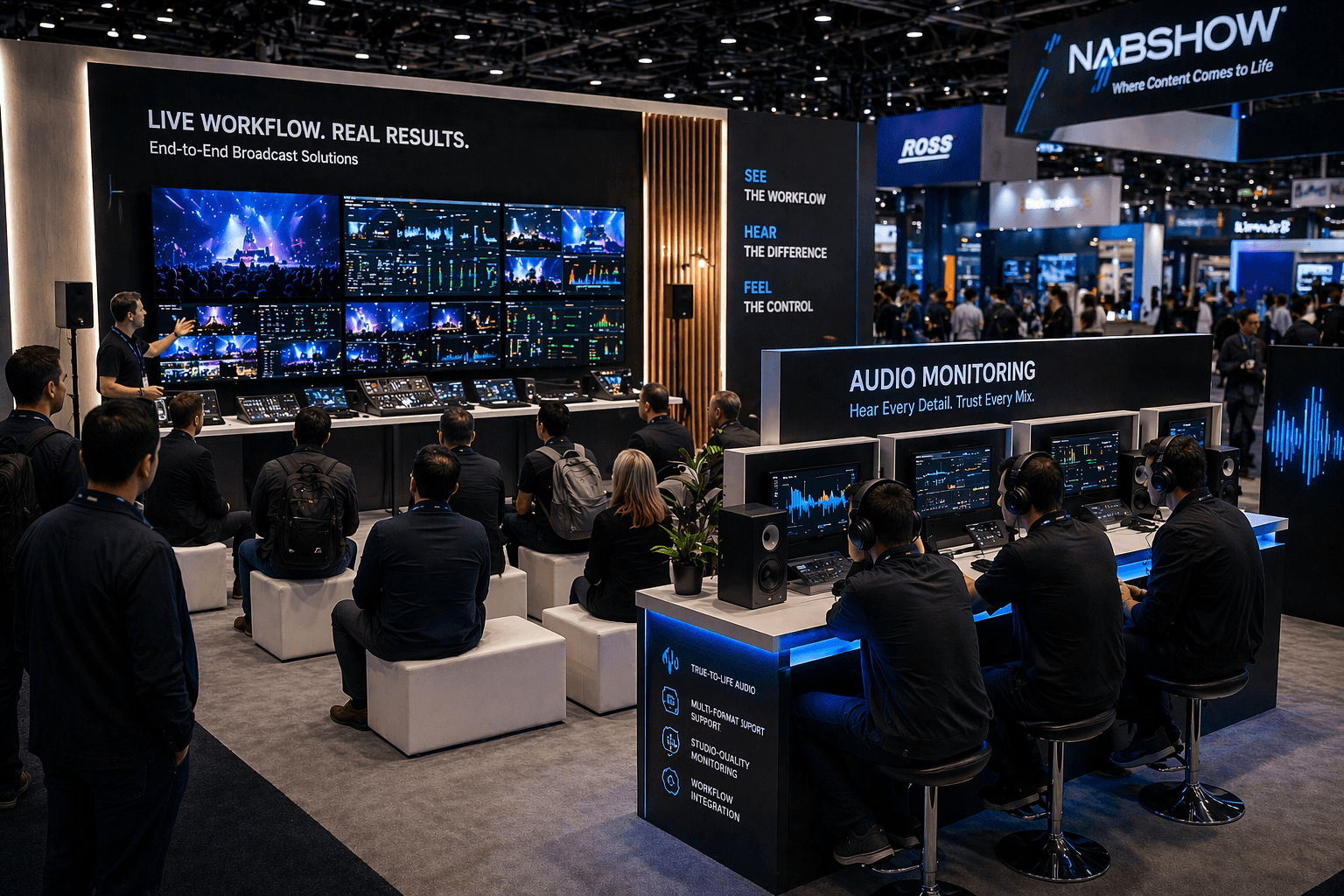
At NAB, audio monitoring zones need adjacency without sound conflict. The best layouts keep headphone or listening stations close enough to support the main presentation, but not so close that they interrupt it.
Audio is one of the easiest things to get wrong in a broadcast booth.
Not because the gear is weak. Usually the gear is the strongest part of the space. The problem is placement. The listening area ends up either too detached from the main demo or too entangled with it. When that happens, the booth starts forcing visitors to choose between understanding the full presentation and testing the audio properly.
That is not a small layout issue. At NAB Show, it changes how the whole demo reads.
A lot of booths treat the audio monitoring area like a side add-on. The main presentation gets the screen wall, the visual hierarchy, and the best crowd position. Then the headphone station or listening point is placed wherever there is space left. On paper that can look efficient. On the floor it often feels disconnected. People watch the main presentation, but the audio area seems like a separate experience rather than part of the same workflow.
The opposite problem is just as common. The listening area sits too close to the presentation zone, so people using headphones or testing a monitor position end up standing inside the viewing path. The booth feels busy, but the activity starts stacking in one place. Visitors trying to watch the presentation are brushing past people who are trying to evaluate sound detail. Staff end up managing the overlap instead of guiding the demo.
The best audio monitoring areas usually sit beside the main presentation zone, not behind it, not far away from it, and not right in front of it.
That side-by-side relationship matters because audio in a broadcast booth is rarely the whole story by itself. People usually need visual context first. They need to understand what kind of workflow, tool, signal chain, or production environment they are looking at. Then the audio station gives them a more focused layer of evaluation. If that station is too far removed, the handoff feels weak. If it is too close to the main crowd line, the booth starts creating its own friction.
A good layout gives the audio station proximity without collision.
That usually means the visitor can watch the main presentation, then take one or two natural steps into the listening area without losing the connection to the main story. The booth should not make the audio evaluation feel like a separate room. It should feel like the next layer of the same demo.
This is one reason a 20x20 trade show booth often works well for broadcast workflow presentations. It is usually the first footprint that gives enough room to separate the audience line, the operator or presenter zone, and a side monitoring position without forcing all three into the same few feet. In a tighter booth, the audio station often becomes either too exposed or too detached. In a better 20x20, it can sit off to the side and still stay connected to the visual center of the demo.
Headphone stations usually benefit from that kind of side placement even more than speaker-based setups do. With headphones, the goal is not to create another audience cluster. It is to create a focused evaluation point. If the station is placed properly, one person can test the audio while the presentation continues to work for everyone else. If the station is placed badly, the booth starts forming a traffic knot around a very small interaction.
That is where booth behavior matters more than square footage alone. The audio area needs enough privacy to make listening worthwhile, but not so much isolation that the booth loses continuity. People should still feel that they are part of the same product story. The main screen or presentation should remain visually present, even if the audio interaction is more focused and personal.
Graphics help here too. Strong graphics and brand presentation can make the audio station easier to understand without adding clutter. A simple message that explains what is being monitored, what makes the output different, or where the station fits in the larger workflow can help the area feel integrated instead of secondary. Without that support, the station can look like extra equipment instead of a meaningful demo layer.
It also helps when the booth gives the listening area its own small buffer rather than forcing it to sit directly on the aisle edge. That keeps casual passersby from cutting through the interaction and gives staff room to guide someone into the station when interest becomes more specific. The booth stays more open, but the evaluation still feels intentional.
This is one reason many exhibitors benefit from planning these zones with a Las Vegas trade show booth builder instead of treating audio monitoring as a late-stage equipment placement issue. The success of the listening area depends on more than where the headphones sit. It depends on sightlines, crowd behavior, message hierarchy, operator position, and how naturally the booth moves from presentation to evaluation.
The strongest NAB booths usually make that transition feel easy. The main presentation attracts the stop. The visitor understands the workflow. Then the audio zone gives that visitor a chance to go deeper without disrupting everyone else around them.
That is the balance that works.
At NAB, audio monitoring areas should stay close enough to the presentation to make sense, but far enough from the main crowd line to stay usable. When that spacing is right, the booth feels more controlled, the demo feels more complete, and the sound gets the kind of attention it actually deserves.
Planning a booth for NAB Show?
Start with NAB booth planning, then shape the layout with a Las Vegas trade show booth builder approach that keeps presentation flow clear while giving audio monitoring a better place to work.

Audio is one of the easiest things to get wrong in a broadcast booth.
Not because the gear is weak. Usually the gear is the strongest part of the space. The problem is placement. The listening area ends up either too detached from the main demo or too entangled with it. When that happens, the booth starts forcing visitors to choose between understanding the full presentation and testing the audio properly.
That is not a small layout issue. At NAB Show, it changes how the whole demo reads.
A lot of booths treat the audio monitoring area like a side add-on. The main presentation gets the screen wall, the visual hierarchy, and the best crowd position. Then the headphone station or listening point is placed wherever there is space left. On paper that can look efficient. On the floor it often feels disconnected. People watch the main presentation, but the audio area seems like a separate experience rather than part of the same workflow.
The opposite problem is just as common. The listening area sits too close to the presentation zone, so people using headphones or testing a monitor position end up standing inside the viewing path. The booth feels busy, but the activity starts stacking in one place. Visitors trying to watch the presentation are brushing past people who are trying to evaluate sound detail. Staff end up managing the overlap instead of guiding the demo.
The best audio monitoring areas usually sit beside the main presentation zone, not behind it, not far away from it, and not right in front of it.
That side-by-side relationship matters because audio in a broadcast booth is rarely the whole story by itself. People usually need visual context first. They need to understand what kind of workflow, tool, signal chain, or production environment they are looking at. Then the audio station gives them a more focused layer of evaluation. If that station is too far removed, the handoff feels weak. If it is too close to the main crowd line, the booth starts creating its own friction.
A good layout gives the audio station proximity without collision.
That usually means the visitor can watch the main presentation, then take one or two natural steps into the listening area without losing the connection to the main story. The booth should not make the audio evaluation feel like a separate room. It should feel like the next layer of the same demo.
This is one reason a 20x20 trade show booth often works well for broadcast workflow presentations. It is usually the first footprint that gives enough room to separate the audience line, the operator or presenter zone, and a side monitoring position without forcing all three into the same few feet. In a tighter booth, the audio station often becomes either too exposed or too detached. In a better 20x20, it can sit off to the side and still stay connected to the visual center of the demo.
Headphone stations usually benefit from that kind of side placement even more than speaker-based setups do. With headphones, the goal is not to create another audience cluster. It is to create a focused evaluation point. If the station is placed properly, one person can test the audio while the presentation continues to work for everyone else. If the station is placed badly, the booth starts forming a traffic knot around a very small interaction.
That is where booth behavior matters more than square footage alone. The audio area needs enough privacy to make listening worthwhile, but not so much isolation that the booth loses continuity. People should still feel that they are part of the same product story. The main screen or presentation should remain visually present, even if the audio interaction is more focused and personal.
Graphics help here too. Strong graphics and brand presentation can make the audio station easier to understand without adding clutter. A simple message that explains what is being monitored, what makes the output different, or where the station fits in the larger workflow can help the area feel integrated instead of secondary. Without that support, the station can look like extra equipment instead of a meaningful demo layer.
It also helps when the booth gives the listening area its own small buffer rather than forcing it to sit directly on the aisle edge. That keeps casual passersby from cutting through the interaction and gives staff room to guide someone into the station when interest becomes more specific. The booth stays more open, but the evaluation still feels intentional.
This is one reason many exhibitors benefit from planning these zones with a Las Vegas trade show booth builder instead of treating audio monitoring as a late-stage equipment placement issue. The success of the listening area depends on more than where the headphones sit. It depends on sightlines, crowd behavior, message hierarchy, operator position, and how naturally the booth moves from presentation to evaluation.
The strongest NAB booths usually make that transition feel easy. The main presentation attracts the stop. The visitor understands the workflow. Then the audio zone gives that visitor a chance to go deeper without disrupting everyone else around them.
That is the balance that works.
At NAB, audio monitoring areas should stay close enough to the presentation to make sense, but far enough from the main crowd line to stay usable. When that spacing is right, the booth feels more controlled, the demo feels more complete, and the sound gets the kind of attention it actually deserves.
Planning a booth for NAB Show?
Start with NAB booth planning, then shape the layout with a Las Vegas trade show booth builder approach that keeps presentation flow clear while giving audio monitoring a better place to work.

Exhibition Cases
Message
Leave your message and we will get back to you ASAP
Send a Message
We’ll Be in Touch!
Message
Leave your message and we will get back to you ASAP
Address:
4915 Steptoe Street #300
Las Vegas, NV 89122



