/

30x40 AI Productivity Dual-Workflow Booth

  • 30x40 AI productivity booth rental with two software demo screens and overhead brand signage
  • 30x40 enterprise AI trade show booth with separate productivity and agent workflow presentations
  • 30x40 SaaS exhibit rental with hands-on software workstations and branded screen walls
  • 30x40 AI agent software booth design with dual workflow displays and visitor reception counter
  • 30x40 productivity software showcase with digital demos and a central buyer discussion table
  • 30x40 enterprise technology island booth with computer demo counters and open circulation
  • 30x40 AI software rental exhibit designed for guided walkthroughs and specialist consultations

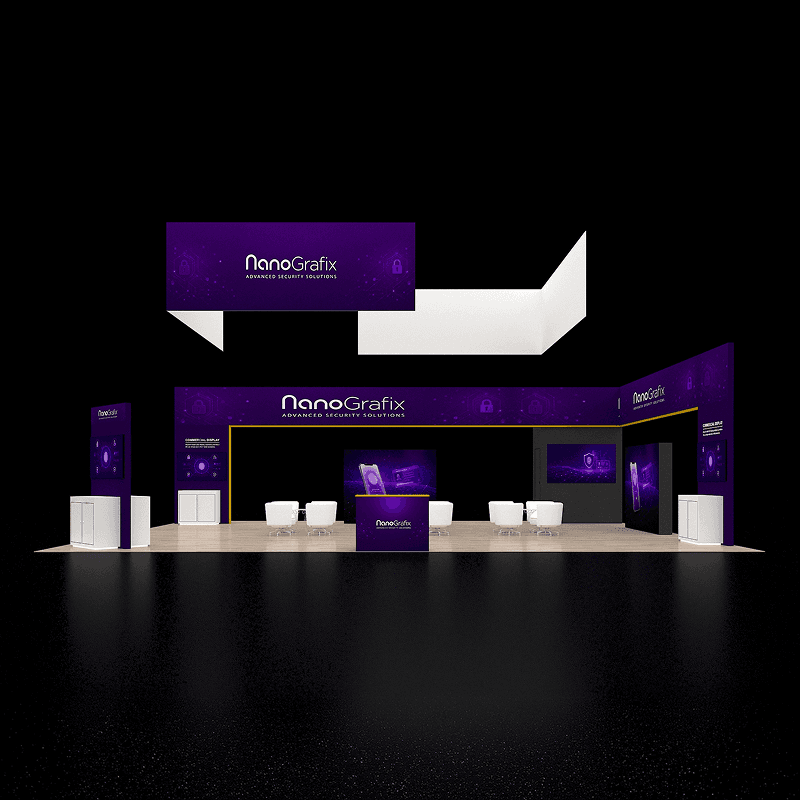
30x40 AI productivity booth rental with two independent software presentation walls, hands-on workstation counters, central meeting table, and overhead branding.

CE-RBD-3040-016

A 30x40 enterprise AI rental design that separates a guided productivity demonstration from an agent-workflow demo, with space for visitor qualification and technical buyer discussions.

30x40 AI Productivity Dual-Workflow Demo Booth Rental Design

How can a 30x40 AI booth demonstrate two productivity workflows without competing for the same screen?

Two independent presentation walls let staff run a guided AI productivity walkthrough alongside a separate agent-building or workflow configuration demo. Walk-up workstations support hands-on questions, while reception and a small conversation table keep sales handoffs clear of the main screens.

Request Customization

Features :

Fully customizable

Zero post show billing

On-Time Delivery

Best For

Enterprise AI assistants, productivity software, agent-building platforms, workflow automation vendors, SaaS companies, collaboration tools, and technology teams presenting multiple related software capabilities.

Main Features:

  • Two distinct large software demonstration screens

  • Separate productivity and agent-workflow presentation zones

  • Two hands-on computer demo counter positions

  • Open reception and lead qualification counter

  • Compact discussion table for specialist handoff

  • Long suspended branded header

  • Sightlines that keep both demonstrations visible

  • Optional protected cable management and device storage

Layyout Description

A long suspended brand header marks the island without enclosing it. The left screen wall introduces AI productivity use cases, while a separate right-hand display supports agent or workflow configuration demonstrations. Two slim workstations beside the second wall allow closer, individual software interaction. A reception counter is placed toward one outer aisle and a small café-height discussion point sits between the presentation areas. The open floor allows short demos to continue while enterprise buyers move into more detailed questions. Charging access and device storage should be planned inside selected counters rather than left in circulation paths.

Features :

Graphics Areas

Overhead branded header, individual workflow headings above display screens, workstation counter graphics, reception counter branding, application use-case panels, and minimal technical messaging.

Furniture Included

Reception counter, two workstation podiums with approved device mounts, a compact discussion table and chairs, and selected cabinet storage; monitors and computers are equipment options.

Screen / LED Option

Two independent presentation displays can show different AI product workflows, while attached computers can support individual trials. Screen specifications, software accounts, bandwidth, and fallback recordings are configured to the exhibitor.

Storage Included

Optional lockable counter cabinets can hold demo laptops, chargers, adapters, cables, printed workflows, and lead retrieval accessories without obstructing either workstation.

Flooring

Neutral island flooring with planned power and data pathways, suitable for frequent movement between the screen zones and consultation area.

Lighting

Low-glare lighting around monitors and workstations improves screen readability; overhead signage lighting and power must follow the approved event service plan.

Quote Note

Final pricing depends on display size and quantity, hands-on workstation equipment, AV integration, network and power distribution, branded graphics, meeting furniture, overhead sign rigging, freight, and installation labor.

Related Enterprise Software and Product Demo Booth Projects

Other 30x40 Software Demo and Meeting Booth Options

Related Exhibitions

FAQs

Can two different AI products be demonstrated at the same time?

Yes. Each presentation wall can be assigned a distinct workflow or buyer audience. Staff should test screen audio, device control, sightlines, and demo sequence so the two experiences do not interfere.

What is required for hands-on AI agent or Copilot-style demos?

Plan computers or tablets, appropriate software accounts, privacy-safe sample data, power, secured cabling, dependable connectivity, and an offline or recorded fallback if a live service becomes unavailable.

How does the booth handle enterprise buyers who need deeper technical answers?

Short walkthroughs can remain at the main screens while qualified visitors move to the small discussion table or a designated specialist. Staff roles and lead capture fields should be established before the event.

Are monitors, internet, and AV technicians included in the rental?

Those items are not automatically included. The final scope must identify each monitor, device, connectivity service, AV technician requirement, and show-site power or rigging order.

Plan a Trade Show Booth Rental That Fits Your Event

Compare booth size, rental design, graphics, product display needs, and show-site setup before choosing your final booth structure.

Office

4915 Steptoe St #300, Las Vegas, NV 89122

Telephone