/

30x30 Workplace Device Demo Booth

  • 30x30 workplace technology booth rental for device and collaboration demonstrations
  • 30x30 computer peripheral exhibit rental for keyboard and mouse product trials
  • 30x30 video conferencing booth rental for enterprise meeting solutions
  • 30x30 workplace collaboration exhibit design for IT buyer evaluations
  • 30x30 professional AV booth rental for conferencing hardware demonstrations
  • 30x30 office technology trade show booth for hardware comparisons
  • Las Vegas 30x30 technology booth rental for workplace device exhibitors

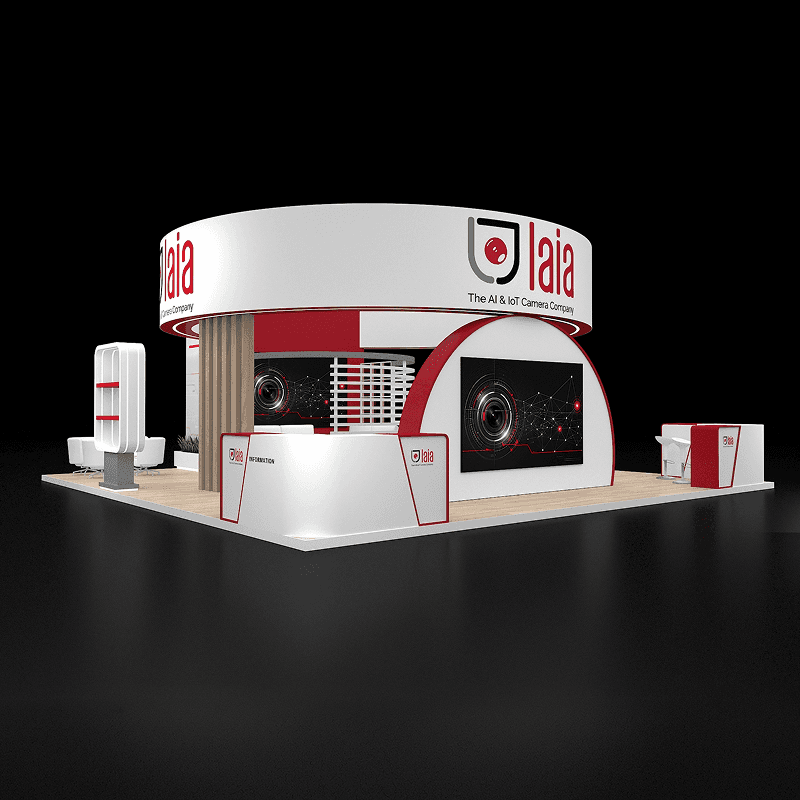
Desktop accessory trials and video collaboration demonstrations have separate positions, letting staff guide workplace IT buyers between the two product groups.

CE-RBD-3030-022

Let buyers try desktop accessories, then compare video collaboration setups at separate counters. Reception directs workplace IT teams to the relevant demonstration.

30x30 Workplace Device and Video Collaboration Booth Rental Design

How can buyers evaluate desktop and meeting technology?

Desktop accessory trials occupy the long tables, while two wall counters support separate conferencing demonstrations. This 30x30 workplace technology booth rental lets IT buyers compare personal devices and meeting systems in one visit.

Request Customization

Features :

Fully customizable

Zero post show billing

On-Time Delivery

Best For

Desktop peripheral, conferencing hardware, and workplace collaboration exhibitors giving IT teams, integrators, and procurement buyers practical device comparisons.

Main Features๏ผš

  • Long tables for desktop accessory trials

  • Desktop monitor positions for device demonstrations

  • Two separate video collaboration demo counters

  • Wall screens for conferencing product comparisons

  • Stools for seated collaboration demonstrations

  • Front reception counter for visitor routing

  • Product graphic wall distinguishing peripheral ranges

  • Suspended square sign above the open island

Layyout Description

Place keyboard and pointing device trials at the long tables on the left. Use the two counters at the collaboration wall for separate camera and meeting system demonstrations. The front reception counter can route workplace IT buyers according to device, room, or deployment needs. Keep the center open for staff handoffs and leave room behind stools so an occupied video station does not block access to the tables.

Features :

Graphics Areas

Product panels, collaboration wall, suspended sign, screen headers, and reception graphics distinguish desktop accessories from video conferencing systems.

Furniture Included

Proposed furniture includes device tables, a reception counter, demo counters, stools, and planters. Confirm heights, quantities, and access before production.

Screen / LED Option

Desktop monitors and two wall screens support device comparisons. Confirm cameras, peripherals, source computers, and meeting accounts in the quote.

Storage Included

Optional cabinets beneath counters can secure peripherals and literature. Specify charging, ventilation, and access. No dedicated storage room is shown.

Flooring

Wood-look flooring connects the device tables and collaboration counters. Cover cable runs, stabilize stools, and keep transitions clear between demonstrations.

Lighting

Canopy lighting should highlight collaboration counters without screen reflections. Confirm fixture positions, circuits, and suspended sign rigging before production.

Quote Note

Final pricing depends on demo tables, device mounts, screen sizes, cameras, audio equipment, connectivity, graphics, suspended signage, freight, venue services, and setup dates.

Device and Professional AV Demo Projects
More 30x30 Technology Demo Layouts

Related Exhibitions

FAQs

Can buyers compare desktop and meeting devices?

Keep accessory trials at the tables and video comparisons at the wall counters. Staff can guide buyers between the two zones.

Where can IT buyers discuss deployment needs?

Use an unoccupied counter for short questions. Add meeting furniture if detailed deployment discussions need to continue alongside both video demonstrations.

How should a live video demo be prepared?

Test cameras, microphones, source computers, meeting accounts, and the venue network together. Keep local playback ready if the live connection drops.

What changes a Las Vegas collaboration quote?

Screen sizes, device security, audio equipment, and data connections affect the quote. Confirm venue services, rigging, and setup labor before ordering.

Plan a Trade Show Booth Rental That Fits Your Event

Compare booth size, rental design, graphics, product display needs, and show-site setup before choosing your final booth structure.

Office

4915 Steptoe St #300, Las Vegas, NV 89122

Telephone