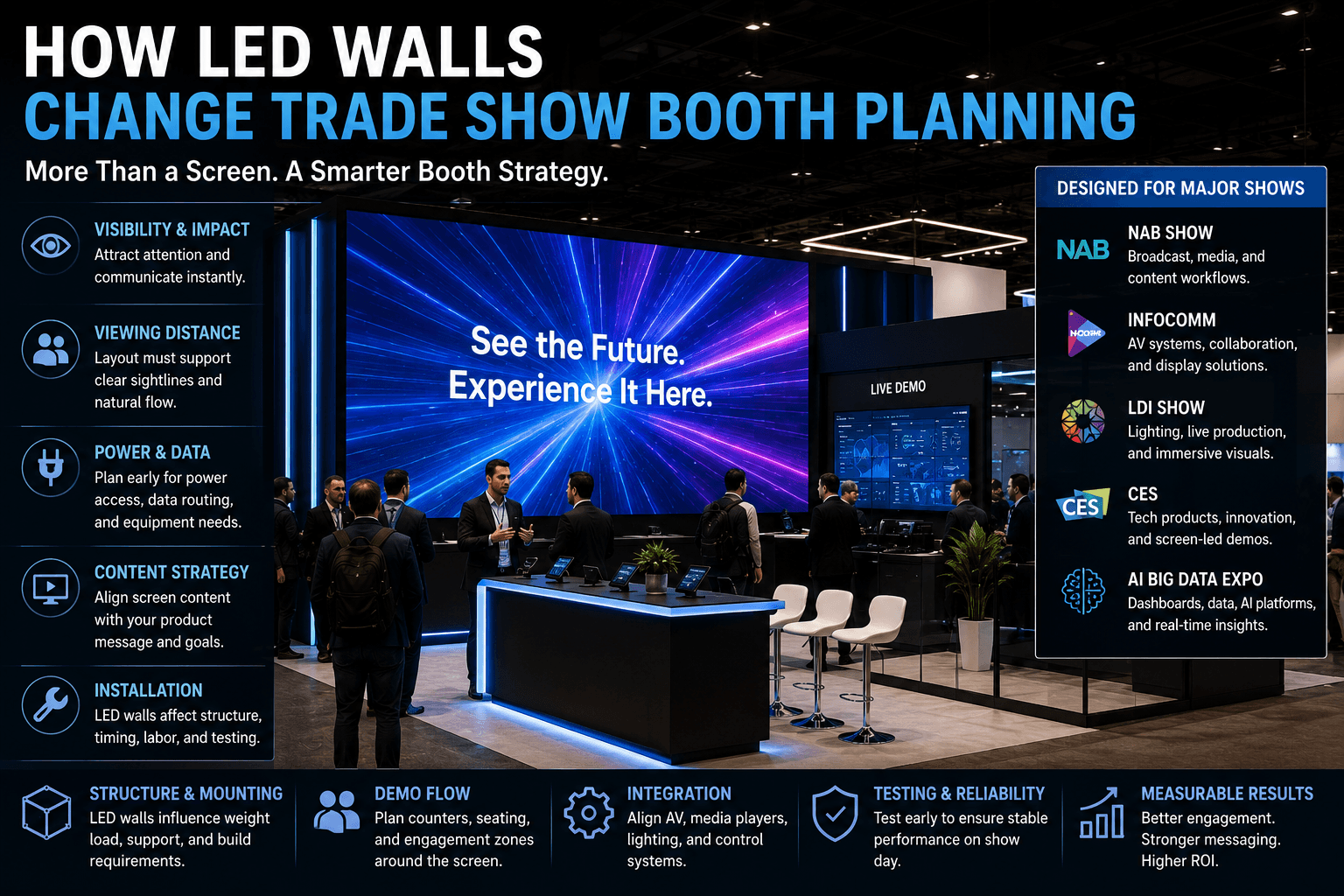
Trade show booth with LED wall, screen-led product demo, control station, power and data routing, graphics hierarchy, and visitor viewing flow

/

/

/

/

How LED Walls Change Trade Show Booth Planning

How LED Walls Change Trade Show Booth Planning

How LED Walls Change Trade Show Booth Planning

How LED Walls Change Trade Show Booth Planning

Published:

Jan 6, 2026

Updated:

Jan 6, 2026

Circle Exhibit Team

Industry professionals

Exhibition industry professional dedicated to delivering the latest insights and curated recommendations to you.

Exhibition industry professional dedicated to delivering the latest insights and curated recommendations to you.

LED walls change more than the look of a booth. They affect booth structure, visitor viewing distance, demo flow, power/data planning, AV routing, graphics hierarchy, installation timing, and how staff manage screen-led conversations.

LED walls change more than the look of a booth. They affect booth structure, visitor viewing distance, demo flow, power/data planning, AV routing, graphics hierarchy, installation timing, and how staff manage screen-led conversations.

LED walls change more than the look of a booth. They affect booth structure, visitor viewing distance, demo flow, power/data planning, AV routing, graphics hierarchy, installation timing, and how staff manage screen-led conversations.

Quick Answer: How do LED walls change trade show booth planning?

LED walls change trade show booth planning by affecting viewing distance, structure, power/data access, AV routing, screen content, demo flow, and installation sequence. A booth with a large screen needs more than a strong visual wall; it needs a layout that lets visitors watch, understand, and move into the right conversation without blocking traffic.

Quick Answer: How do LED walls change trade show booth planning?

LED walls change trade show booth planning by affecting viewing distance, structure, power/data access, AV routing, screen content, demo flow, and installation sequence. A booth with a large screen needs more than a strong visual wall; it needs a layout that lets visitors watch, understand, and move into the right conversation without blocking traffic.

LED walls can make a trade show booth more visible, but they also add planning pressure. Once a booth relies on a large screen or video wall, the layout has to support viewing distance, screen content, demo counters, power access, cable routing, and installation order. This is especially important for screen-heavy shows such as NAB, InfoComm, LDI, CES, and AI Big Data Expo.


LED Walls Change the Booth Before the Design Is Finished

An LED wall is not just a visual upgrade.

Once a booth uses a large screen or video wall, it changes how the entire space should work. The booth has to consider where people stand, how far they are from the screen, where staff explain the content, how cables and power are routed, and how the screen is installed before the show opens.

This is why LED wall planning should be part of early custom exhibit execution in Las Vegas, not a late add-on after the booth structure is already designed.

A booth with an LED wall needs early decisions around:

  • screen size

  • wall structure

  • visitor viewing distance

  • content hierarchy

  • power and data access

  • AV routing

  • demo counter placement

  • staff position

  • installation sequence

  • final testing before opening

The screen may be the most visible element, but it is not the only thing that changes.

Viewing Distance Becomes a Layout Decision

LED walls need room to be watched.

A large screen can lose value if visitors stand too close, too far away, or directly in the aisle. The booth layout needs a viewing zone where visitors can stop, understand the message, and decide whether to move deeper into the booth.

This viewing zone should not block the demo counter.

It should also not force visitors to stand in the aisle. If the screen attracts attention but gives people nowhere to pause, the booth may create traffic pressure instead of useful engagement.

A strong viewing plan should define:

  • where visitors first see the screen

  • where they can stand without blocking traffic

  • how long they are expected to watch

  • where they move after the screen message

  • how staff can explain the content without blocking the view

The LED wall should pull visitors into the booth, not trap them at the edge.

Screen Content Must Match the Booth Purpose

A big screen does not fix unclear messaging.

The LED wall content should support the booth’s main job. For some exhibitors, that means a live product demo. For others, it may be a brand story, software workflow, broadcast feed, AV system output, lighting show, AI dashboard, or product launch sequence.

The content should answer one question quickly:

What should visitors understand before they talk to staff?

A strong LED wall message usually includes:

  • product category clarity

  • one main visual idea

  • limited text

  • a clear demo purpose

  • strong contrast

  • motion that supports the product story

  • a natural connection to the demo counter

The LED wall should not become a giant slideshow of every product feature.

It should guide visitors toward the next step.

LED Walls Affect Demo Counter Placement

The demo counter should work with the screen, not compete with it.

In many booths, the counter is where staff explain the product, run the software, control the AV system, or qualify visitors. If the counter blocks the screen, visitors cannot watch comfortably. If the counter is too far from the screen, the demo feels disconnected.

A screen-led booth should plan the relationship between:

  • LED wall

  • demo counter

  • operator position

  • visitor viewing line

  • buyer conversation area

For example, a broadcast technology booth may need an operator counter in front of a screen wall. A software booth may need a side demo counter with a dashboard screen. A lighting or live event booth may need a clearer viewing lane to show the visual effect.

The counter should help explain the screen.

It should not become a barrier between the screen and the visitor.

LED Wall Booth Zone Planning

Booth Zone

Main Role

Planning Requirement

LED wall / screen wall

Attract visitors and explain the main product story

Clear sightline, correct viewing distance, strong content hierarchy

Viewing zone

Give visitors a place to stop and understand the screen

Enough depth so viewers do not block aisle traffic

Demo counter

Support product explanation, control, or staff-led walkthrough

Close enough to connect with screen content

AV / technical support area

Hold media players, routers, control devices, or backup equipment

Hidden but accessible for troubleshooting

Buyer conversation area

Move qualified visitors into deeper discussion

Side or rear placement away from the screen crowd

Storage / service access

Hold cases, adapters, graphics, tools, and staff items

Kept out of sight but available to the team

Power and Data Planning Must Happen Early

LED walls make power and data planning more important.

A booth with a screen wall may need power for LED panels, processors, monitors, media players, control stations, laptops, lighting, routers, and demo equipment. If power and cable paths are not planned early, the booth may face layout changes during move-in.

Early technical planning should confirm:

  • screen power requirements

  • control station location

  • media playback source

  • data or network needs

  • cable routing path

  • floor or wall cable concealment

  • access for troubleshooting

  • testing schedule before show opening

This is why LED wall booths need early on-site installation and dismantle support. The booth is not ready just because the wall is standing. It is ready when the screen works cleanly inside the booth environment.

Graphics Still Matter Around the LED Wall

An LED wall does not replace booth graphics.

It changes how graphics should be used. The surrounding graphics should frame the screen, clarify the product category, and support the demo message. They should not compete with the screen or repeat too much text.

For screen-led booths, graphics and brand presentation support should help define:

  • what the screen is showing

  • what product category the booth represents

  • where visitors should look first

  • what message should stay static

  • what message can move on-screen

  • how brand elements support the screen wall

The screen creates motion.
The graphics create context.

When both are planned together, visitors understand the booth faster.

Different Shows Use LED Walls Differently

LED wall planning should match the event environment.

The same screen wall does not work the same way at every trade show. A broadcast booth, AV booth, lighting booth, technology booth, and AI software booth all use screens differently.

Event Context

How LED Walls Usually Affect Booth Planning

NAB Show booth planning

Screen walls often support broadcast workflows, operator demos, video feeds, and controlled viewing lines

InfoComm booth planning

LED walls need clear display quality, AV routing, control stations, and technical viewing distance

LDI booth planning

Screens may support lighting, live production, stage visuals, motion content, and atmosphere-driven demos

CES booth planning

LED walls often help explain tech products, product launches, screen-based demos, and fast visitor decisions

AI Big Data Expo booth planning

Screens may show dashboards, analytics workflows, AI platforms, data visualization, and enterprise software demos

This is why LED walls should not be treated as a generic booth feature.

The screen has to match the event’s visitor behavior and product explanation needs.

NAB: LED Walls Need Workflow Clarity

At NAB, LED walls often need to show workflow.

Broadcast exhibitors may use screen walls for live production feeds, editing environments, sports broadcast examples, cloud production tools, newsroom systems, or streaming dashboards. In this context, the screen is part of the product proof.

The booth should plan:

  • operator counter location

  • viewing line depth

  • screen hierarchy

  • AV routing

  • staff explanation position

  • technical follow-up area

The goal is not only to impress visitors with a large screen.

The goal is to make the media workflow easier to understand.

InfoComm: LED Walls Need Technical Demonstration Space

At InfoComm, LED walls are often judged as AV systems.

Visitors may care about display quality, control, brightness, signal routing, content management, collaboration tools, or AV-over-IP workflows. The booth needs enough room for people to watch the screen and understand how it is controlled.

The layout should support:

  • display viewing distance

  • control station access

  • cable and power routing

  • equipment visibility where useful

  • clean demo handoff

  • technical buyer conversations

For InfoComm exhibitors, the LED wall is not just a backdrop. It may be the product or the proof of the system.

LDI: LED Walls Need Atmosphere and Control

At LDI, LED walls often connect with lighting, live production, stage environments, and visual control.

That means the booth may need darker presentation areas, controlled sightlines, demo timing, and enough distance for visitors to experience the lighting and screen effect together.

A strong LDI booth should consider:

  • lighting spill

  • screen brightness

  • demo timing

  • visitor viewing angle

  • control console placement

  • aisle visibility

  • sound and motion content balance

The booth should feel controlled, not chaotic.

For live production exhibitors, the screen should help visitors understand how the system behaves in a real environment.

CES: LED Walls Need Fast Product Understanding

At CES, LED walls often need to explain products quickly.

Visitors may not have time to stand through a full presentation. The screen needs to clarify the product category, main benefit, and demo purpose before staff begin a deeper conversation.

For CES booths, LED wall planning should focus on:

  • product category clarity

  • screen message hierarchy

  • demo-before-sales flow

  • fast visitor decisions

  • aisle-facing readability

  • staff handoff into deeper conversation

A large screen can attract attention, but the content must be easy to understand in seconds.

That is especially important for complex technology products.

AI Big Data Expo: LED Walls Need Dashboard Clarity

At AI Big Data Expo, LED walls often need to show software, data, and platform logic.

This can be difficult because dashboards and analytics interfaces may be visually dense. If the screen shows too many charts, tables, and metrics, visitors may not understand the product quickly.

A stronger approach is to use the LED wall for simplified platform storytelling:

  • one dashboard scenario

  • one AI workflow

  • one data visualization story

  • one enterprise problem

  • one clear callout to the demo counter

Detailed interface review can happen later at a smaller screen or meeting counter.

The large screen should create understanding, not overwhelm the visitor.

Installation Sequence Is More Sensitive With LED Walls

LED walls create more install dependencies than static graphics.

The booth structure, screen support, power access, cable paths, media playback, graphics, lighting, and final testing all need to happen in the right order. If one step is delayed, it can affect the rest of the booth setup.

A typical LED wall install sequence may include:

  1. Confirm floor marks and booth structure position.

  2. Build the screen support structure.

  3. Confirm power and cable access.

  4. Install LED panels or screen components.

  5. Place control station and media equipment.

  6. Route cables and conceal exposed lines.

  7. Install surrounding graphics and counters.

  8. Test screen content and demo flow.

  9. Complete final cleaning and punch-list checks.

This is why LED walls should be planned with the installation team early.

They are not a last-minute content surface.

What Happens When LED Walls Are Added Too Late?

The booth may look strong but operate poorly.

Late LED wall decisions can create practical problems:

  • not enough viewing distance

  • power access in the wrong place

  • cables exposed or hard to service

  • demo counter blocking the screen

  • staff standing in the viewing line

  • graphics competing with screen content

  • screen content too detailed for aisle traffic

  • install sequence becoming rushed

  • final testing squeezed into the last setup window

These problems are avoidable when the LED wall is treated as part of booth planning from the beginning.

The screen should shape the layout, not be squeezed into it.

LED Wall Booth Planning Checklist

A practical checklist helps keep screen-led booths grounded.

Checklist

  • What is the main purpose of the LED wall?

  • Is the screen showing brand content, product demo, workflow, dashboard, or live visuals?

  • How far away should visitors stand to understand it?

  • Will visitors watch from the aisle, inside the booth, or both?

  • Where will the demo counter or control station sit?

  • What power and data access is required?

  • How will cables be routed and concealed?

  • What graphics need to frame or explain the screen?

  • Where should qualified buyers move after watching?

  • How will the screen be installed, tested, and dismantled?

  • Does the event context change how the screen should be used?

These questions prevent the LED wall from becoming a large visual feature with no real booth logic.

Final Takeaway

LED walls change trade show booth planning because they affect the whole booth system.

They influence visitor flow, viewing distance, demo counter placement, screen content, graphics, power/data setup, AV routing, installation sequence, and staff movement. At shows such as NAB, InfoComm, LDI, CES, and AI Big Data Expo, the screen often becomes part of the product explanation.

A strong LED wall booth does not start with screen size.

It starts with the question: What should visitors understand when they stop to watch?

Once that answer is clear, the booth layout, content, graphics, and installation plan can support the screen instead of fighting it.


LED Walls Change the Booth Before the Design Is Finished

An LED wall is not just a visual upgrade.

Once a booth uses a large screen or video wall, it changes how the entire space should work. The booth has to consider where people stand, how far they are from the screen, where staff explain the content, how cables and power are routed, and how the screen is installed before the show opens.

This is why LED wall planning should be part of early custom exhibit execution in Las Vegas, not a late add-on after the booth structure is already designed.

A booth with an LED wall needs early decisions around:

  • screen size

  • wall structure

  • visitor viewing distance

  • content hierarchy

  • power and data access

  • AV routing

  • demo counter placement

  • staff position

  • installation sequence

  • final testing before opening

The screen may be the most visible element, but it is not the only thing that changes.

Viewing Distance Becomes a Layout Decision

LED walls need room to be watched.

A large screen can lose value if visitors stand too close, too far away, or directly in the aisle. The booth layout needs a viewing zone where visitors can stop, understand the message, and decide whether to move deeper into the booth.

This viewing zone should not block the demo counter.

It should also not force visitors to stand in the aisle. If the screen attracts attention but gives people nowhere to pause, the booth may create traffic pressure instead of useful engagement.

A strong viewing plan should define:

  • where visitors first see the screen

  • where they can stand without blocking traffic

  • how long they are expected to watch

  • where they move after the screen message

  • how staff can explain the content without blocking the view

The LED wall should pull visitors into the booth, not trap them at the edge.

Screen Content Must Match the Booth Purpose

A big screen does not fix unclear messaging.

The LED wall content should support the booth’s main job. For some exhibitors, that means a live product demo. For others, it may be a brand story, software workflow, broadcast feed, AV system output, lighting show, AI dashboard, or product launch sequence.

The content should answer one question quickly:

What should visitors understand before they talk to staff?

A strong LED wall message usually includes:

  • product category clarity

  • one main visual idea

  • limited text

  • a clear demo purpose

  • strong contrast

  • motion that supports the product story

  • a natural connection to the demo counter

The LED wall should not become a giant slideshow of every product feature.

It should guide visitors toward the next step.

LED Walls Affect Demo Counter Placement

The demo counter should work with the screen, not compete with it.

In many booths, the counter is where staff explain the product, run the software, control the AV system, or qualify visitors. If the counter blocks the screen, visitors cannot watch comfortably. If the counter is too far from the screen, the demo feels disconnected.

A screen-led booth should plan the relationship between:

  • LED wall

  • demo counter

  • operator position

  • visitor viewing line

  • buyer conversation area

For example, a broadcast technology booth may need an operator counter in front of a screen wall. A software booth may need a side demo counter with a dashboard screen. A lighting or live event booth may need a clearer viewing lane to show the visual effect.

The counter should help explain the screen.

It should not become a barrier between the screen and the visitor.

LED Wall Booth Zone Planning

Booth Zone

Main Role

Planning Requirement

LED wall / screen wall

Attract visitors and explain the main product story

Clear sightline, correct viewing distance, strong content hierarchy

Viewing zone

Give visitors a place to stop and understand the screen

Enough depth so viewers do not block aisle traffic

Demo counter

Support product explanation, control, or staff-led walkthrough

Close enough to connect with screen content

AV / technical support area

Hold media players, routers, control devices, or backup equipment

Hidden but accessible for troubleshooting

Buyer conversation area

Move qualified visitors into deeper discussion

Side or rear placement away from the screen crowd

Storage / service access

Hold cases, adapters, graphics, tools, and staff items

Kept out of sight but available to the team

Power and Data Planning Must Happen Early

LED walls make power and data planning more important.

A booth with a screen wall may need power for LED panels, processors, monitors, media players, control stations, laptops, lighting, routers, and demo equipment. If power and cable paths are not planned early, the booth may face layout changes during move-in.

Early technical planning should confirm:

  • screen power requirements

  • control station location

  • media playback source

  • data or network needs

  • cable routing path

  • floor or wall cable concealment

  • access for troubleshooting

  • testing schedule before show opening

This is why LED wall booths need early on-site installation and dismantle support. The booth is not ready just because the wall is standing. It is ready when the screen works cleanly inside the booth environment.

Graphics Still Matter Around the LED Wall

An LED wall does not replace booth graphics.

It changes how graphics should be used. The surrounding graphics should frame the screen, clarify the product category, and support the demo message. They should not compete with the screen or repeat too much text.

For screen-led booths, graphics and brand presentation support should help define:

  • what the screen is showing

  • what product category the booth represents

  • where visitors should look first

  • what message should stay static

  • what message can move on-screen

  • how brand elements support the screen wall

The screen creates motion.
The graphics create context.

When both are planned together, visitors understand the booth faster.

Different Shows Use LED Walls Differently

LED wall planning should match the event environment.

The same screen wall does not work the same way at every trade show. A broadcast booth, AV booth, lighting booth, technology booth, and AI software booth all use screens differently.

Event Context

How LED Walls Usually Affect Booth Planning

NAB Show booth planning

Screen walls often support broadcast workflows, operator demos, video feeds, and controlled viewing lines

InfoComm booth planning

LED walls need clear display quality, AV routing, control stations, and technical viewing distance

LDI booth planning

Screens may support lighting, live production, stage visuals, motion content, and atmosphere-driven demos

CES booth planning

LED walls often help explain tech products, product launches, screen-based demos, and fast visitor decisions

AI Big Data Expo booth planning

Screens may show dashboards, analytics workflows, AI platforms, data visualization, and enterprise software demos

This is why LED walls should not be treated as a generic booth feature.

The screen has to match the event’s visitor behavior and product explanation needs.

NAB: LED Walls Need Workflow Clarity

At NAB, LED walls often need to show workflow.

Broadcast exhibitors may use screen walls for live production feeds, editing environments, sports broadcast examples, cloud production tools, newsroom systems, or streaming dashboards. In this context, the screen is part of the product proof.

The booth should plan:

  • operator counter location

  • viewing line depth

  • screen hierarchy

  • AV routing

  • staff explanation position

  • technical follow-up area

The goal is not only to impress visitors with a large screen.

The goal is to make the media workflow easier to understand.

InfoComm: LED Walls Need Technical Demonstration Space

At InfoComm, LED walls are often judged as AV systems.

Visitors may care about display quality, control, brightness, signal routing, content management, collaboration tools, or AV-over-IP workflows. The booth needs enough room for people to watch the screen and understand how it is controlled.

The layout should support:

  • display viewing distance

  • control station access

  • cable and power routing

  • equipment visibility where useful

  • clean demo handoff

  • technical buyer conversations

For InfoComm exhibitors, the LED wall is not just a backdrop. It may be the product or the proof of the system.

LDI: LED Walls Need Atmosphere and Control

At LDI, LED walls often connect with lighting, live production, stage environments, and visual control.

That means the booth may need darker presentation areas, controlled sightlines, demo timing, and enough distance for visitors to experience the lighting and screen effect together.

A strong LDI booth should consider:

  • lighting spill

  • screen brightness

  • demo timing

  • visitor viewing angle

  • control console placement

  • aisle visibility

  • sound and motion content balance

The booth should feel controlled, not chaotic.

For live production exhibitors, the screen should help visitors understand how the system behaves in a real environment.

CES: LED Walls Need Fast Product Understanding

At CES, LED walls often need to explain products quickly.

Visitors may not have time to stand through a full presentation. The screen needs to clarify the product category, main benefit, and demo purpose before staff begin a deeper conversation.

For CES booths, LED wall planning should focus on:

  • product category clarity

  • screen message hierarchy

  • demo-before-sales flow

  • fast visitor decisions

  • aisle-facing readability

  • staff handoff into deeper conversation

A large screen can attract attention, but the content must be easy to understand in seconds.

That is especially important for complex technology products.

AI Big Data Expo: LED Walls Need Dashboard Clarity

At AI Big Data Expo, LED walls often need to show software, data, and platform logic.

This can be difficult because dashboards and analytics interfaces may be visually dense. If the screen shows too many charts, tables, and metrics, visitors may not understand the product quickly.

A stronger approach is to use the LED wall for simplified platform storytelling:

  • one dashboard scenario

  • one AI workflow

  • one data visualization story

  • one enterprise problem

  • one clear callout to the demo counter

Detailed interface review can happen later at a smaller screen or meeting counter.

The large screen should create understanding, not overwhelm the visitor.

Installation Sequence Is More Sensitive With LED Walls

LED walls create more install dependencies than static graphics.

The booth structure, screen support, power access, cable paths, media playback, graphics, lighting, and final testing all need to happen in the right order. If one step is delayed, it can affect the rest of the booth setup.

A typical LED wall install sequence may include:

  1. Confirm floor marks and booth structure position.

  2. Build the screen support structure.

  3. Confirm power and cable access.

  4. Install LED panels or screen components.

  5. Place control station and media equipment.

  6. Route cables and conceal exposed lines.

  7. Install surrounding graphics and counters.

  8. Test screen content and demo flow.

  9. Complete final cleaning and punch-list checks.

This is why LED walls should be planned with the installation team early.

They are not a last-minute content surface.

What Happens When LED Walls Are Added Too Late?

The booth may look strong but operate poorly.

Late LED wall decisions can create practical problems:

  • not enough viewing distance

  • power access in the wrong place

  • cables exposed or hard to service

  • demo counter blocking the screen

  • staff standing in the viewing line

  • graphics competing with screen content

  • screen content too detailed for aisle traffic

  • install sequence becoming rushed

  • final testing squeezed into the last setup window

These problems are avoidable when the LED wall is treated as part of booth planning from the beginning.

The screen should shape the layout, not be squeezed into it.

LED Wall Booth Planning Checklist

A practical checklist helps keep screen-led booths grounded.

Checklist

  • What is the main purpose of the LED wall?

  • Is the screen showing brand content, product demo, workflow, dashboard, or live visuals?

  • How far away should visitors stand to understand it?

  • Will visitors watch from the aisle, inside the booth, or both?

  • Where will the demo counter or control station sit?

  • What power and data access is required?

  • How will cables be routed and concealed?

  • What graphics need to frame or explain the screen?

  • Where should qualified buyers move after watching?

  • How will the screen be installed, tested, and dismantled?

  • Does the event context change how the screen should be used?

These questions prevent the LED wall from becoming a large visual feature with no real booth logic.

Final Takeaway

LED walls change trade show booth planning because they affect the whole booth system.

They influence visitor flow, viewing distance, demo counter placement, screen content, graphics, power/data setup, AV routing, installation sequence, and staff movement. At shows such as NAB, InfoComm, LDI, CES, and AI Big Data Expo, the screen often becomes part of the product explanation.

A strong LED wall booth does not start with screen size.

It starts with the question: What should visitors understand when they stop to watch?

Once that answer is clear, the booth layout, content, graphics, and installation plan can support the screen instead of fighting it.

Planning a Booth With an LED Wall or Screen-Led Demo?

Start with the screen purpose, then plan viewing distance, demo counter placement, graphics, power/data setup, AV routing, and installation sequence as one connected booth system.

The first two hours of setup can affect floor marking, crate access, structure staging, graphics checks, power confirmation, and final closeout. Circle Exhibit teams help exhibitors plan on-site installation and dismantle support so booth components move into place with a clear crew sequence.
