How NAB Booths Should Plan Screen Walls, Demo Counters, and AV Flow

Circle Exhibit Team
Industry professionals
Exhibition industry professional dedicated to delivering the latest insights and curated recommendations to you.
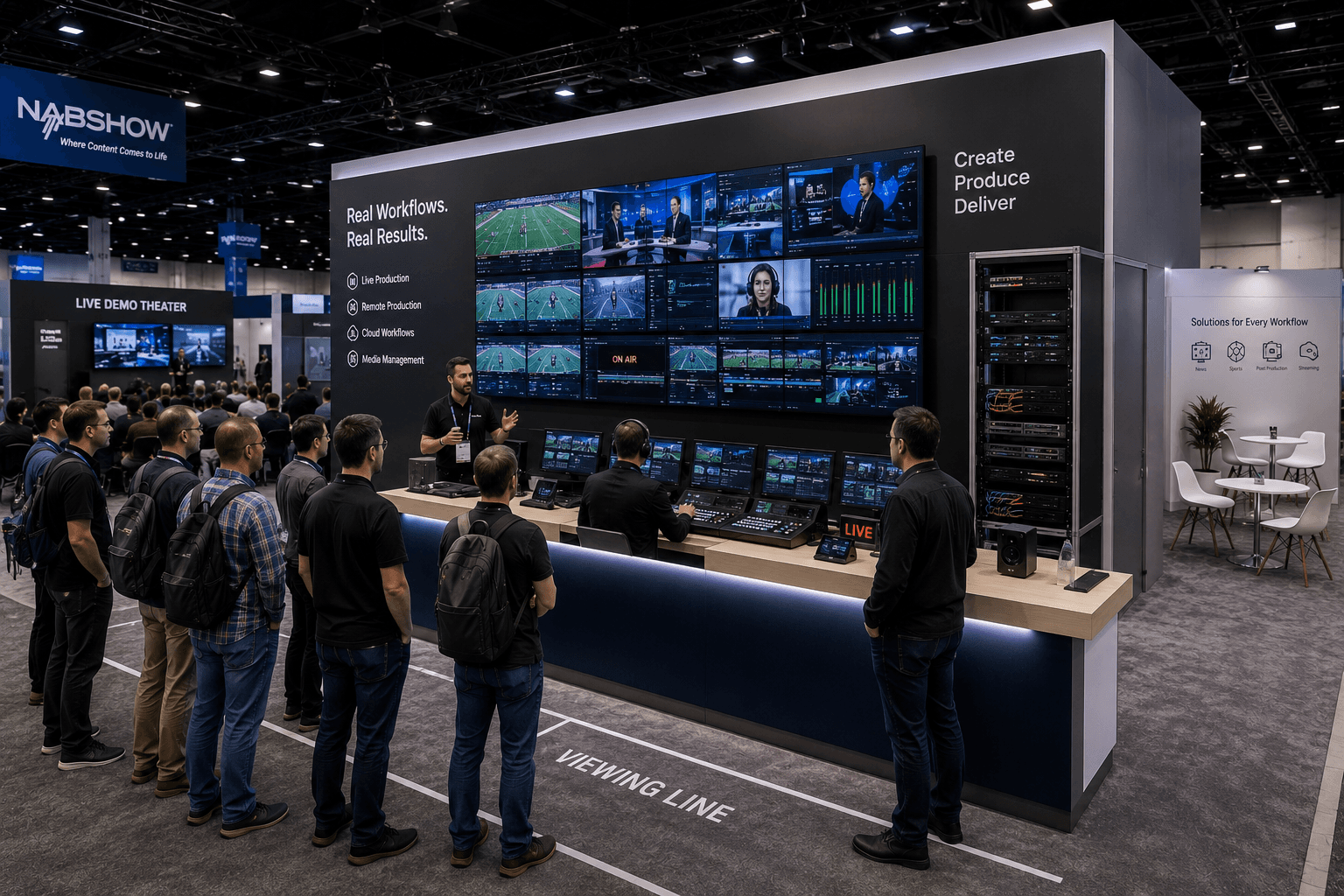
NAB booths work better when screen walls, demo counters, AV routing, power/data setup, and visitor viewing lines are planned together. For broadcast technology exhibitors, the booth layout should help visitors watch, understand, ask questions, and move into deeper conversations without crowding the demo area.
NAB booths are often led by screens.
That makes the layout different from a standard product booth. A broadcast technology exhibit may need to show live production tools, camera systems, post-production workflows, streaming platforms, cloud tools, audio systems, newsroom technology, or monitor-heavy control environments.
NAB Show is held at the Las Vegas Convention Center and focuses on the broadcast, media, and entertainment technology ecosystem, which makes booth planning especially dependent on screen visibility, demo clarity, and technical presentation flow.
For exhibitors, NAB Show booth planning should start with how visitors will watch the screen wall, where they will stop, how staff will explain the demo, and where qualified conversations should move next.
Quick Answer
NAB booths should plan screen walls, demo counters, and AV flow as one connected system. The screen wall should attract and explain, the demo counter should support operator-led interaction, and the booth layout should create a controlled viewing line so visitors can watch without blocking the aisle or crowding sales conversations.
Why Do NAB Booths Need Screen-Led Layout Planning?
Broadcast technology is often hard to explain through static graphics alone.
Visitors need to see workflow, timing, interface behavior, media movement, production quality, or system response. That means the screen wall is not decoration. It is part of the product demonstration.
A strong NAB booth usually needs to support three actions:
watch the screen
understand the workflow
ask a qualified question
If the screen wall, demo counter, and visitor path are planned separately, the booth may look impressive but feel hard to use.
The booth should help visitors know where to stand, what to watch first, and how to move from a quick viewing moment into a deeper conversation.
Where Should the Screen Wall Be Placed?
The screen wall should be visible from the aisle, but not placed so aggressively that it creates a traffic wall.
In many NAB booths, the screen wall acts as the first visual anchor. It may show a live feed, production interface, content workflow, camera signal, sports broadcast example, editing environment, streaming dashboard, or cloud-based media operation.
The placement should answer four questions:
Can visitors see the screen before entering?
Is there enough space for people to stop and watch?
Can staff explain the screen without blocking the view?
Can qualified visitors move away from the viewing line for a real conversation?
A good screen wall pulls people in.
A poorly placed screen wall traps people at the aisle.
How Should the Demo Counter Support Operator-Led Demos?
The demo counter should act like an operator position, not just a reception desk.
For NAB exhibitors, the counter may hold control surfaces, laptops, switchers, audio equipment, camera controls, tablets, encoders, playback systems, or software dashboards. It needs to let staff run a clear demonstration while keeping visitors oriented toward the screen wall.
A demo counter should usually support:
staff-led workflow explanation
product or interface control
power/data access
cable concealment
enough surface area for devices
visitor viewing space in front or beside the counter
a clean handoff to sales or technical follow-up
The counter should not block the screen. It should help visitors understand what is happening on the screen.
That relationship between operator counter and screen wall is one of the most important layout decisions in an AV-heavy booth.
Screen Wall, Demo Counter, and AV Flow Planning
Booth Element | Main Role | Planning Requirement |
|---|---|---|
Screen wall | Attract visitors and show broadcast workflow | Clear sightline, strong hierarchy, readable from aisle |
Operator counter | Run demo controls and staff explanation | Power/data access, cable control, staff working space |
Viewing line | Give visitors a place to stop and watch | Enough depth so viewers do not block aisle traffic |
AV routing | Connect screens, devices, control systems, and demo stations | Planned before installation, not fixed on-site |
Buyer conversation area | Move qualified visitors into deeper discussion | Side or rear placement, away from screen crowd |
Storage / technical support | Hold devices, cases, tools, adapters, and backup gear | Hidden but accessible to staff |
Why Does the Viewing Line Matter?
A screen-led booth needs a controlled viewing line.
Visitors often stop before they fully enter the booth. They watch the screen, listen to a short explanation, or wait for a demo moment. If the booth does not give them space to stand, they may block the aisle or crowd the demo counter.
The viewing line should be planned like a real booth zone.
It needs enough depth for people to pause without cutting off the next visitor. It also needs a clear exit path so viewers can leave, continue to a demo counter, or move into a buyer conversation area.
For NAB, this matters because screen-based demos can attract small clusters quickly. The layout should expect that behavior instead of reacting to it after the booth is installed.
How Should AV Routing Be Planned Before Installation?
AV routing should be decided before the booth reaches the show floor.
An AV-heavy booth may need screens, media players, laptops, switchers, speakers, cameras, routers, cables, power strips, network access, and backup devices. If these systems are not planned into the booth structure, the install team may have to solve technical problems during move-in.
That creates pressure.
Good AV planning should clarify:
where screens mount
where devices sit
where cables route
where power is needed
where data or network access may be required
where staff operate the demo
where backup devices or adapters are stored
how the booth will be tested before opening
This is why on-site booth installation for AV-heavy exhibits should be connected to layout planning early. The booth is not ready until the AV system works inside the booth environment.
How Do Graphics Support Screen-Led Demos?
Graphics should make the screen easier to understand.
In a broadcast booth, visitors may see moving images, dashboards, production interfaces, camera feeds, and workflow diagrams at the same time. If the surrounding graphics also try to say too much, the booth becomes visually noisy.
A better graphic system gives context.
The main graphic message should explain what kind of workflow or technology the visitor is seeing. Supporting graphics can identify product categories, workflow stages, or use cases.
For screen-led booths, graphics and brand presentation for demo booths should usually focus on:
product category clarity
workflow labels
use-case framing
brand recognition from the aisle
minimal copy near active screens
visual separation between demo and sales zones
The screen should carry the motion. The graphics should carry the context.
How Does a 20x30 Booth Help Screen-Led Demos?
A 20x30 booth gives screen-led demos more room to breathe.
Compared with a tighter booth footprint, a 20x30 layout can separate the screen wall, operator counter, viewing line, storage, and buyer conversation area more clearly. That matters when the booth needs to support both high-traffic viewing and technical explanation.
20x30 booth layouts for screen-led demos often work well because the extra depth or width can create:
a front viewing area
a main screen wall
an operator counter
a side demo station
a small buyer conversation area
hidden storage or technical support space
The size does not solve the layout automatically. But it gives the exhibitor more control over where people stop and how staff move through the booth.
For broadcast technology exhibits, that control can make the difference between a crowded screen display and a working demo environment.
20x30 NAB Booth Zone Planning
Zone | Purpose | Best Use |
|---|---|---|
Front viewing zone | Let visitors pause and watch | Keep open and easy to enter |
Screen wall | Show primary workflow or demo content | Use one clear hierarchy, not too many competing screens |
Operator counter | Run demo and explain technical flow | Place near screen, but not blocking the view |
Side demo point | Support smaller interface or product explanation | Use for secondary workflow or device interaction |
Buyer conversation area | Handle qualified follow-up | Keep away from screen crowd |
Hidden storage | Hold cases, adapters, tools, and materials | Keep accessible but out of visitor view |
What Happens When Screens and Counters Compete?
The booth loses clarity.
If the counter blocks the screen, visitors cannot watch comfortably. If the screen is too far from the counter, staff have trouble explaining the workflow. If viewers stand between the counter and screen, the demo becomes visually broken.
This problem is common in screen-heavy booths because both the screen wall and counter want the same prime space.
The better approach is to plan them as a pair.
The screen shows the workflow.
The counter controls the workflow.
The viewing line gives visitors space to understand the workflow.
When those three pieces are aligned, the booth feels easier to use.
How Should Buyer Conversations Be Separated From AV Demo Traffic?
Buyer conversations should not happen inside the main viewing line.
A visitor watching a screen demo and a qualified buyer discussing technical fit are in different stages of the booth journey. If both happen at the same counter, staff may be interrupted and the demo flow may slow down.
A better layout moves buyer conversations to a side or rear zone.
That area can include:
a small table
a standing counter
a quieter screen for deeper workflow review
product literature or technical materials
seating for partner or buyer discussion
For NAB exhibitors, this separation helps keep the front demo active while allowing serious conversations to continue without fighting the screen crowd.
How Should Staff Positions Be Planned Around AV Flow?
Staff positions should support the viewing sequence.
A screen-led booth may need different roles:
a greeter to help visitors understand where to stop
an operator to run the demo
a product expert to explain workflow details
a sales lead to handle qualified conversations
a technical support person to manage devices or AV issues
If all staff stand at the demo counter, they may block the screen or crowd the interaction area.
The booth should give staff a working path that does not cut through the visitor viewing line.
In AV-heavy booths, staff movement can either support the demo or distract from it.
What Should Exhibitors Confirm Before Finalizing an NAB Booth?
NAB booth planning should begin with the screen-led experience.
Before choosing the final wall structure, counter position, or furniture, exhibitors should define how visitors will watch, understand, and discuss the demo.
Planning Checklist
What is the main screen showing?
Is the demo live, simulated, interactive, or presentation-led?
Where should visitors stand while watching?
How long should a typical demo moment last?
Where does the operator or presenter stand?
What devices, controls, or interfaces need counter space?
Where are power and data required?
How will AV cables be routed and hidden?
Where should qualified buyers move after the demo?
Does the booth need a 20x30 layout for viewing depth?
What needs to be tested before show opening?
How will AV components be dismantled and repacked after the show?
These questions help keep the booth practical. They also reduce the chance of AV decisions being made too late.
What Is the Best Layout Logic for an NAB Screen-Led Booth?
The best NAB booth layout starts with the screen wall, then builds the visitor flow around it.
First, define what the visitor should see. Then place the operator counter where staff can explain or control the demo. After that, create a viewing line, buyer conversation area, storage, and AV routing plan that supports the booth’s real use.
A strong broadcast technology booth should make three things clear:
what workflow or system is being shown
where visitors should stand to understand it
where deeper technical or sales conversations should continue
That is how screens, counters, and AV flow stop competing with each other.
For NAB exhibitors, the booth should not simply display media technology. It should make the technology easier to watch, understand, and discuss.
Planning an AV-Heavy Booth for NAB Show?
Start with the NAB show context, then plan the screen wall, operator counter, controlled viewing line, AV routing, and on-site installation sequence as one connected booth system.

NAB booths are often led by screens.
That makes the layout different from a standard product booth. A broadcast technology exhibit may need to show live production tools, camera systems, post-production workflows, streaming platforms, cloud tools, audio systems, newsroom technology, or monitor-heavy control environments.
NAB Show is held at the Las Vegas Convention Center and focuses on the broadcast, media, and entertainment technology ecosystem, which makes booth planning especially dependent on screen visibility, demo clarity, and technical presentation flow.
For exhibitors, NAB Show booth planning should start with how visitors will watch the screen wall, where they will stop, how staff will explain the demo, and where qualified conversations should move next.
Quick Answer
NAB booths should plan screen walls, demo counters, and AV flow as one connected system. The screen wall should attract and explain, the demo counter should support operator-led interaction, and the booth layout should create a controlled viewing line so visitors can watch without blocking the aisle or crowding sales conversations.
Why Do NAB Booths Need Screen-Led Layout Planning?
Broadcast technology is often hard to explain through static graphics alone.
Visitors need to see workflow, timing, interface behavior, media movement, production quality, or system response. That means the screen wall is not decoration. It is part of the product demonstration.
A strong NAB booth usually needs to support three actions:
watch the screen
understand the workflow
ask a qualified question
If the screen wall, demo counter, and visitor path are planned separately, the booth may look impressive but feel hard to use.
The booth should help visitors know where to stand, what to watch first, and how to move from a quick viewing moment into a deeper conversation.
Where Should the Screen Wall Be Placed?
The screen wall should be visible from the aisle, but not placed so aggressively that it creates a traffic wall.
In many NAB booths, the screen wall acts as the first visual anchor. It may show a live feed, production interface, content workflow, camera signal, sports broadcast example, editing environment, streaming dashboard, or cloud-based media operation.
The placement should answer four questions:
Can visitors see the screen before entering?
Is there enough space for people to stop and watch?
Can staff explain the screen without blocking the view?
Can qualified visitors move away from the viewing line for a real conversation?
A good screen wall pulls people in.
A poorly placed screen wall traps people at the aisle.
How Should the Demo Counter Support Operator-Led Demos?
The demo counter should act like an operator position, not just a reception desk.
For NAB exhibitors, the counter may hold control surfaces, laptops, switchers, audio equipment, camera controls, tablets, encoders, playback systems, or software dashboards. It needs to let staff run a clear demonstration while keeping visitors oriented toward the screen wall.
A demo counter should usually support:
staff-led workflow explanation
product or interface control
power/data access
cable concealment
enough surface area for devices
visitor viewing space in front or beside the counter
a clean handoff to sales or technical follow-up
The counter should not block the screen. It should help visitors understand what is happening on the screen.
That relationship between operator counter and screen wall is one of the most important layout decisions in an AV-heavy booth.
Screen Wall, Demo Counter, and AV Flow Planning
Booth Element | Main Role | Planning Requirement |
|---|---|---|
Screen wall | Attract visitors and show broadcast workflow | Clear sightline, strong hierarchy, readable from aisle |
Operator counter | Run demo controls and staff explanation | Power/data access, cable control, staff working space |
Viewing line | Give visitors a place to stop and watch | Enough depth so viewers do not block aisle traffic |
AV routing | Connect screens, devices, control systems, and demo stations | Planned before installation, not fixed on-site |
Buyer conversation area | Move qualified visitors into deeper discussion | Side or rear placement, away from screen crowd |
Storage / technical support | Hold devices, cases, tools, adapters, and backup gear | Hidden but accessible to staff |
Why Does the Viewing Line Matter?
A screen-led booth needs a controlled viewing line.
Visitors often stop before they fully enter the booth. They watch the screen, listen to a short explanation, or wait for a demo moment. If the booth does not give them space to stand, they may block the aisle or crowd the demo counter.
The viewing line should be planned like a real booth zone.
It needs enough depth for people to pause without cutting off the next visitor. It also needs a clear exit path so viewers can leave, continue to a demo counter, or move into a buyer conversation area.
For NAB, this matters because screen-based demos can attract small clusters quickly. The layout should expect that behavior instead of reacting to it after the booth is installed.
How Should AV Routing Be Planned Before Installation?
AV routing should be decided before the booth reaches the show floor.
An AV-heavy booth may need screens, media players, laptops, switchers, speakers, cameras, routers, cables, power strips, network access, and backup devices. If these systems are not planned into the booth structure, the install team may have to solve technical problems during move-in.
That creates pressure.
Good AV planning should clarify:
where screens mount
where devices sit
where cables route
where power is needed
where data or network access may be required
where staff operate the demo
where backup devices or adapters are stored
how the booth will be tested before opening
This is why on-site booth installation for AV-heavy exhibits should be connected to layout planning early. The booth is not ready until the AV system works inside the booth environment.
How Do Graphics Support Screen-Led Demos?
Graphics should make the screen easier to understand.
In a broadcast booth, visitors may see moving images, dashboards, production interfaces, camera feeds, and workflow diagrams at the same time. If the surrounding graphics also try to say too much, the booth becomes visually noisy.
A better graphic system gives context.
The main graphic message should explain what kind of workflow or technology the visitor is seeing. Supporting graphics can identify product categories, workflow stages, or use cases.
For screen-led booths, graphics and brand presentation for demo booths should usually focus on:
product category clarity
workflow labels
use-case framing
brand recognition from the aisle
minimal copy near active screens
visual separation between demo and sales zones
The screen should carry the motion. The graphics should carry the context.
How Does a 20x30 Booth Help Screen-Led Demos?
A 20x30 booth gives screen-led demos more room to breathe.
Compared with a tighter booth footprint, a 20x30 layout can separate the screen wall, operator counter, viewing line, storage, and buyer conversation area more clearly. That matters when the booth needs to support both high-traffic viewing and technical explanation.
20x30 booth layouts for screen-led demos often work well because the extra depth or width can create:
a front viewing area
a main screen wall
an operator counter
a side demo station
a small buyer conversation area
hidden storage or technical support space
The size does not solve the layout automatically. But it gives the exhibitor more control over where people stop and how staff move through the booth.
For broadcast technology exhibits, that control can make the difference between a crowded screen display and a working demo environment.
20x30 NAB Booth Zone Planning
Zone | Purpose | Best Use |
|---|---|---|
Front viewing zone | Let visitors pause and watch | Keep open and easy to enter |
Screen wall | Show primary workflow or demo content | Use one clear hierarchy, not too many competing screens |
Operator counter | Run demo and explain technical flow | Place near screen, but not blocking the view |
Side demo point | Support smaller interface or product explanation | Use for secondary workflow or device interaction |
Buyer conversation area | Handle qualified follow-up | Keep away from screen crowd |
Hidden storage | Hold cases, adapters, tools, and materials | Keep accessible but out of visitor view |
What Happens When Screens and Counters Compete?
The booth loses clarity.
If the counter blocks the screen, visitors cannot watch comfortably. If the screen is too far from the counter, staff have trouble explaining the workflow. If viewers stand between the counter and screen, the demo becomes visually broken.
This problem is common in screen-heavy booths because both the screen wall and counter want the same prime space.
The better approach is to plan them as a pair.
The screen shows the workflow.
The counter controls the workflow.
The viewing line gives visitors space to understand the workflow.
When those three pieces are aligned, the booth feels easier to use.
How Should Buyer Conversations Be Separated From AV Demo Traffic?
Buyer conversations should not happen inside the main viewing line.
A visitor watching a screen demo and a qualified buyer discussing technical fit are in different stages of the booth journey. If both happen at the same counter, staff may be interrupted and the demo flow may slow down.
A better layout moves buyer conversations to a side or rear zone.
That area can include:
a small table
a standing counter
a quieter screen for deeper workflow review
product literature or technical materials
seating for partner or buyer discussion
For NAB exhibitors, this separation helps keep the front demo active while allowing serious conversations to continue without fighting the screen crowd.
How Should Staff Positions Be Planned Around AV Flow?
Staff positions should support the viewing sequence.
A screen-led booth may need different roles:
a greeter to help visitors understand where to stop
an operator to run the demo
a product expert to explain workflow details
a sales lead to handle qualified conversations
a technical support person to manage devices or AV issues
If all staff stand at the demo counter, they may block the screen or crowd the interaction area.
The booth should give staff a working path that does not cut through the visitor viewing line.
In AV-heavy booths, staff movement can either support the demo or distract from it.
What Should Exhibitors Confirm Before Finalizing an NAB Booth?
NAB booth planning should begin with the screen-led experience.
Before choosing the final wall structure, counter position, or furniture, exhibitors should define how visitors will watch, understand, and discuss the demo.
Planning Checklist
What is the main screen showing?
Is the demo live, simulated, interactive, or presentation-led?
Where should visitors stand while watching?
How long should a typical demo moment last?
Where does the operator or presenter stand?
What devices, controls, or interfaces need counter space?
Where are power and data required?
How will AV cables be routed and hidden?
Where should qualified buyers move after the demo?
Does the booth need a 20x30 layout for viewing depth?
What needs to be tested before show opening?
How will AV components be dismantled and repacked after the show?
These questions help keep the booth practical. They also reduce the chance of AV decisions being made too late.
What Is the Best Layout Logic for an NAB Screen-Led Booth?
The best NAB booth layout starts with the screen wall, then builds the visitor flow around it.
First, define what the visitor should see. Then place the operator counter where staff can explain or control the demo. After that, create a viewing line, buyer conversation area, storage, and AV routing plan that supports the booth’s real use.
A strong broadcast technology booth should make three things clear:
what workflow or system is being shown
where visitors should stand to understand it
where deeper technical or sales conversations should continue
That is how screens, counters, and AV flow stop competing with each other.
For NAB exhibitors, the booth should not simply display media technology. It should make the technology easier to watch, understand, and discuss.
Planning an AV-Heavy Booth for NAB Show?
Start with the NAB show context, then plan the screen wall, operator counter, controlled viewing line, AV routing, and on-site installation sequence as one connected booth system.

Exhibition Cases
Message
Leave your message and we will get back to you ASAP
Send a Message
We’ll Be in Touch!
Message
Leave your message and we will get back to you ASAP
Address:
4915 Steptoe Street #300
Las Vegas, NV 89122



