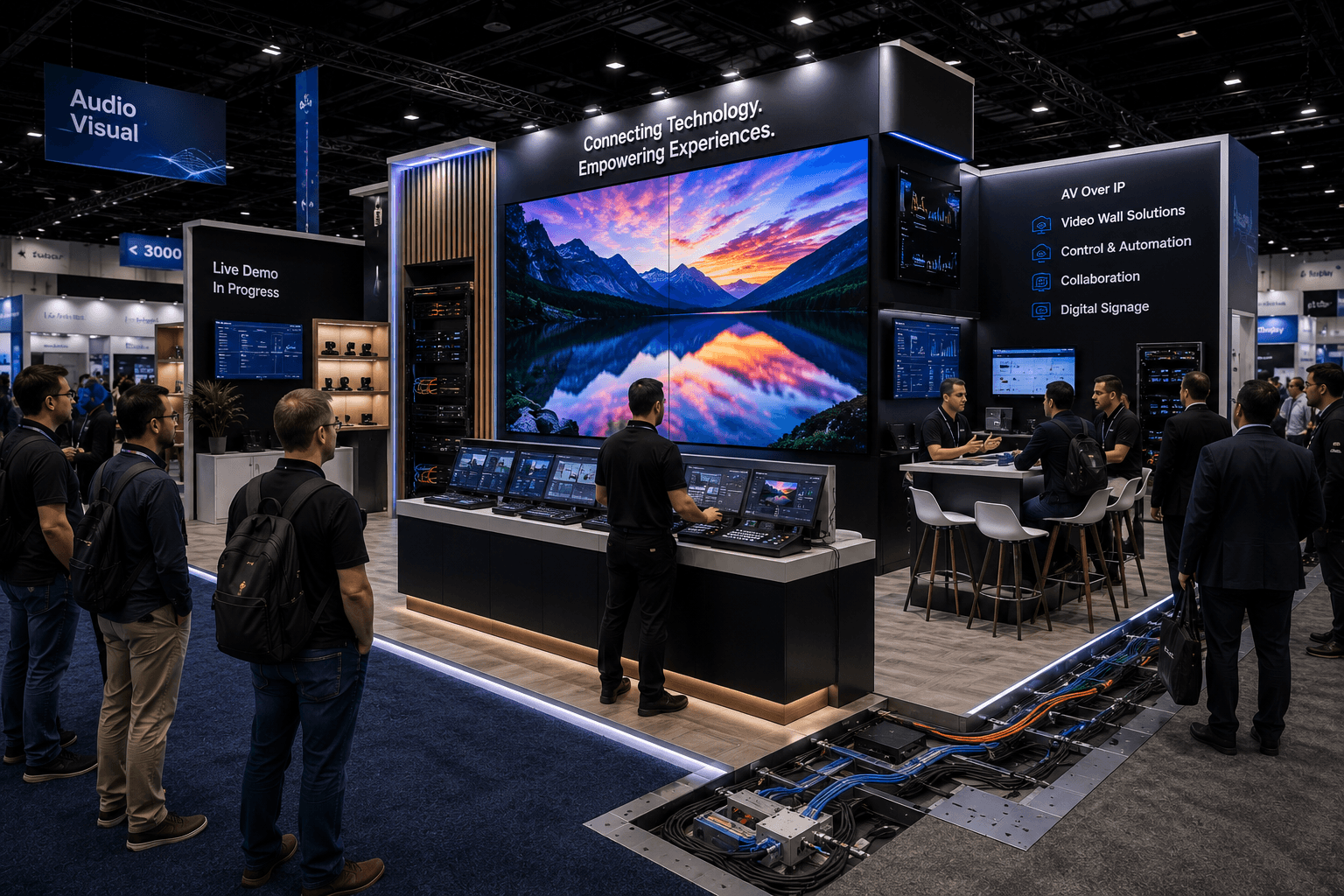
InfoComm AV display booth with LED wall, control stations, live demo counters, cable and power routing, and visitor viewing flow in Las Vegas

InfoComm Booth Planning for AV Display Systems and Live Demo Flow

InfoComm Booth Planning for AV Display Systems and Live Demo Flow

Circle Exhibit Team

Industry professionals

Exhibition industry professional dedicated to delivering the latest insights and curated recommendations to you.

Exhibition industry professional dedicated to delivering the latest insights and curated recommendations to you.

AV-heavy InfoComm booths need screen visibility, controlled demo flow, early technical planning, and clean show-site execution. A strong layout should connect LED walls, control stations, cable routing, power/data access, visitor viewing lines, and buyer conversations before installation begins.

AV-heavy InfoComm booths need screen visibility, controlled demo flow, early technical planning, and clean show-site execution. A strong layout should connect LED walls, control stations, cable routing, power/data access, visitor viewing lines, and buyer conversations before installation begins.

AV-heavy InfoComm booths need screen visibility, controlled demo flow, early technical planning, and clean show-site execution. A strong layout should connect LED walls, control stations, cable routing, power/data access, visitor viewing lines, and buyer conversations before installation begins.

InfoComm booths often need to prove the technology while the visitor is standing in the booth.

That makes the layout different from a standard product display. AV display systems, LED walls, control stations, audio demos, collaboration tools, and technical interfaces all need to be visible, powered, connected, and easy to understand.

InfoComm 2026 is scheduled for June 13–19 at the Las Vegas Convention Center, with exhibits June 17–19. Official AVIXA materials describe the show as a major pro AV event covering areas such as display, video, streaming, control, conferencing and collaboration, broadcast AV, enterprise IT, digital signage, learning spaces, and live event technologies.

For exhibitors, InfoComm booth planning should start with how the AV demo works on the floor, not just how the booth looks in a rendering.

Quick Answer

InfoComm exhibitors should plan AV-heavy booths by starting with the live demo flow, then placing LED walls, control stations, power/data access, cable routing, staff positions, and visitor viewing areas around that flow. The booth should let visitors see the display system clearly, understand the demo quickly, and move into technical or sales conversations without crowding the front zone.

Why Do AV-Heavy Booths Need a Different Planning Logic?

AV-heavy booths depend on working systems.

A booth with a large LED wall, display system, control station, speaker setup, or collaboration demo cannot be planned like a static product booth. The technology needs to run, connect, and be explained in real time.

That means the booth should support three actions:

  • see the display clearly

  • understand what the system is doing

  • ask a technical or buyer-specific question

If the screen, control station, visitor path, and power/data setup are planned separately, the booth may look complete but feel difficult to use.

An AV booth should be designed around the demo sequence.

Where Should the LED Wall or Main Display Go?

The LED wall should be visible from the aisle, but it should not trap visitors at the edge of the booth.

For InfoComm, the main display is often the first attraction point. It may show digital signage, conferencing content, broadcast workflow, immersive visuals, control room interfaces, education technology, or live event graphics.

The display wall should answer four layout questions:

  • Can visitors see the content from the aisle?

  • Is there enough space to stop and watch?

  • Can staff explain the system without blocking the screen?

  • Can serious buyers move into a deeper conversation area?

A good LED wall pulls people in.

A poorly placed LED wall creates a crowd at the front and blocks the rest of the booth.

How Should Control Stations Support Live Demo Flow?

The control station should explain the system, not hide behind it.

In an AV demo booth, the control station may hold switchers, tablets, laptops, touchscreens, audio controls, signal routing tools, collaboration interfaces, or system dashboards. It needs to sit close enough to the display for visitors to connect the action with the result.

A strong control station should support:

  • staff-led demonstration

  • screen or LED wall control

  • device switching or content triggering

  • power/data access

  • clean cable routing

  • visitor viewing space

  • technical explanation without crowding

The control station should not sit directly in front of the display if it blocks sightlines. It should work like an operator position that helps visitors understand what they are seeing.

AV Booth Zone Planning

Booth Zone

Main Role

Planning Requirement

LED wall / main display

Attract visitors and show the AV system in action

Clear sightline, strong content hierarchy, enough viewing distance

Control station

Run the demo and explain system behavior

Power/data access, cable control, staff working space

Viewing area

Let visitors pause without blocking the aisle

Clear standing zone and exit path

Secondary demo station

Show device-level or software-level details

Smaller group interaction, screen or tablet support

Buyer conversation area

Move qualified visitors into deeper technical discussion

Side or rear placement, away from the main screen crowd

Storage / technical support

Hold adapters, cases, devices, tools, and backup gear

Hidden but accessible to staff

Why Does Visitor Viewing Distance Matter?

Display booths need space for people to watch.

A large screen or LED wall can lose value if visitors stand too close or if the viewing area sits directly in the aisle. People need enough distance to understand the content, compare image quality, and follow the demo.

The viewing area should be treated as a real booth zone.

It should have:

  • enough depth for a small group

  • a clear view of the display

  • room for staff to explain

  • a path toward the control station

  • a path toward buyer conversations

  • no furniture blocking the screen

The goal is not just to make the display visible.

The goal is to let people watch comfortably long enough to understand the system.

How Should Cable Routing Be Planned?

Cable routing should be planned before the booth is installed.

In AV-heavy booths, cables are not a small detail. They affect screen placement, control station location, power access, device stability, visitor safety, and final presentation quality.

Cable routing should consider:

  • LED wall or screen power

  • signal routing from control stations

  • device charging

  • data or network access

  • speaker or audio equipment connections

  • floor cable protection

  • hidden routing through walls, counters, or flooring

  • backup access for troubleshooting

A booth can look polished and still fail as a demo environment if cable paths are exposed, unsafe, or hard to service.

AV booths need clean routing and practical access at the same time.

Why Should Power and Data Setup Be Decided Early?

Power and data setup affects the entire booth layout.

For InfoComm exhibitors, power is not only for lighting and a few screens. It may support LED walls, control stations, audio systems, charging areas, interactive devices, media players, collaboration systems, routers, laptops, and backup equipment.

Power/data planning should answer:

  • What needs dedicated power?

  • Where does the main display connect?

  • What devices need charging or continuous operation?

  • Does the demo need network access?

  • Where can cables be hidden without blocking service access?

  • When can the full demo be tested before opening?

If power/data is planned too late, the booth may need layout changes during move-in.

That is the wrong time to solve technical logic.

How Do Graphics Support AV Display Systems?

Graphics should frame the demo, not compete with it.

An AV booth already has moving visuals, screens, controls, and live content. If every surrounding wall carries heavy copy, the booth can become visually noisy.

Good graphics should explain the context of the demo:

  • what system is being shown

  • what problem the display solves

  • what workflow the visitor is watching

  • where the visitor should go next

  • how the brand fits into the AV environment

For AV-heavy exhibits, graphics and screen content should not fight each other. Graphics and brand presentation should make the demo easier to read from the aisle and easier to understand once the visitor steps in.

The screen shows the system.

The graphics explain why the system matters.

How Should Staff Positions Work Around an AV Demo?

Staff should not stand in front of the screen.

This sounds simple, but it is a common booth problem. Staff naturally gather near the main demo because that is where visitors stop. If they stand in the wrong place, they block sightlines and weaken the demo.

A stronger staff plan may include:

  • one greeter near the aisle

  • one demo lead at the control station

  • one technical expert near the secondary demo area

  • one sales lead near the buyer conversation zone

  • one floating support person for busy periods

The staff path should not cut through the viewing line.

The booth should allow staff to explain the system while keeping the display visible.

How Does Las Vegas Show-Site Execution Affect InfoComm Booths?

AV-heavy booths need tighter show-site coordination than simple display booths.

At LVCC, the booth may need walls, LED structures, monitors, audio equipment, control stations, graphics, power/data access, cable routing, storage, and final demo testing to come together in the right sequence. This is where custom exhibit execution in Las Vegas becomes important.

The booth plan should account for:

  • freight staging

  • screen and LED wall installation

  • control station placement

  • electrical access

  • cable concealment

  • device protection during setup

  • graphics installation around display areas

  • live demo testing before show opening

  • dismantle and repacking after the event

AV-heavy booths are not ready when the walls are standing.

They are ready when the system works.

Why Does Installation Planning Matter for AV Demo Booths?

Installation should follow the technical sequence.

A booth with AV systems cannot be installed in a random order. The structure, power access, display mounting, cable routing, control station, graphics, and final testing all depend on each other.

That is why on-site installation support for AV demo booths should be connected to planning early.

The installation team should know:

  • which structures go up first

  • where LED walls or screens mount

  • where cable routes need to remain open

  • when control stations are placed

  • when graphics can be installed

  • when power/data access is checked

  • when the live demo can be tested

  • how equipment will be protected during dismantle

If the demo depends on the system working, installation is part of the product experience.

What Happens When AV Flow Is Not Controlled?

The booth becomes difficult to understand.

Visitors may gather at the screen but never reach the control station. Staff may explain from the wrong position. Buyers may ask technical questions in the main viewing line. Cables may limit where devices can sit. The display may look strong but fail to guide the visitor journey.

Common problems include:

  • blocked screen sightlines

  • crowded demo counters

  • unclear control station location

  • exposed or messy cable routing

  • weak transition into buyer conversations

  • staff standing in visitor paths

  • no clear place for technical follow-up

An AV booth should help visitors move from attention to understanding to conversation.

If that path is unclear, the booth loses some of its technical value.

How Should Exhibitors Prepare Before Finalizing an InfoComm Booth?

The booth should be planned from the AV system outward.

Before choosing wall shapes, counter finishes, or furniture, exhibitors should define what the live demo needs to show and how visitors should experience it.

Planning Checklist

  • What AV display system is the main attraction?

  • Does the booth need an LED wall, monitor wall, projection, or smaller screen setup?

  • Where should visitors stand to watch the demo?

  • Where should the control station sit?

  • What devices, controls, or interfaces need counter space?

  • Where are power and data required?

  • How will cables be routed and hidden?

  • Does the booth need audio control or noise management?

  • Where will qualified buyers move after the demo?

  • What graphics are needed to explain the system?

  • When can the full demo be tested before opening?

  • How will equipment be protected during dismantle?

These questions keep the booth grounded in real AV behavior.

What Is the Best Layout Logic for an InfoComm AV Booth?

The best InfoComm booth layout starts with the live demo flow.

First, define what visitors should see. Then place the LED wall or main display. After that, position the control station, viewing line, cable routing, graphics, storage, and buyer conversation area around the demo.

A strong AV booth should make three things clear:

  • what display system or AV workflow is being shown

  • where visitors should stand to understand it

  • where deeper technical or sales conversations should continue

That is how an AV-heavy booth becomes easier to watch, easier to explain, and easier to execute on the show floor.

Planning an AV-Heavy Booth for InfoComm?

Start with the InfoComm show context, then plan the LED wall, control station, cable routing, power/data setup, live demo flow, and Las Vegas installation sequence as one connected booth system.


Primary Button:

InfoComm booths often need to prove the technology while the visitor is standing in the booth.

That makes the layout different from a standard product display. AV display systems, LED walls, control stations, audio demos, collaboration tools, and technical interfaces all need to be visible, powered, connected, and easy to understand.

InfoComm 2026 is scheduled for June 13–19 at the Las Vegas Convention Center, with exhibits June 17–19. Official AVIXA materials describe the show as a major pro AV event covering areas such as display, video, streaming, control, conferencing and collaboration, broadcast AV, enterprise IT, digital signage, learning spaces, and live event technologies.

For exhibitors, InfoComm booth planning should start with how the AV demo works on the floor, not just how the booth looks in a rendering.

Quick Answer

InfoComm exhibitors should plan AV-heavy booths by starting with the live demo flow, then placing LED walls, control stations, power/data access, cable routing, staff positions, and visitor viewing areas around that flow. The booth should let visitors see the display system clearly, understand the demo quickly, and move into technical or sales conversations without crowding the front zone.

Why Do AV-Heavy Booths Need a Different Planning Logic?

AV-heavy booths depend on working systems.

A booth with a large LED wall, display system, control station, speaker setup, or collaboration demo cannot be planned like a static product booth. The technology needs to run, connect, and be explained in real time.

That means the booth should support three actions:

  • see the display clearly

  • understand what the system is doing

  • ask a technical or buyer-specific question

If the screen, control station, visitor path, and power/data setup are planned separately, the booth may look complete but feel difficult to use.

An AV booth should be designed around the demo sequence.

Where Should the LED Wall or Main Display Go?

The LED wall should be visible from the aisle, but it should not trap visitors at the edge of the booth.

For InfoComm, the main display is often the first attraction point. It may show digital signage, conferencing content, broadcast workflow, immersive visuals, control room interfaces, education technology, or live event graphics.

The display wall should answer four layout questions:

  • Can visitors see the content from the aisle?

  • Is there enough space to stop and watch?

  • Can staff explain the system without blocking the screen?

  • Can serious buyers move into a deeper conversation area?

A good LED wall pulls people in.

A poorly placed LED wall creates a crowd at the front and blocks the rest of the booth.

How Should Control Stations Support Live Demo Flow?

The control station should explain the system, not hide behind it.

In an AV demo booth, the control station may hold switchers, tablets, laptops, touchscreens, audio controls, signal routing tools, collaboration interfaces, or system dashboards. It needs to sit close enough to the display for visitors to connect the action with the result.

A strong control station should support:

  • staff-led demonstration

  • screen or LED wall control

  • device switching or content triggering

  • power/data access

  • clean cable routing

  • visitor viewing space

  • technical explanation without crowding

The control station should not sit directly in front of the display if it blocks sightlines. It should work like an operator position that helps visitors understand what they are seeing.

AV Booth Zone Planning

Booth Zone

Main Role

Planning Requirement

LED wall / main display

Attract visitors and show the AV system in action

Clear sightline, strong content hierarchy, enough viewing distance

Control station

Run the demo and explain system behavior

Power/data access, cable control, staff working space

Viewing area

Let visitors pause without blocking the aisle

Clear standing zone and exit path

Secondary demo station

Show device-level or software-level details

Smaller group interaction, screen or tablet support

Buyer conversation area

Move qualified visitors into deeper technical discussion

Side or rear placement, away from the main screen crowd

Storage / technical support

Hold adapters, cases, devices, tools, and backup gear

Hidden but accessible to staff

Why Does Visitor Viewing Distance Matter?

Display booths need space for people to watch.

A large screen or LED wall can lose value if visitors stand too close or if the viewing area sits directly in the aisle. People need enough distance to understand the content, compare image quality, and follow the demo.

The viewing area should be treated as a real booth zone.

It should have:

  • enough depth for a small group

  • a clear view of the display

  • room for staff to explain

  • a path toward the control station

  • a path toward buyer conversations

  • no furniture blocking the screen

The goal is not just to make the display visible.

The goal is to let people watch comfortably long enough to understand the system.

How Should Cable Routing Be Planned?

Cable routing should be planned before the booth is installed.

In AV-heavy booths, cables are not a small detail. They affect screen placement, control station location, power access, device stability, visitor safety, and final presentation quality.

Cable routing should consider:

  • LED wall or screen power

  • signal routing from control stations

  • device charging

  • data or network access

  • speaker or audio equipment connections

  • floor cable protection

  • hidden routing through walls, counters, or flooring

  • backup access for troubleshooting

A booth can look polished and still fail as a demo environment if cable paths are exposed, unsafe, or hard to service.

AV booths need clean routing and practical access at the same time.

Why Should Power and Data Setup Be Decided Early?

Power and data setup affects the entire booth layout.

For InfoComm exhibitors, power is not only for lighting and a few screens. It may support LED walls, control stations, audio systems, charging areas, interactive devices, media players, collaboration systems, routers, laptops, and backup equipment.

Power/data planning should answer:

  • What needs dedicated power?

  • Where does the main display connect?

  • What devices need charging or continuous operation?

  • Does the demo need network access?

  • Where can cables be hidden without blocking service access?

  • When can the full demo be tested before opening?

If power/data is planned too late, the booth may need layout changes during move-in.

That is the wrong time to solve technical logic.

How Do Graphics Support AV Display Systems?

Graphics should frame the demo, not compete with it.

An AV booth already has moving visuals, screens, controls, and live content. If every surrounding wall carries heavy copy, the booth can become visually noisy.

Good graphics should explain the context of the demo:

  • what system is being shown

  • what problem the display solves

  • what workflow the visitor is watching

  • where the visitor should go next

  • how the brand fits into the AV environment

For AV-heavy exhibits, graphics and screen content should not fight each other. Graphics and brand presentation should make the demo easier to read from the aisle and easier to understand once the visitor steps in.

The screen shows the system.

The graphics explain why the system matters.

How Should Staff Positions Work Around an AV Demo?

Staff should not stand in front of the screen.

This sounds simple, but it is a common booth problem. Staff naturally gather near the main demo because that is where visitors stop. If they stand in the wrong place, they block sightlines and weaken the demo.

A stronger staff plan may include:

  • one greeter near the aisle

  • one demo lead at the control station

  • one technical expert near the secondary demo area

  • one sales lead near the buyer conversation zone

  • one floating support person for busy periods

The staff path should not cut through the viewing line.

The booth should allow staff to explain the system while keeping the display visible.

How Does Las Vegas Show-Site Execution Affect InfoComm Booths?

AV-heavy booths need tighter show-site coordination than simple display booths.

At LVCC, the booth may need walls, LED structures, monitors, audio equipment, control stations, graphics, power/data access, cable routing, storage, and final demo testing to come together in the right sequence. This is where custom exhibit execution in Las Vegas becomes important.

The booth plan should account for:

  • freight staging

  • screen and LED wall installation

  • control station placement

  • electrical access

  • cable concealment

  • device protection during setup

  • graphics installation around display areas

  • live demo testing before show opening

  • dismantle and repacking after the event

AV-heavy booths are not ready when the walls are standing.

They are ready when the system works.

Why Does Installation Planning Matter for AV Demo Booths?

Installation should follow the technical sequence.

A booth with AV systems cannot be installed in a random order. The structure, power access, display mounting, cable routing, control station, graphics, and final testing all depend on each other.

That is why on-site installation support for AV demo booths should be connected to planning early.

The installation team should know:

  • which structures go up first

  • where LED walls or screens mount

  • where cable routes need to remain open

  • when control stations are placed

  • when graphics can be installed

  • when power/data access is checked

  • when the live demo can be tested

  • how equipment will be protected during dismantle

If the demo depends on the system working, installation is part of the product experience.

What Happens When AV Flow Is Not Controlled?

The booth becomes difficult to understand.

Visitors may gather at the screen but never reach the control station. Staff may explain from the wrong position. Buyers may ask technical questions in the main viewing line. Cables may limit where devices can sit. The display may look strong but fail to guide the visitor journey.

Common problems include:

  • blocked screen sightlines

  • crowded demo counters

  • unclear control station location

  • exposed or messy cable routing

  • weak transition into buyer conversations

  • staff standing in visitor paths

  • no clear place for technical follow-up

An AV booth should help visitors move from attention to understanding to conversation.

If that path is unclear, the booth loses some of its technical value.

How Should Exhibitors Prepare Before Finalizing an InfoComm Booth?

The booth should be planned from the AV system outward.

Before choosing wall shapes, counter finishes, or furniture, exhibitors should define what the live demo needs to show and how visitors should experience it.

Planning Checklist

  • What AV display system is the main attraction?

  • Does the booth need an LED wall, monitor wall, projection, or smaller screen setup?

  • Where should visitors stand to watch the demo?

  • Where should the control station sit?

  • What devices, controls, or interfaces need counter space?

  • Where are power and data required?

  • How will cables be routed and hidden?

  • Does the booth need audio control or noise management?

  • Where will qualified buyers move after the demo?

  • What graphics are needed to explain the system?

  • When can the full demo be tested before opening?

  • How will equipment be protected during dismantle?

These questions keep the booth grounded in real AV behavior.

What Is the Best Layout Logic for an InfoComm AV Booth?

The best InfoComm booth layout starts with the live demo flow.

First, define what visitors should see. Then place the LED wall or main display. After that, position the control station, viewing line, cable routing, graphics, storage, and buyer conversation area around the demo.

A strong AV booth should make three things clear:

  • what display system or AV workflow is being shown

  • where visitors should stand to understand it

  • where deeper technical or sales conversations should continue

That is how an AV-heavy booth becomes easier to watch, easier to explain, and easier to execute on the show floor.

Planning an AV-Heavy Booth for InfoComm?

Start with the InfoComm show context, then plan the LED wall, control station, cable routing, power/data setup, live demo flow, and Las Vegas installation sequence as one connected booth system.

Primary Button:

Message

Leave your message and we will get back to you ASAP

Send a Message

We’ll Be in Touch!

Message

Leave your message and we will get back to you ASAP

Address:

4915 Steptoe Street #300

Las Vegas, NV 89122
