
How AAPEX Buyers Compare Product Lines
AAPEX buyers usually begin with fit: which vehicle, system, or repair task the product is made for. From there, they may compare materials, performance levels, packaging, product families, or the differences between related options.
The display should follow those questions rather than internal SKU codes or warehouse categories. Technicians may focus on service use and installation, distributors on range and availability, and retailers on packaging and merchandising. Related options should stay together so buyers can compare them without moving back and forth across the booth.

Products grouped by application or service task are easier for AAPEX buyers to compare than a display arranged by internal SKU order.
What Belongs on Display, on Screen, or in Storage
Keep the products buyers are most likely to handle or compare in the main display. Additional sizes, models, applications, and detailed specifications can move to a digital lookup. Replacement samples and support materials should remain close enough for staff to reach without filling the visible product area.
What Should Stay Visible, Move to a Screen, or Be Stored?
What to show or store | Where it should go | Why |
|---|---|---|
Main products and comparison samples | Product wall or sample counter | Buyers can handle them and compare the differences directly |
Additional sizes, models, and applications | Digital lookup screen | Expands the range without filling every shelf |
Fitment and compatibility details | Beside the relevant product | Makes vehicle coverage and service use easier to verify |
Replacement samples and reserve stock | Concealed storage nearby | Keeps restocking quick without crowding the display |
Extra literature and packaging | Support storage | Keeps counters clear while materials remain within reach |
When a Screen Helps
A screen is most useful when it gives buyers access to products that are not physically displayed. Keep the samples they are likely to touch or compare within reach, and use digital lookup for additional applications, specifications, and less frequently requested models.

Core products stay visible for comparison, while digital lookup, fitment labels, reserve stock, and a side restocking path keep the booth organized.
Keep Fitment Details With the Product
Buyers should be able to confirm fitment without searching across the booth. Vehicle or system application, model and year coverage, material, dimensions, connection type, and service use should sit beside the relevant sample.
When several products look alike, show the differences that affect selection instead of repeating every specification. The same information order should carry through product labels, comparison graphics, shelves, and product walls.
Product Information Buyers May Need at a Glance
Vehicle or system application
Model and year coverage
Material or construction
Dimensions and connection type
Installation or service use
Differences between related options
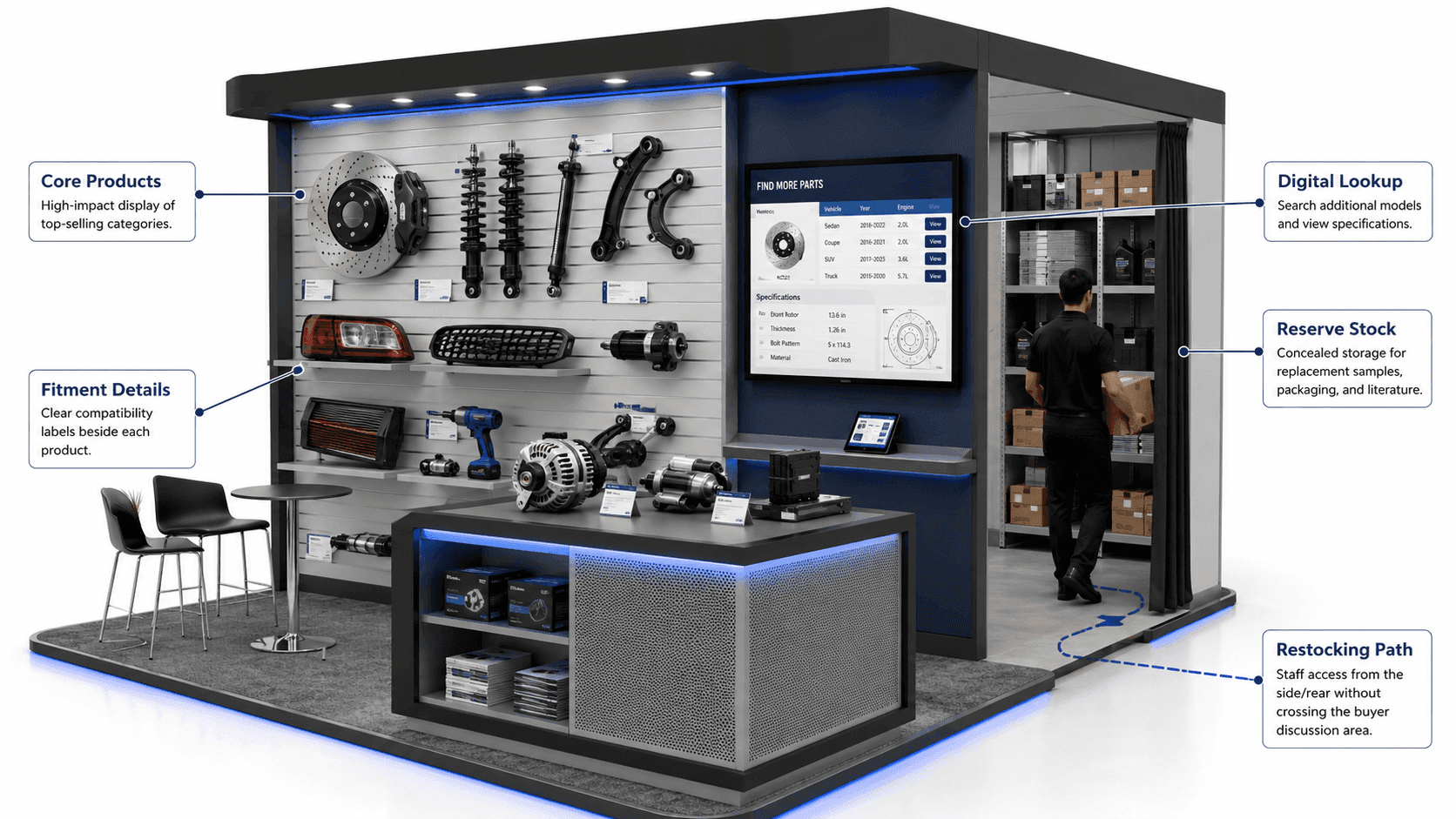
Core products remain visible, extended models move to digital lookup, and replacement stock stays close enough for restocking without crowding the display.
Make Product Access and Restocking Work Together
Product walls and sample counters should be easy for buyers to reach without getting in the way of staff. Frequently requested products should stay within easy reach of the staff answering product questions, with enough room for buyers to compare related products side by side.
Reserve stock and replacement samples should stay near the display but out of sight. Restocking should happen from the side or rear so boxes do not pass through meeting areas or interrupt product conversations.
EV Components and Diagnostic Tools Need to Be Shown Differently
EV and Hybrid Products
For products connected with the AAPEX EV Experience, battery-service tools, charging products, motors, inverters, cooling components, and hybrid equipment should be grouped by system role. Buyers need to see where each item fits, what service task it supports, and which vehicles or systems it applies to. Compatibility and safety details belong beside the sample rather than on a separate general graphic.
Diagnostic Hardware and Screens
For AAPEX Diagnostics and Shop Systems, the physical device should stay closely tied to the information it produces. Keep the scan tool or sensor, vehicle data, screen, sample report, and main message in one sightline so buyers can follow the path from data capture to diagnostic result without moving between unrelated stations.
What Makes an AAPEX Product Display Hard to Follow
A product display becomes confusing when buyers cannot tell what matters first or how the options differ.
Giving every SKU the same visual weight
Placing fitment details away from the product
Showing screen content unrelated to nearby samples
Leaving no nearby space for replacement stock
Blocking products with counters, furniture, or staff positions
A clear display helps buyers find the right category, compare the main differences, and ask focused questions without searching across the booth.
FAQ
How should automotive products be grouped at AAPEX?
Group products by vehicle application, fitment, system, or repair task. Keep related options together and make the differences buyers care about easy to see.
Which products should an exhibitor display?
Show the products buyers are most likely to handle, compare, or ask about. Less common models can remain available through a lookup tool, with replacement samples stored nearby.
How should fitment information appear in the booth?
Fitment details belong beside the product they describe. Vehicle coverage, model and year, dimensions, connection type, and service use should be readable without sending buyers to another wall or screen.







