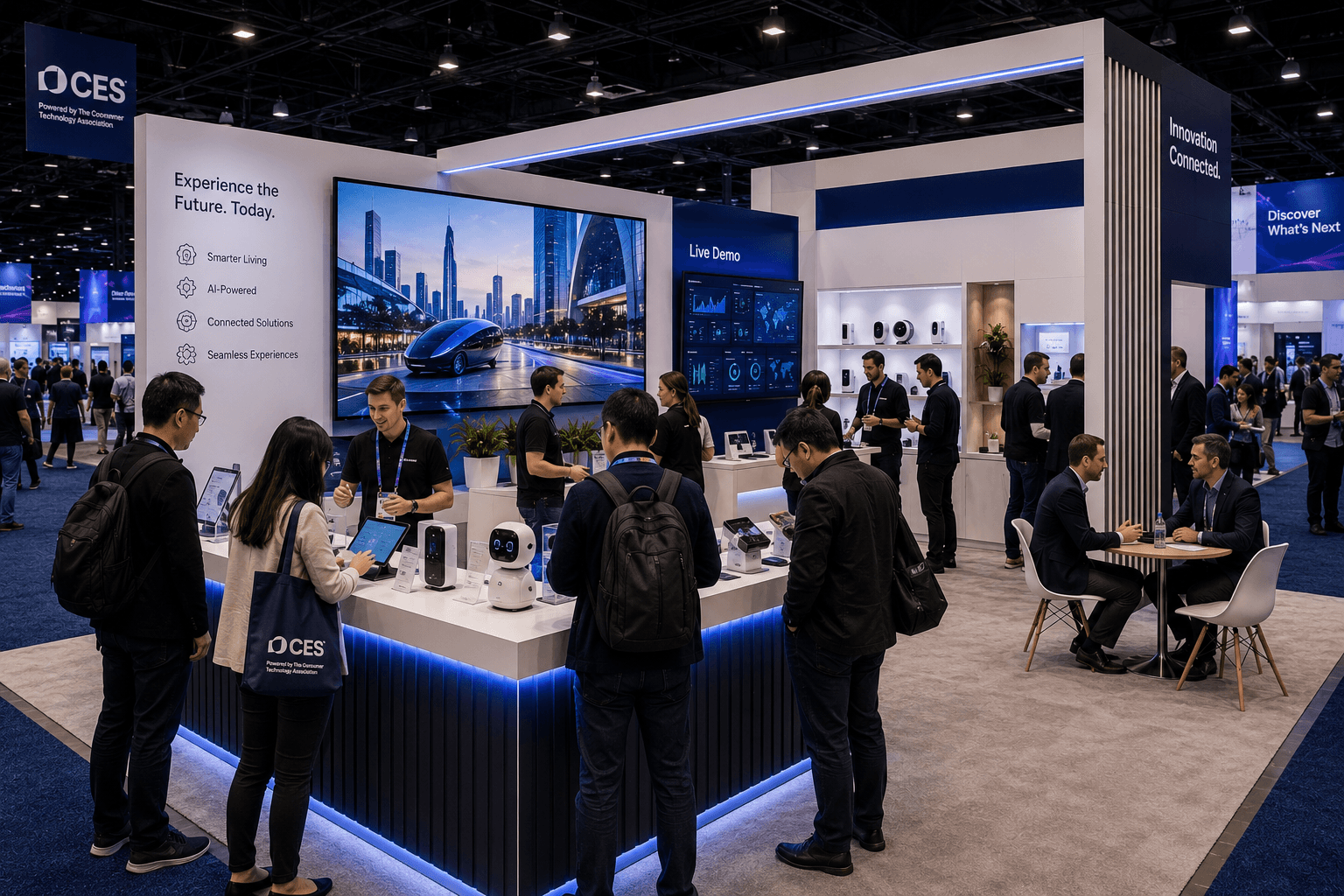
CES demo-ready booth at LVCC with product interaction counter, large screen, tech devices, visitor demo flow, and buyer conversation area

How CES Exhibitors Should Plan Demo-Ready Booths at LVCC

How CES Exhibitors Should Plan Demo-Ready Booths at LVCC

Circle Exhibit Team

Industry professionals

Exhibition industry professional dedicated to delivering the latest insights and curated recommendations to you.

Exhibition industry professional dedicated to delivering the latest insights and curated recommendations to you.

CES exhibitors need demo-ready booths that help visitors understand, test, and discuss technology quickly. At LVCC, booth planning should connect screen hierarchy, product interaction, traffic flow, staff positions, storage, and installation sequencing before the booth reaches the show floor.

CES exhibitors need demo-ready booths that help visitors understand, test, and discuss technology quickly. At LVCC, booth planning should connect screen hierarchy, product interaction, traffic flow, staff positions, storage, and installation sequencing before the booth reaches the show floor.

CES exhibitors need demo-ready booths that help visitors understand, test, and discuss technology quickly. At LVCC, booth planning should connect screen hierarchy, product interaction, traffic flow, staff positions, storage, and installation sequencing before the booth reaches the show floor.

CES booths need to explain technology quickly.

At LVCC, visitors move through large halls with competing screens, product launches, media moments, and live demonstrations. CES describes the LVCC Campus as its largest venue and notes that North, South, Central, and West Halls are all used for different topic areas and exhibit narratives.

That means a CES booth should not only look impressive. It should help visitors understand what the product does, where to stop, and how to move from a quick demo into a real conversation.

Quick Answer

CES exhibitors should plan demo-ready booths at LVCC by separating fast product interaction, screen viewing, staff explanation, and buyer follow-up. The front zone should help visitors understand the technology quickly, while the side or rear zone should support deeper conversations without blocking demo traffic or aisle movement.

For show-specific layout planning, CES booth planning should start with the demo behavior before walls, counters, graphics, or meeting areas are finalized.

Why Do CES Booths Need Demo-Ready Layouts?

CES visitors often decide quickly whether a booth is worth stopping for.

They may see a screen, product device, prototype, mobility display, AI interface, robotics demo, health tech product, or smart home system from the aisle. If the booth does not explain the product fast enough, visitors keep moving.

A demo-ready booth should support three actions:

  • attract attention from the aisle

  • make the product behavior clear

  • move qualified visitors into a deeper conversation

The booth layout should not force all three actions into one crowded counter. A better layout gives each behavior its own space.

What Should Visitors Understand First?

Visitors should understand the product category before they understand the full feature set.

At CES, many booths try to show too much at once: screens, devices, dashboards, prototypes, product samples, and branded messaging. That can make the booth harder to read, especially in high-traffic halls.

The first message should answer one question:

What is being demonstrated?

That may be:

  • an AI-powered product workflow

  • a connected home device

  • a robotics interaction

  • a digital health interface

  • a mobility technology display

  • an enterprise software dashboard

  • a consumer electronics product launch

Once the category is clear, the booth can introduce the deeper story.

A CES booth should not make the visitor solve the layout before they understand the product.

How Should the Front Demo Zone Work?

The front demo zone should be built for fast stopping behavior.

This area should let visitors step close enough to understand the product, but not so deep that they block staff or trap the next visitor. The best front demo zones often include a counter, product interaction point, main screen, and clear staff position.

A strong front demo zone should support:

  • one clear product interaction

  • one primary screen or visual anchor

  • enough space for visitors to stop briefly

  • staff access behind or beside the counter

  • clean cable routing

  • limited clutter around the product

  • a clear next step for qualified visitors

The demo zone should feel active, not crowded.

If visitors are watching, touching, scanning, testing, or asking quick questions, the layout needs enough space for those actions to happen without blocking the aisle.

Why Does Screen Hierarchy Matter at CES?

Screens are useful only when visitors know which one matters first.

At CES, screens compete with screens. A booth may have a large video wall, product monitor, dashboard display, presentation screen, and smaller device interfaces. If every screen has equal weight, visitors may not know where to look.

A demo-ready booth should use screen hierarchy:

Screen Type

Best Role

Layout Note

Main screen

Attract attention and explain the primary product story

Visible from the aisle, but not blocking entry

Demo screen

Show product behavior, dashboard, or live workflow

Close to staff and interaction point

Device screen

Support hands-on testing or product use

Positioned for small-group viewing

Meeting screen

Support deeper buyer discussion

Placed away from front demo traffic

Background motion

Add atmosphere only if it does not distract

Keep secondary to the main demo

The main screen should guide visitors into the booth. It should not become a visual wall that stops traffic at the front edge.

How Should Product Interaction Be Planned?

Product interaction should be simple enough to understand in seconds.

Visitors should know whether they are supposed to touch, scan, test, watch, sit, wear, open, compare, or speak to a staff member. If the action is unclear, the demo slows down.

A good product interaction point should have:

  • one obvious action

  • staff support nearby

  • space for one or two visitors at a time

  • clear product placement

  • nearby screen support if needed

  • enough room for the next visitor to wait without blocking the booth

For hardware demos, the product should be positioned at a natural interaction height. For software demos, the interface should be visible without forcing visitors to crowd around a laptop. For connected systems, the physical product and digital response should be close enough to understand together.

The booth should make the demo feel easy to enter.

Demo Zone vs Buyer Conversation Zone

Booth Area

Main Role

Best Placement

Planning Need

Front demo zone

Show what the product does quickly

Front or aisle-facing side

Open access, staff space, clear product action

Main screen area

Attract visitors and explain the product category

Visible from aisle

Strong hierarchy, limited competing content

Product interaction point

Let visitors test, touch, scan, or observe

Near demo counter

Cable control, staff guidance, clean surface

Buyer conversation zone

Discuss fit, deployment, pricing, or partnership

Rear or side zone

Quieter placement, seating or counter

Storage / technical support

Hold devices, chargers, tools, cases, and staff materials

Hidden from traffic

Easy staff access, clean visual control

How Should Staff Positions Support Demo Flow?

Staff should not stand where visitors need to move.

This is a common CES booth problem. Staff naturally gather near the demo counter or screen, but if they block the entry path, visitors may hesitate to step in.

A demo-ready booth should give staff defined working positions:

  • one greeter or qualifier near the aisle

  • one demo lead near the product interaction point

  • one technical expert near the dashboard or product detail area

  • one sales lead near the buyer conversation zone

  • one floating support person for busy periods

Staff should be able to hand off visitors smoothly. A casual visitor may only need a fast demo. A qualified buyer may need to move to a side counter or rear meeting point.

The layout should make that handoff visible and natural.

How Should LVCC Execution Shape the Booth Plan?

LVCC execution should be considered before the final layout is approved.

CES 2026 spanned more than 2.6 million net square feet and 13 venues across Las Vegas, including the Las Vegas Convention Center, according to CES official press material. In that kind of environment, booth setup is not only about design. It also depends on freight timing, labor coordination, staging, electrical access, AV placement, and final install checks.

This is where booth build support in Las Vegas helps connect booth design to show-site execution.

A CES demo booth should plan early for:

  • monitor placement

  • power access

  • cable routing

  • product security

  • device charging

  • counter placement

  • staff movement

  • storage access

  • lighting alignment

  • final demo testing before opening

If the booth relies on working technology, installation timing matters.

A screen that is mounted late, a cable path that is blocked, or a demo counter without enough power can weaken the booth before visitors ever arrive.

Why Does Installation Planning Matter for Demo Booths?

Demo booths have more dependencies than static display booths.

A static booth may need walls, counters, graphics, and lighting. A demo-ready CES booth may also need monitors, devices, interactive screens, product mounts, charging points, demo stations, tablets, sensors, networked components, and secure storage.

That means on-site installation and dismantle support should be planned around the demo sequence, not only the booth structure.

The install team needs to know:

  • which structure goes up first

  • when screens are mounted

  • where power and cable access are needed

  • which products must stay protected until final placement

  • when demo testing can begin

  • how the booth will be dismantled and repacked after the show

A demo-ready booth is only ready when the technology, structure, graphics, and staff flow work together.

What Happens When Demo Traffic Is Not Controlled?

The booth becomes harder to use.

When demo traffic is not controlled, visitors may crowd around the screen, block the product, interrupt buyer conversations, or prevent new visitors from entering. Staff may spend more time managing bodies than explaining the product.

This is especially risky for CES exhibitors because the booth may receive waves of traffic after media coverage, scheduled demos, partner visits, or product announcements.

A controlled booth should give visitors clear options:

  • stop for a quick demo

  • watch a short screen explanation

  • test or interact with the product

  • ask a short technical question

  • move into a buyer conversation area

If the booth does not support these options, every visitor competes for the same space.

How Should Graphics Support a Demo-Ready Booth?

Graphics should make the demo easier to understand.

They should not repeat every product feature. Instead, they should help visitors identify the product category, understand the use case, and know where to look.

For CES booths, graphics often work best in layers:

  • aisle-facing graphics define the product category

  • demo-area graphics explain the interaction

  • screen content shows the product behavior

  • meeting-area graphics support deeper buyer questions

A demo-ready booth does not need more text.

It needs the right message in the right place.

What Should CES Exhibitors Confirm Before Finalizing the Booth?

A CES booth should be planned from the demo outward.

Before choosing the final booth structure, exhibitors should define how visitors will interact with the product and what the team needs to support that interaction.

Planning Checklist

  • What product or system should visitors understand first?

  • Is the demo physical, screen-based, software-based, or mixed?

  • Where should the main screen sit?

  • Where should visitors stop without blocking the aisle?

  • How many people can watch or interact at one time?

  • Where will staff stand during the demo?

  • Where will qualified buyers move after the demo?

  • How much storage is needed for devices, chargers, tools, and staff items?

  • Where will power and cable routing happen?

  • Can the booth be tested before show opening?

  • Can the booth be dismantled and repacked without damaging demo components?

These questions help keep the booth grounded in real show behavior.

When Is a Demo-Ready Booth Especially Important at CES?

A demo-ready booth is especially important when the product cannot be understood through a static display.

This includes products that involve:

  • AI interfaces

  • robotics movement

  • connected devices

  • digital health tools

  • smart home systems

  • automotive or mobility technology

  • enterprise software dashboards

  • immersive entertainment hardware

  • wearable or sensor-based products

These products need a clear interaction path.

The booth should show what the product does, not just where the product sits.

What Is the Best Layout Logic for CES Demo Booths?

The best CES demo booth starts with the product action.

First, define what visitors should see, touch, test, or understand. Then place the screen, counter, staff position, graphics, storage, and conversation area around that action.

A strong CES booth should make three things clear:

  • what technology is being demonstrated

  • how visitors should interact with it

  • where qualified conversations should happen next

When that logic is clear, the booth can handle faster traffic without losing buyer quality.

That is what makes a booth demo-ready at LVCC.

Planning a Demo-Ready CES Booth at LVCC?

Start with the CES show context, then plan the demo zone, screen hierarchy, product interaction point, staff flow, and Las Vegas show-site installation as one connected booth system.



CES booths need to explain technology quickly.

At LVCC, visitors move through large halls with competing screens, product launches, media moments, and live demonstrations. CES describes the LVCC Campus as its largest venue and notes that North, South, Central, and West Halls are all used for different topic areas and exhibit narratives.

That means a CES booth should not only look impressive. It should help visitors understand what the product does, where to stop, and how to move from a quick demo into a real conversation.

Quick Answer

CES exhibitors should plan demo-ready booths at LVCC by separating fast product interaction, screen viewing, staff explanation, and buyer follow-up. The front zone should help visitors understand the technology quickly, while the side or rear zone should support deeper conversations without blocking demo traffic or aisle movement.

For show-specific layout planning, CES booth planning should start with the demo behavior before walls, counters, graphics, or meeting areas are finalized.

Why Do CES Booths Need Demo-Ready Layouts?

CES visitors often decide quickly whether a booth is worth stopping for.

They may see a screen, product device, prototype, mobility display, AI interface, robotics demo, health tech product, or smart home system from the aisle. If the booth does not explain the product fast enough, visitors keep moving.

A demo-ready booth should support three actions:

  • attract attention from the aisle

  • make the product behavior clear

  • move qualified visitors into a deeper conversation

The booth layout should not force all three actions into one crowded counter. A better layout gives each behavior its own space.

What Should Visitors Understand First?

Visitors should understand the product category before they understand the full feature set.

At CES, many booths try to show too much at once: screens, devices, dashboards, prototypes, product samples, and branded messaging. That can make the booth harder to read, especially in high-traffic halls.

The first message should answer one question:

What is being demonstrated?

That may be:

  • an AI-powered product workflow

  • a connected home device

  • a robotics interaction

  • a digital health interface

  • a mobility technology display

  • an enterprise software dashboard

  • a consumer electronics product launch

Once the category is clear, the booth can introduce the deeper story.

A CES booth should not make the visitor solve the layout before they understand the product.

How Should the Front Demo Zone Work?

The front demo zone should be built for fast stopping behavior.

This area should let visitors step close enough to understand the product, but not so deep that they block staff or trap the next visitor. The best front demo zones often include a counter, product interaction point, main screen, and clear staff position.

A strong front demo zone should support:

  • one clear product interaction

  • one primary screen or visual anchor

  • enough space for visitors to stop briefly

  • staff access behind or beside the counter

  • clean cable routing

  • limited clutter around the product

  • a clear next step for qualified visitors

The demo zone should feel active, not crowded.

If visitors are watching, touching, scanning, testing, or asking quick questions, the layout needs enough space for those actions to happen without blocking the aisle.

Why Does Screen Hierarchy Matter at CES?

Screens are useful only when visitors know which one matters first.

At CES, screens compete with screens. A booth may have a large video wall, product monitor, dashboard display, presentation screen, and smaller device interfaces. If every screen has equal weight, visitors may not know where to look.

A demo-ready booth should use screen hierarchy:

Screen Type

Best Role

Layout Note

Main screen

Attract attention and explain the primary product story

Visible from the aisle, but not blocking entry

Demo screen

Show product behavior, dashboard, or live workflow

Close to staff and interaction point

Device screen

Support hands-on testing or product use

Positioned for small-group viewing

Meeting screen

Support deeper buyer discussion

Placed away from front demo traffic

Background motion

Add atmosphere only if it does not distract

Keep secondary to the main demo

The main screen should guide visitors into the booth. It should not become a visual wall that stops traffic at the front edge.

How Should Product Interaction Be Planned?

Product interaction should be simple enough to understand in seconds.

Visitors should know whether they are supposed to touch, scan, test, watch, sit, wear, open, compare, or speak to a staff member. If the action is unclear, the demo slows down.

A good product interaction point should have:

  • one obvious action

  • staff support nearby

  • space for one or two visitors at a time

  • clear product placement

  • nearby screen support if needed

  • enough room for the next visitor to wait without blocking the booth

For hardware demos, the product should be positioned at a natural interaction height. For software demos, the interface should be visible without forcing visitors to crowd around a laptop. For connected systems, the physical product and digital response should be close enough to understand together.

The booth should make the demo feel easy to enter.

Demo Zone vs Buyer Conversation Zone

Booth Area

Main Role

Best Placement

Planning Need

Front demo zone

Show what the product does quickly

Front or aisle-facing side

Open access, staff space, clear product action

Main screen area

Attract visitors and explain the product category

Visible from aisle

Strong hierarchy, limited competing content

Product interaction point

Let visitors test, touch, scan, or observe

Near demo counter

Cable control, staff guidance, clean surface

Buyer conversation zone

Discuss fit, deployment, pricing, or partnership

Rear or side zone

Quieter placement, seating or counter

Storage / technical support

Hold devices, chargers, tools, cases, and staff materials

Hidden from traffic

Easy staff access, clean visual control

How Should Staff Positions Support Demo Flow?

Staff should not stand where visitors need to move.

This is a common CES booth problem. Staff naturally gather near the demo counter or screen, but if they block the entry path, visitors may hesitate to step in.

A demo-ready booth should give staff defined working positions:

  • one greeter or qualifier near the aisle

  • one demo lead near the product interaction point

  • one technical expert near the dashboard or product detail area

  • one sales lead near the buyer conversation zone

  • one floating support person for busy periods

Staff should be able to hand off visitors smoothly. A casual visitor may only need a fast demo. A qualified buyer may need to move to a side counter or rear meeting point.

The layout should make that handoff visible and natural.

How Should LVCC Execution Shape the Booth Plan?

LVCC execution should be considered before the final layout is approved.

CES 2026 spanned more than 2.6 million net square feet and 13 venues across Las Vegas, including the Las Vegas Convention Center, according to CES official press material. In that kind of environment, booth setup is not only about design. It also depends on freight timing, labor coordination, staging, electrical access, AV placement, and final install checks.

This is where booth build support in Las Vegas helps connect booth design to show-site execution.

A CES demo booth should plan early for:

  • monitor placement

  • power access

  • cable routing

  • product security

  • device charging

  • counter placement

  • staff movement

  • storage access

  • lighting alignment

  • final demo testing before opening

If the booth relies on working technology, installation timing matters.

A screen that is mounted late, a cable path that is blocked, or a demo counter without enough power can weaken the booth before visitors ever arrive.

Why Does Installation Planning Matter for Demo Booths?

Demo booths have more dependencies than static display booths.

A static booth may need walls, counters, graphics, and lighting. A demo-ready CES booth may also need monitors, devices, interactive screens, product mounts, charging points, demo stations, tablets, sensors, networked components, and secure storage.

That means on-site installation and dismantle support should be planned around the demo sequence, not only the booth structure.

The install team needs to know:

  • which structure goes up first

  • when screens are mounted

  • where power and cable access are needed

  • which products must stay protected until final placement

  • when demo testing can begin

  • how the booth will be dismantled and repacked after the show

A demo-ready booth is only ready when the technology, structure, graphics, and staff flow work together.

What Happens When Demo Traffic Is Not Controlled?

The booth becomes harder to use.

When demo traffic is not controlled, visitors may crowd around the screen, block the product, interrupt buyer conversations, or prevent new visitors from entering. Staff may spend more time managing bodies than explaining the product.

This is especially risky for CES exhibitors because the booth may receive waves of traffic after media coverage, scheduled demos, partner visits, or product announcements.

A controlled booth should give visitors clear options:

  • stop for a quick demo

  • watch a short screen explanation

  • test or interact with the product

  • ask a short technical question

  • move into a buyer conversation area

If the booth does not support these options, every visitor competes for the same space.

How Should Graphics Support a Demo-Ready Booth?

Graphics should make the demo easier to understand.

They should not repeat every product feature. Instead, they should help visitors identify the product category, understand the use case, and know where to look.

For CES booths, graphics often work best in layers:

  • aisle-facing graphics define the product category

  • demo-area graphics explain the interaction

  • screen content shows the product behavior

  • meeting-area graphics support deeper buyer questions

A demo-ready booth does not need more text.

It needs the right message in the right place.

What Should CES Exhibitors Confirm Before Finalizing the Booth?

A CES booth should be planned from the demo outward.

Before choosing the final booth structure, exhibitors should define how visitors will interact with the product and what the team needs to support that interaction.

Planning Checklist

  • What product or system should visitors understand first?

  • Is the demo physical, screen-based, software-based, or mixed?

  • Where should the main screen sit?

  • Where should visitors stop without blocking the aisle?

  • How many people can watch or interact at one time?

  • Where will staff stand during the demo?

  • Where will qualified buyers move after the demo?

  • How much storage is needed for devices, chargers, tools, and staff items?

  • Where will power and cable routing happen?

  • Can the booth be tested before show opening?

  • Can the booth be dismantled and repacked without damaging demo components?

These questions help keep the booth grounded in real show behavior.

When Is a Demo-Ready Booth Especially Important at CES?

A demo-ready booth is especially important when the product cannot be understood through a static display.

This includes products that involve:

  • AI interfaces

  • robotics movement

  • connected devices

  • digital health tools

  • smart home systems

  • automotive or mobility technology

  • enterprise software dashboards

  • immersive entertainment hardware

  • wearable or sensor-based products

These products need a clear interaction path.

The booth should show what the product does, not just where the product sits.

What Is the Best Layout Logic for CES Demo Booths?

The best CES demo booth starts with the product action.

First, define what visitors should see, touch, test, or understand. Then place the screen, counter, staff position, graphics, storage, and conversation area around that action.

A strong CES booth should make three things clear:

  • what technology is being demonstrated

  • how visitors should interact with it

  • where qualified conversations should happen next

When that logic is clear, the booth can handle faster traffic without losing buyer quality.

That is what makes a booth demo-ready at LVCC.

Planning a Demo-Ready CES Booth at LVCC?

Start with the CES show context, then plan the demo zone, screen hierarchy, product interaction point, staff flow, and Las Vegas show-site installation as one connected booth system.


Message

Leave your message and we will get back to you ASAP

Send a Message

We’ll Be in Touch!

Message

Leave your message and we will get back to you ASAP

Address:

4915 Steptoe Street #300

Las Vegas, NV 89122
